This thread has been locked.

If you have a related question, please click the "Ask a related question" button in the top right corner. The newly created question will be automatically linked to this question.

Project questions

Other Parts Discussed in Thread: TM4C123GH6PM

JohnS said:
That will be mostly dependent on your coding skills.

Hi Johns, I am again plagued by IDE issue, I am sure a new version is coming soon but on Linux Mint 17 when I create a copy of a project or a new one have a working environment is too much complex and I cannot figure why some thing appear. CCS version 6.0.1.00040

 Where can I find an exaustive guide to CCS usage?

 Are of some help example of how to set a project to use launchpads and setup from scratch?

 I ported a project from 129 series to 123 and I found some hint to do this, but I also found changing processor some setting remain set to old processor on .cproject: PART_TM4C123GH6PM get changed but TARGET_IS_TM4C123_RB1 has to be changed by hand. strange was it still worked with this wrong setting.

 Again to avoid all these issue I copy'd a working project, I manually added <linkedResources> to .project file but I am not able to link file due library name are missing...

 What can I do in these cases? Here is the project that come from a working one, in the first GPIORead and UART are ok in this one don't link...

 I am trying to port code from a project was for LX120 launchpad.

4721.SUMP_LA_1.zip

  • error from console, all linked resource appear as ok and uartstdio and gpio files are on path.

    **** Build of configuration Debug for project SUMP_LA_1 ****

    /opt/ti/ccsv6/utils/bin/gmake -k all
    Building target: SUMP_LA_1.out
    Invoking: ARM Linker
    "/opt/ti/ccsv6/tools/compiler/arm_5.1.8/bin/armcl" -mv7M4 --code_state=16 --float_support=FPv4SPD16 --abi=eabi -me -O2 -g --gcc --define=ccs="ccs" --define=TARGET_IS_TM4C123_RB1 --define=PART_TM4C123GH6PM --display_error_number --diag_warning=225 --diag_wrap=off --gen_func_subsections=on --ual -z -m"grlib_demo_ccs.map" --heap_size=0 --stack_size=2048 -i"/opt/ti/ccsv6/tools/compiler/arm_5.1.8/lib" -i"/opt/ti/ccsv6/tools/compiler/arm_5.1.8/include" --reread_libs --warn_sections --display_error_number --diag_wrap=off --xml_link_info="SUMP_LA_1_linkInfo.xml" --rom_model -o "SUMP_LA_1.out"  "./sump_la1.obj" "./tm4c123gh6pm_startup_ccs.obj" "./utils/cmdline.obj" "./utils/uartstdio.obj" "./utils/ustdlib.obj" "../tm4c123gh6pm.cmd" -l"libc.a"
    <Linking>

     undefined            first referenced
      symbol                  in file     
     ---------            ----------------
     GPIOPinRead          ./sump_la1.obj  
     GPIOPinTypeGPIOInput ./sump_la1.obj  
     UARTClockSourceSet   ./sump_la1.obj  

    error #10234-D: unresolved symbols remain

    >> Compilation failure
    error #10010: errors encountered during linking; "SUMP_LA_1.out" not built
    gmake: *** [SUMP_LA_1.out] Error 1
    gmake: Target `all' not remade because of errors.

    **** Build Finished ****

  • Roberto Romano said:
     undefined            first referenced
      symbol                  in file     
     ---------            ----------------
     GPIOPinRead          ./sump_la1.obj  
     GPIOPinTypeGPIOInput ./sump_la1.obj  
     UARTClockSourceSet   ./sump_la1.obj  

    error #10234-D: unresolved symbols remain

     Found that on Linker search path:

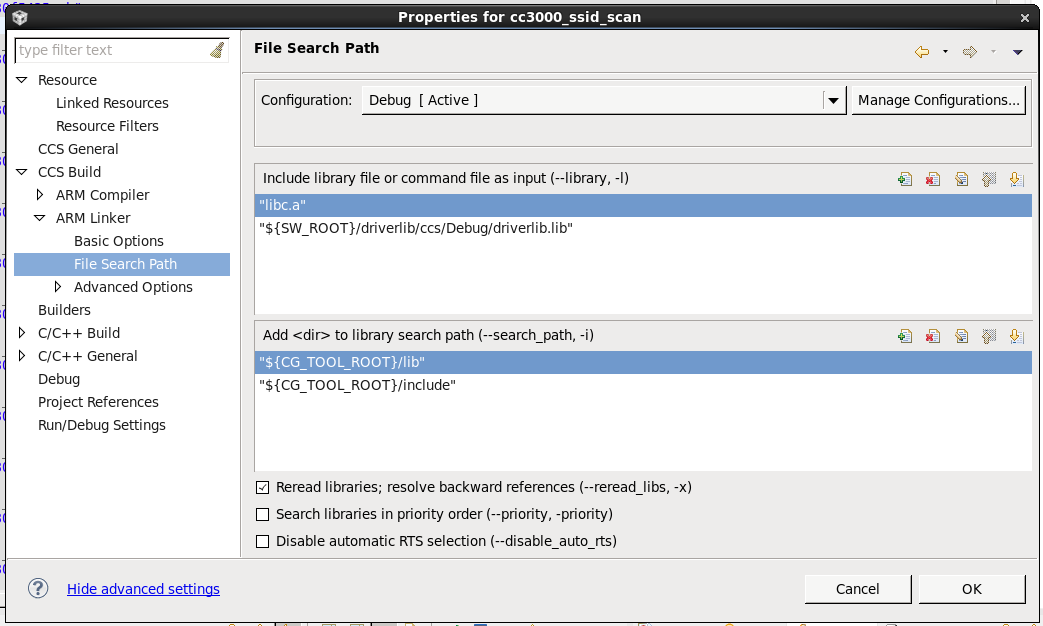
    "${SW_ROOT}/driverlib/ccs/Debug/driverlib.lib"

    where removed.

  • Roberto Romano said:
     undefined            first referenced
      symbol                  in file     
     ---------            ----------------
     GPIOPinRead          ./sump_la1.obj  
     GPIOPinTypeGPIOInput ./sump_la1.obj  
     UARTClockSourceSet   ./sump_la1.obj

    Those unresolved symbols are in the TivaWare driverlib.

    From the linker command line, I can't see the TivaWare driverlib.lib in the list of libraries, which explains why the linker reports unresolved symbols.

    Under the CCS Project Properties driverlib.lib should be in the linker --library list:

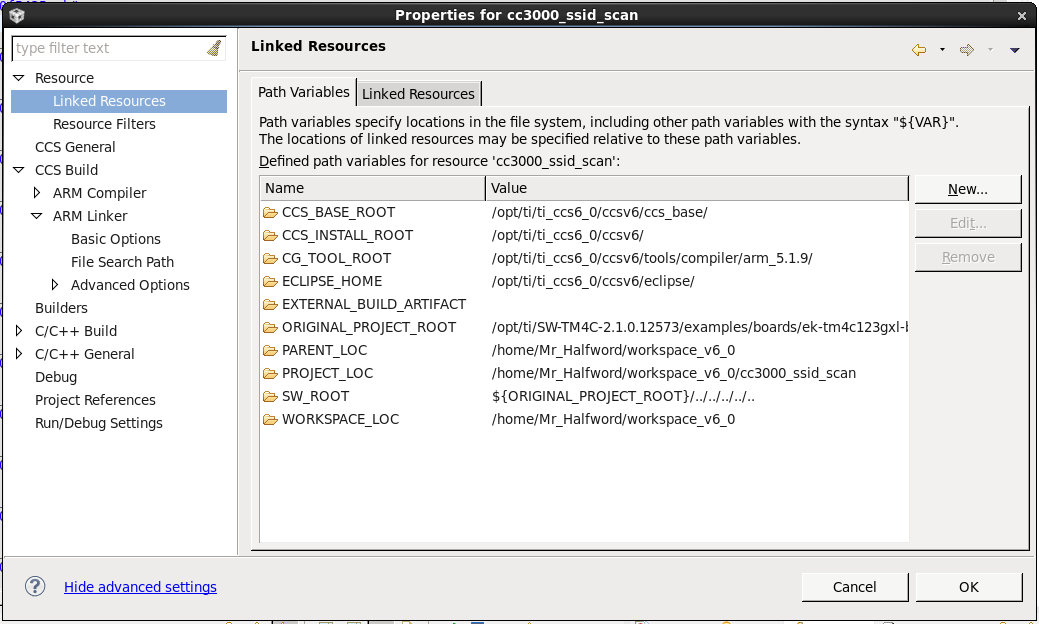
    In this example the driverlib.lib file is given relative to the SW_ROOT path variable, which has been set in the Linked Resources to point to the TivaWare installation:

  • Chester Gillon said:

    In this example the driverlib.lib file is given relative to the SW_ROOT path variable, which has been set in the Linked Resources to point to the TivaWare installation:

     Chester, I agree with you but on original project all was ok, original project was also linked to tft driver, maybe I accidentally removed this line due to a possible double click, TFT driver was in the middle.

     Trouble come forever when a project get copy'd on Linux so I wish to learn how to setup a project from scratch, I never got success that way.

     Another worst thing is the ISR table, why not set as IAR and GCC do for MSP430 automating setting of vector?

     Edit: I forgot this: some project work just with libc.a other require explicit driverlib and TIVAWARE link, this is a non regular behaviour of IDE, link get inherited from somewhere one time got unresolved another still on same project.

  • Roberto,

    It looks like you have resolved the linking issue you had, but I will try to comment on some of your other questions/comments.

    You should be able to make a copy of a project (by using copy and paste in Project Explorer view) and the copied projects should retain the settings such as include paths, libraries/search paths etc. If you wish to start a project from scratch, you can do that too, and then you would need to make sure to manually add all the necessary options to make it work for your device and with TivaWare. Using a TivaWare example as a reference would be the way to start.

    Roberto Romano said:
    some project work just with libc.a other require explicit driverlib and TIVAWARE link

    This depends on what the code does/requires and is not something preset in the IDE. Programs that don't do anything with peripherals would not require driverlib or other libs from TivaWare while those that do use peripherals would need them.