This thread has been locked.

If you have a related question, please click the "Ask a related question" button in the top right corner. The newly created question will be automatically linked to this question.

Compiler version mismatch

Hi,

I got the latest update for MSP430 compiler (said to be v4.3.5) through CCS but the folder in C:\ti\ccsv6\tools\compiler is now called ti-cgt-msp430_4.4.1 when it used to be msp430_4.3.4.

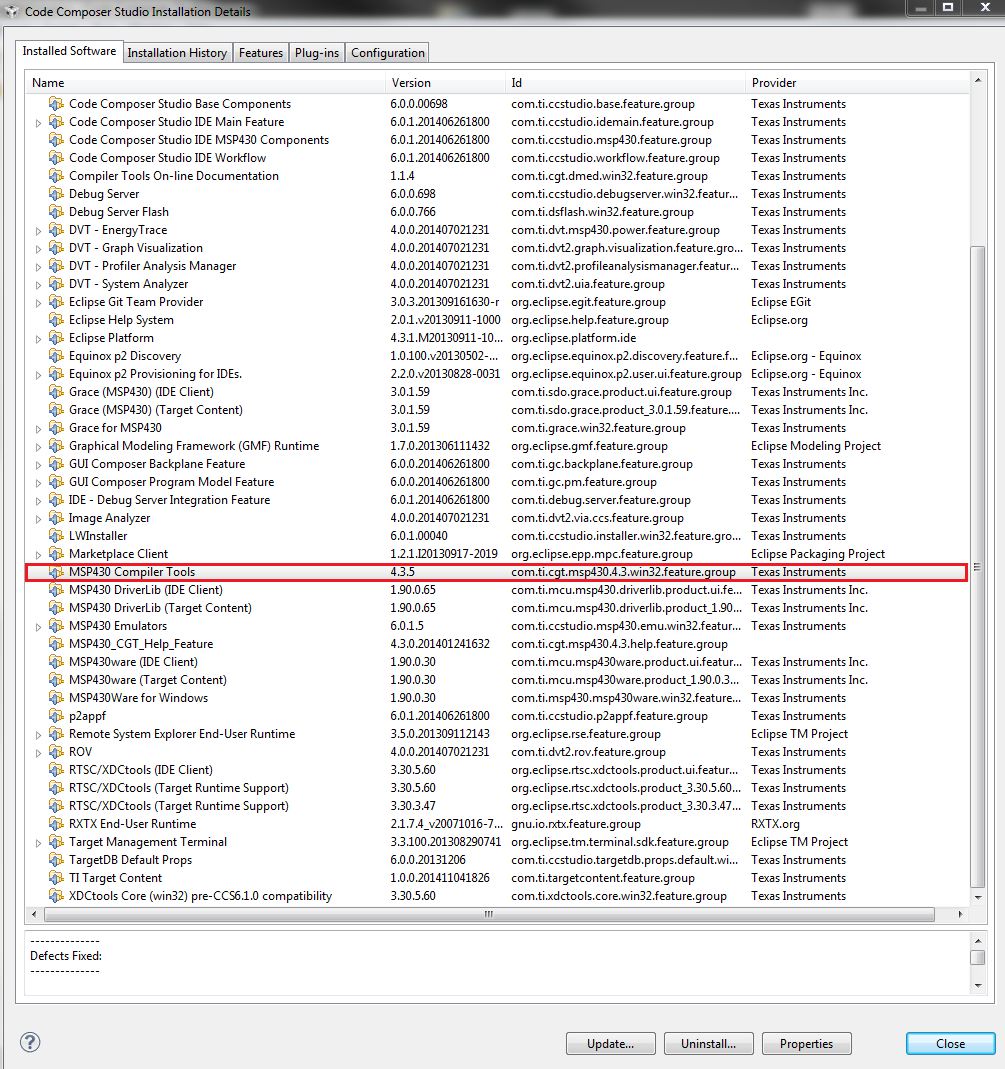
1- Why is the folder name now different and the version indicated there mismatching from what was indicated on the updated? Btw, the CCS Installation Details show that I have MSP430 Compiler Tools v4.3.5 and not 4.4.1. In fact, no component listed there has version 4.4.1 (!?)

2- When I run "cl430 -version" inside ti-cgt-msp430_4.4.1\bin it reports MSP430 C/C++ Compiler v4.4.1

I need to keep track of compiler version used so could you please clarify this version inconsistencies?

  • Tiago Monte said:
    Why is the folder name now different

    TI compiler installations are included in other software packages besides CCS.  In those packages it is good to know that a directory contains Texas Instruments Code Generation Tools.  This clarity is not needed in CCS, where all the compilers are in a directory named install_root/ccsv6/tools/compiler .  

    Tiago Monte said:
    the CCS Installation Details show that I have MSP430 Compiler Tools v4.3.5 and not 4.4.1. In fact, no component listed there has version 4.4.1 (!?)

    I am unable to reproduce this result.  I installed MSP430 compiler 4.4.1.  It is in a directory named C:\ti\ccsv6\tools\compiler\ti-cgt-msp430_4.4.1 .  I see it in the CCS Installation Details.

    Tiago Monte said:
    When I run "cl430 -version" inside ti-cgt-msp430_4.4.1\bin it reports MSP430 C/C++ Compiler v4.4.1

    That is exactly as expected.

    Thanks and regards,

    -George

  • Please check the image below, it shows MSP430 compiler tools 4.3.5 and not 4.4.1.

    We are using customized makefiles for our projects so it's good to have some clarity over the version of the tools we are using, especially the compilation tools. What is then the most recent version of MSP430 compiler?

  • Tiago Monte said:
    Please check the image below, it shows MSP430 compiler tools 4.3.5 and not 4.4.1.

    A colleague also failed to reproduce this result.  So I still don't know why this is occurring.  When you use the methods described here, do you see the 4.4.1 compiler?

    Tiago Monte said:
    What is then the most recent version of MSP430 compiler?

    4.4.1.

    Thanks and regards,

    -George

  • Yes, I see the compiler on both project Preferences as well as Window->Preferences->Code Composer Studio->Build->Compilers.

    Thanks, I don't know the origin of the mismatch shown in Installation Details but it was useful to know the actual compiler version. If there's something else I can do to help you troubleshoot the version 4.3.5 shown in the installation details let me know.

  • If you have 4.3.5 tools installed and then install 4.4.1, you should end up with both installed.  They are distinct features as far as the CCS Installation Details window is concerned.  You should have both of:

    • com.ti.cgt.msp430.4.3.win32.feature.group
    • com.ti.cgt.msp430.4.4.win32.feature.group

    Try sorting by the Id column

  • There's no action when I click on the Id box, list remains the same, is there some other way to sort it? Anyway, I looked at all the components one by one and I only have com.ti.cgt.msp430.4.3.win32.feature.group

  • Tiago Monte said:
    There's no action when I click on the Id box, list remains the same, is there some other way to sort it?

    Sorry, I thought that column was sortable.  Go to the "Features" tab and click on "Feature Id", which I know is sortable.

    ... but apparently doesn't include the compilers themselves.

    [ Edited - Archaeologist ]

  • Check the image below from the installation history. The update for the correct version is mentioned but the configuration content shows 4.3.5.