This thread has been locked.

If you have a related question, please click the "Ask a related question" button in the top right corner. The newly created question will be automatically linked to this question.

Format of bound value in GUI composer


Hi,

I'm designing a GUI using gui composer and have a question about a format of values. 

I placed a textbox in the GUI and the textbox is bound with a 32-bit value. Now I'd like to show the value as a binary format in GUI. For instance, I wish to show the value(13) as like '1101' in the GUI. I read how I can express the value in octal(0o%o) or hexadecimal(0x%X) format as below. But there's no example for binary format.
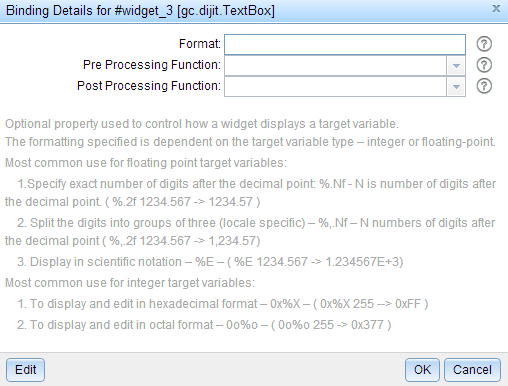
Could you give me an advice how I can display the value in binary format?

BR,

Travis

  • Travis,

    I could not display data in binary format on the GUI Composer Text Box component. Given that javascript usually does not have support for binary data, I imagine that is the main reason why it is not implemented.

    On the other hand, you can probably manipulate the displayed data by creating a pre Processing Function that is applied to the value of the variable to be displayed. This would perhaps take some javascript coding skills, but it is certainly doable.

    Hope this helps,

    Rafael

  • Rafael,

    Thank you for your reply. Now I know there's no way to display data in binary format. Could you show me the simple example of using pre-processing function? Actually I have no experience of javascript.

    BR,

    Travis

  • Travis,

    You can add the function at the app.js file of your GUI composer project, and assign it as the pre processing function:

    function convertToBinary( valueFromTarget) {
    	return parseInt(valueFromTarget, 10).toString(2);
    }

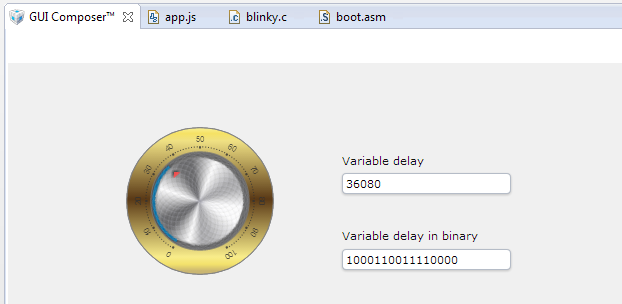
    The end result is:

    If you are getting the error reported here when trying to edit the app.js file, you will need to add the JavaScript component on the CCS App center, under Code Composer Studio Add-ins:

    The GUI Composer tutorial has good basic information on creating these apps, and JavaScript help is usually around the web. I got most of the information about parseInt and toString at www.w3schools.com and www.stackoverflow.com

    Hope this helps,

    Rafael

  • Rafael,

    When I clicked the '...' box of Value in the Binding tab, I could see the pop-up as below.

    And it seems I have to place something into the Pre Processing Function. What contents do I have to fill in there? 

    Additionally, I cannot see any change when I clicked the 'Edit' button. So I tried to open the app.js file directly and found the contents is a bit different from yours.

    BR,

    Travis

  • Travis,

    As I mentioned, edit the app.js file and add the function I sent before to the bottom of this file. Save both the file and then the project. Then the drop-down menu of the Binding Details box will allow you to select the function just created. Typing the name of the function works as well. 

    One thing I noticed when working with GUI composer is that you need to save files and sometimes the project every step of the way to be sure the changes are picked up by other entities.

    BTW, the Edit button does not work for me either.

    Hope this helps,

    Rafael

  • Rafael,

    I didn't consider using the drop-down menu. It works well now.!
    One thing I realized is, if someone want to change the refresh rate via modifying app.json file, he has to modify app.json after adding every pre-processing function. Unless, he will be faced on an error message like 'convertToBinary is not defined in app.json'.
    Thank you.

    BR,
    Travis
  • Travis,

    Thanks for reporting this back. I noticed that some things tend to disappear or be reset to defaults depending on what actions are done. I couldn't yet pinpoint all scenarios where this happens, as I haven't yet used GUI Composer thoroughly yet.

    Cheers,
    Rafael