This thread has been locked.

If you have a related question, please click the "Ask a related question" button in the top right corner. The newly created question will be automatically linked to this question.

How do I erase the flash of a locked TMS320F28030 device using CCS5.5?

Other Parts Discussed in Thread: TMS320F28030, UNIFLASH

Hello,

    I develop a Application using CCS5.5.0.00077, the processor is TMS320F28030. when I finished the development, set the CSM key in the DSP2803x_CSMPasswords.asm file.  but I find some mistaken in th app, and wish to update the image loaded in the flash.

when I try to connect to device with debug mode,  prompts following information:

Error connecting to the target:
(Error -1015 @ 0x0)
Device is not responding to the request.  Device may be locked, or the emulator connection may be unreliable. Unlock the device if possible (e.g. use wait in reset mode, and power-cycle the board). If error persists, confirm configuration and/or try more reliable JTAG settings (e.g. lower TCLK).
(Emulation package 5.1.232.0)

what will I do to erase the flash, and update a new image in the flash?

  • Hi,

    what will I do to erase the flash, and update a new image in the flash?

    You'll have to unlock the flash either using CCS or CCS Uniflash. Uniflash will be an easy tool to use.

    Regards,
    Gautam
  • Dear Gautam,

    What uniflash version is properly for me? I searched a Uniflash for TI Microcontrollers (MCU) and Sitara Processors, is it ?
    otherwise, how do I unlock the flash using CCS5.5? I cannot find any button in the menu of CCS5.5.

    Best Regards.
    Sunchao
  • Dear Gautam,
    bothering you again, I downloaded the uniflash software which is a file 'uniflash_setup_3.1.0.00026[1]', how to run to install?

    Best Regards.
    Sunchao
  • Dear Gautam,
    I add a postfix '.exe' to the downloaded file, then it can be inststalled. why make such trick to test me? Oh...
  • OK, they do it sometimes to bypass the anti-virus & get rid of virus attacks :)
    or sometimes downloader itself changes the extension of the file.
    Anyways, let me know if you need any help with the tool.

    Regards,
    Gautam
  • Dear Dautam,

    Thanks, I have installed the CCS uniflash. a new problom, when I open the CCS uniflash, select Target Configuration file from the existing project, prompt me following information:
    [16:34:13] Begin Launching session operation.
    [16:34:13] ERROR >> Cannot read System Setup data from XML file D:\DSPWorkSpaceV3\WeftDetectV3.01\targetConfigs\TMS320F28030.ccxml
    Error parsing file:
    Fatal Error at (0, 0): An exception occurred! Type:RuntimeException, Message:The primary document entity could not be opened. Id=D:\DSPWorkSpaceV3\WeftDetectV3.01\targetConfigs\connections\SEED-XDS510PLUS_Connection.xml while parsing file: D:\DSPWorkSpaceV3\WeftDetectV3.01\targetConfigs\connections\SEED-XDS510PLUS_Connection.xml
    [16:34:13] com.ti.debug.engine.IApplication$InitializationException: Cannot read System Setup data from XML file D:\DSPWorkSpaceV3\WeftDetectV3.01\targetConfigs\TMS320F28030.ccxml
    Error parsing file:
    Fatal Error at (0, 0): An exception occurred! Type:RuntimeException, Message:The primary document entity could not be opened. Id=D:\DSPWorkSpaceV3\WeftDetectV3.01\targetConfigs\connections\SEED-XDS510PLUS_Connection.xml while parsing file: D:\DSPWorkSpaceV3\WeftDetectV3.01\targetConfigs\connections\SEED-XDS510PLUS_Connection.xml
    [16:34:13] Operation Launching session returned.
    [16:34:13] Loaded target configuration from: D:\DSPWorkSpaceV3\WeftDetectV3.01\targetConfigs\TMS320F28030.ccxml

    How can I do something to correct this issue?
  • How can I do something to correct this issue?

    Why D drive? Ideally it should be here: C:\ti\uniflashv3
    where CCS is also installed. Above errors all indicate the address conflicts.

    Regards,
    Gautam
  • You are right, when I installed a new instance of SEED-XDS510PLUS under the CCS uniflash, I can open the Target Counfiguration file now. but I meet a new problom, I always have new problom to bother you:(
    Whther I do "Erase, Program, Verfiy" to erase flash, or inputing the CSM password to unlock flash, the tool always return the informaiton:
    Error connecting to the target:
    (Error -120 @ 0x0)
    This error number is used when a command is invalid.
    It is likely a problem with `SC_CMD' in SMG_call()
    selecting a function that has not been implemented.
    (Emulation package 5.1.402.0)

    pleae help me.
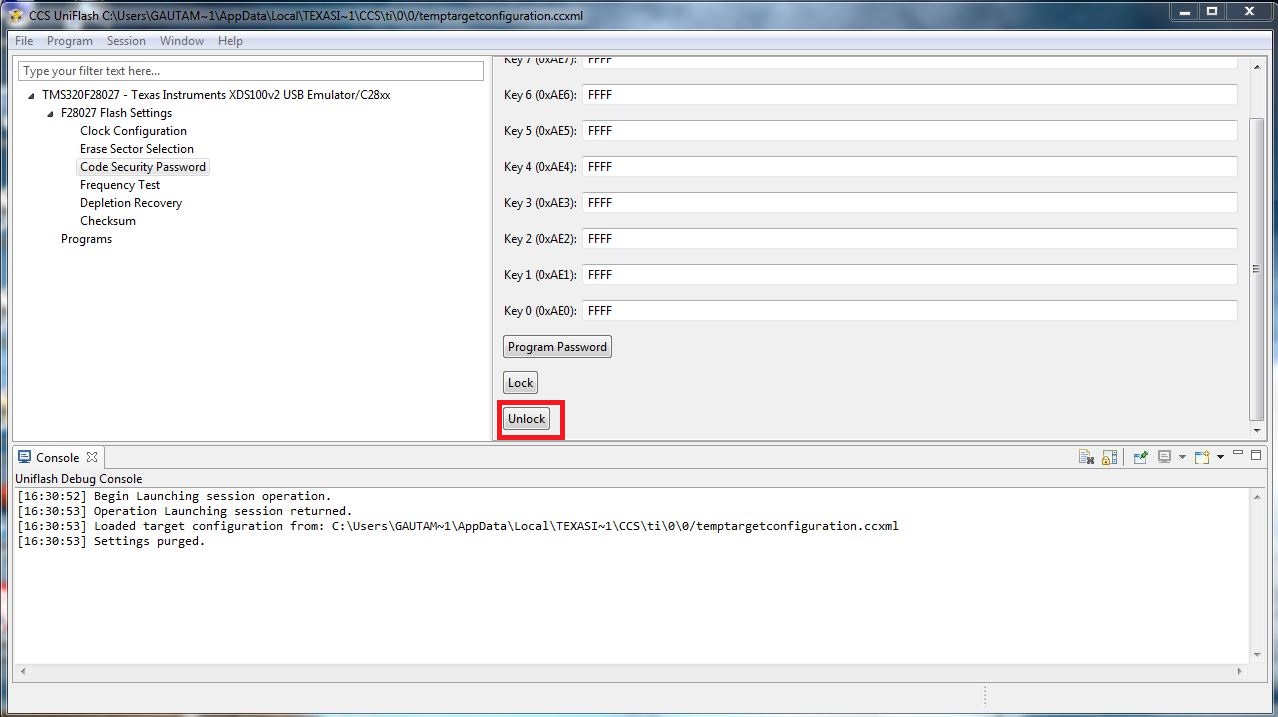
  • You just have to use the Unlock Option first. Once you unlock the device you can flash it again.

    Regards,

    Gautam

  • I do the same operation, but got a wrong result.  the CCS Flash which I installed is  Version: 3.1.0.00026;

  • I attach a result informaiton:

  • The screenshot cannot be posted, I only post the informaiton:
    Error connecting to the target:
    (Error -120 @ 0x0)
    This error number is used when a command is invalid.
    It is likely a problem with `SC_CMD' in SMG_call()
    selecting a function that has not been implemented.
    (Emulation package 5.1.402.0)
  • "Wrong Result" as in? Can you paste the screenshot of the error?
  • I try again to post the screenshot:

  • Please check your JTAG connectivity between the header and the controller. Let me know whether they're correct.
  • Dear Gautam,
    I think the connectity if fine, Because I can connect other device using this emulator and line.
    Best Regards.
    Sunchao
  • I think the connectity if fine, Because I can connect other device using this emulator and line.

    I'm talking about the board and not the emulator. If I'm not wrong you've a custom board & an external emulator, right? Also, this custom board is locked that you're trying to unlock. While unlocking you get an error which can be due to :
    1. Improper JTAG connectivity on the custom board
    2. Device permanently locked and can't be unlocked ever
    3. Device is damaged
    Give me your inputs.

    Regards,
    Gautam
  • Dear Gautam,

    Yes, the device is a custom board, and a SEED-XDS510PLUS emulator is used for development. the board is locked because I set the CSMpassword in the DSP2803x_CSMPasswords.asm file. now I want to unlock this device. I need to know how to unlock a protected device using CSMPassword, otherwise, I afraid to protect the image using the CSM feature.
    1. I am sure the connectivity is fine.
    2. What step make me lock the board permanently? I just set the CSMpassword in the DSP2803x_CSMPasswords.asm file. this is what was I warried.
    3. The device now is working now, so I think the device is fine.

    I tryed to connect an unlocked device using the CCS uniflash v3.1, but also prompt the informaiton:
    Error connecting to the target:
    (Error -120 @ 0x0)
    This error number is used when a command is invalid.
    It is likely a problem with `SC_CMD' in SMG_call()
    selecting a function that has not been implemented.
    (Emulation package 5.1.402.0)

    so, I think I need to understand what means is about the (Error-120@0x0) ? this uniflash tool version is wrong or cannot support SEED-XDS510PLUS amulator?

  • so, I think I need to understand what means is about the (Error-120@0x0) ? this uniflash tool version is wrong or cannot support SEED-XDS510PLUS amulator?


    Uniflash does support this emulator. In any case you can try unlocking the device using CCS too. All you've to do is:
    Goto DSP2803x_SysCtrl.c, under CsmUnlock() routine feed in your password. Feed 0xFFFF in DSP2802x_CSMPasswords.asm
    Build the project and debug it. This should unlock your device for sure, if still you receive the error then either the password is incorrect or any of the above issues.

    Regards,
    Gautam

  • Since your device is already locked. You can't re-program the device unless you unlock the device. No matter what flash tool you use, you have to unlock the device inorder to re-program the device.

    In CCS5.5, you have on chip flash tool from tools menu which allows the user the enter CSM password to unlock the device.

    Regards,
    Manoj
  • Dear friends,

    Seeming it doesn't work  for me to unlock the device. According to the suggestion from Gautam I feed the password under the CsmUnlock() in the  DSP2803x_SysCtrl.c.

    Uint16 CsmUnlock()
    {
        volatile Uint16 temp;

        // Load the key registers with the current password. The 0xFFFF's are dummy
        // passwords.  User should replace them with the correct password for the DSP.

        EALLOW;
        CsmRegs.KEY0 = 0x0002;
        CsmRegs.KEY1 = 0x0000;
        CsmRegs.KEY2 = 0x0001;
        CsmRegs.KEY3 = 0x0004;
        CsmRegs.KEY4 = 0x0001;
        CsmRegs.KEY5 = 0x0002;
        CsmRegs.KEY6 = 0x0000;
        CsmRegs.KEY7 = 0x0001;
        EDIS;

    then build the entire project and debug it. then CCS prompts a information:

    Error connecting to the target:
    (Error -1015 @ 0x0)
    Device is not responding to the request.  Device may be locked, or the emulator connection may be unreliable. Unlock the device if possible (e.g. use wait in reset mode, and power-cycle the board). If error persists, confirm configuration and/or try more reliable JTAG settings (e.g. lower TCLK).
    (Emulation package 5.1.232.0).

    Do we have any other way to unlock this device?  or to understand me why this device is locked according my step.

    @Manoj,   I cannot find the menu or configuration about on-chip flash tool in the CCS5.5, can you guide me ? I just find a configuration : 'F28030 Flash Settings ' under the Run/Debug Settings, but no way to unlock the device.

    Best Regards.

    Sunchao

  • Hi Sunchao,

    user4228415 said:
      EALLOW;
        CsmRegs.KEY0 = 0x0002;
        CsmRegs.KEY1 = 0x0000;
        CsmRegs.KEY2 = 0x0001;
        CsmRegs.KEY3 = 0x0004;
        CsmRegs.KEY4 = 0x0001;
        CsmRegs.KEY5 = 0x0002;
        CsmRegs.KEY6 = 0x0000;
        CsmRegs.KEY7 = 0x0001;
        EDIS;


    The passwords seem to have locked your device permanently. is the programmed password valid for unlocking?

    Regards,

    Gautam

  • Sunchao,

    It looks like you are not able to connect to the device. The reason might be JTAG is being disconnected (by ECSL feature) before getting connected to the device.

    Did you try wait boot mode? You should be able to find this information in boot rom section of TRM.

    Regards,
    Manoj
  • Dear firends,
    I didn't get Gautam' point, and also I cannot unlock the device using CCS5.5 from Manoj's suggestion because I cannot find a tool in the CCS5.5 for this.
    @Manoj, What means ‘wait boot mode?’ because i am a beginner about MCU, can you tell me the detail about how to do? I am trying to protect my application using CSM feature. unfortunatly in the first step that I set the password in the DSP2803x_CSMPasswords.asm file made me lock the device and no way to unlock it,
    I appreciate if you can help me to resovle that.

    Best Regards.
    sunchao