This thread has been locked.

If you have a related question, please click the "Ask a related question" button in the top right corner. The newly created question will be automatically linked to this question.

How to port Thingsquare-Mist into CCS6 in InstantContiki?

Other Parts Discussed in Thread: EK-TM4C1294XL

Hi

I'm up and running in InstantContiki with my EK-TM4C1294XL Tiva C LaunchPad by following this guide http://processors.wiki.ti.com/index.php/Thingsquare_6LoWPAN_Tiva_C.

The examples have succesfully been compiled and flashed.

Now I want to set up CCS6 as an IDE, but I'm not sure about how to port the Thingsquare-Mist code into a project where my goal is to be able to debug the code using the Stellaris In-Circuit Debug Interface.

If I make a new project, and just copy the files and folders from thingsquare-mist-1.1.0 into the project, and build it right away, I get the following two errors:
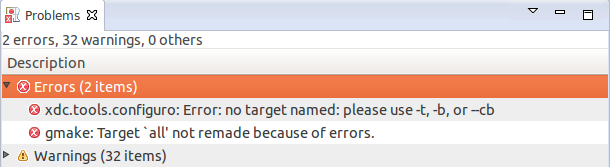
I'm a little confused about if the make files from the thingsquare mist code is getting used, and if it does, how do I set the target board?

Thanks, Jesper

  • Hello Jesper,

    Jesper Hansen said:
    If I make a new project, and just copy the files and folders from thingsquare-mist-1.1.0 into the project

    Can you provide more details on how you created this new project and the types of files you added? I'd also like to see your build output in the console (you can cut and paste to a file and attach it here).

    Thanks

    ki

  • I have figured out what went wrong. In case other newbies like me get into the same trouble, here is what I did:

    First of all, I had to disable "Generate Makefiles automatically", and then set the Build location to the specific example I tried to build, in this instance "blink".
    Then in "CCS Build -> Behaviour" under "Build" I added: "blink.bin TARGET=ek-tm4c1294xl-1120em-tiva", and under "Clean" I added: "TARGET=ek-tm4c1294xl-1120em-tiva clean". This will allow the project to be compiled like if the example was build from the command line.
    In order to make hardware debugging word, one have to add "CFLAGS += -g" in the application specific Makefile. The last thing to do is to correct the "Debug Configuration" under "Program" to point at the output generated file that in my case was "blink.ek-tm4c1294xl-1120em-tiva".

    I hope it might help others.

    Best regards,
    Jesper