Other Parts Discussed in Thread: CCSTUDIO
Hello:
I get a error when I used CCSV6 scripting to perform the operation of "Z1OTPSECLOCKProgram".
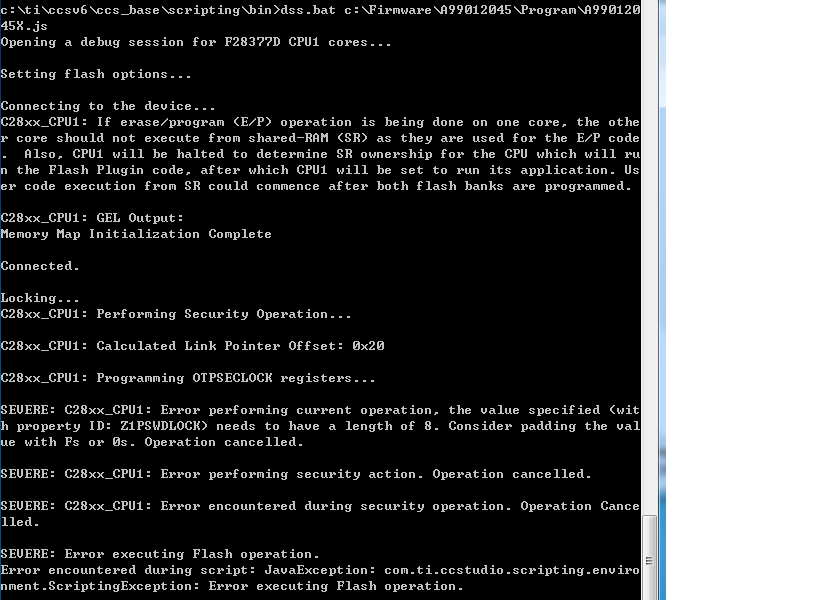
I had set the id Z1PSWDLOCK to "FFFFFFFF" in the scripting. But when I perform the operation of Z1OTPSECLOCKProgram, I get a error of " the value specify < with property ID: Z1PSWDLOCK> need to have a length of 8" .
The attachments is the scripting and the error report. The device is F28377D. The emulator is spectrum digital xds200.
/* Import DebugServer enving and Java packages */
importPackage(Packages.com.ti.debug.engine.scripting);
importPackage(Packages.com.ti.ccstudio.scripting.environment);
importPackage(Packages.java.lang);
/* Global handles to the debugger */
var env = ScriptingEnvironment.instance();
var server = env.getServer("DebugServer.1");
// Create a log file in the current directory to log script execution
env.traceBegin("A99012045.xml", "../stylesheet/DefaultStylesheet.xsl");
env.traceSetFileLevel(TraceLevel.ALL);
server.setConfig("C:/Firmware/A99012045/Program/F28377D.ccxml");
env.traceWrite("Opening a debug session for F28377D CPU1 cores...");
var session = server.openSession("Texas Instruments XDS2xx USB Debug Probe/C28xx_CPU1");
try{
/* Set Flash Options */
env.traceWrite("\nSetting flash options...");
session.flash.options.setString("FlashCoreSelection","CPU1 (Master)");
session.flash.options.setBoolean("FlashBlankCheckToggle",true);
session.flash.options.setString("Z1PSWDLOCK","FFFFFFFF");
session.flash.options.setString("Z1CRCLOCK","FFFFFFFF");
// session.options.printOptionById("FlashProgrammerNode");
env.traceWrite("\nConnecting to the device...");
session.target.connect();
env.traceWrite("Connected. \n");
// session.flash.listSupportedOperations();
env.traceWrite("Locking...");
session.flash.performOperation("Z1OTPSECLOCKProgram");
env.traceWrite("Completed.\n");
}
catch(err)
{
env.traceWrite("Error encountered during script: " + err);
}
/* End session, since the tests are done
*/
server.stop();
session.terminate();
env.traceEnd();
Here is the Error report: