This thread has been locked.

If you have a related question, please click the "Ask a related question" button in the top right corner. The newly created question will be automatically linked to this question.

CCS can't find resource error

Expert 1580 points

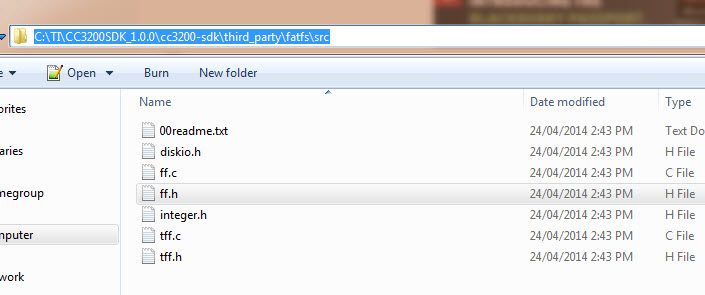
I'm trying to integrate the SD card functionality into a project but I am getting this error “#1965 cannot open source file "ff.h"”.  The fatfs library folder is added to the path, and in fact I can see the folder and ff.h file in the Includes group of the project in CCS.  But the compiler keeps giving this error.  I've tried  restarting CCS, cleaning the project, changing the search order, using absolute paths, etc. but nothing gets rid of this error, so it doesn't compile.

Does anyone have any other suggestions?

Thanks
Angelo

  • Hi Angelo,

    AQ said:
    I've tried  restarting CCS, cleaning the project, changing the search order, using absolute paths, etc. but nothing gets rid of this error, so it doesn't compile.

    Try copy - pasting the same file to your project physically and not linking. Let me know whether this helps you.

    Regards,

    Gautam

  • AQ said:
    The fatfs library folder is added to the path, and in fact I can see the folder and ff.h file in the Includes group of the project in CCS. 

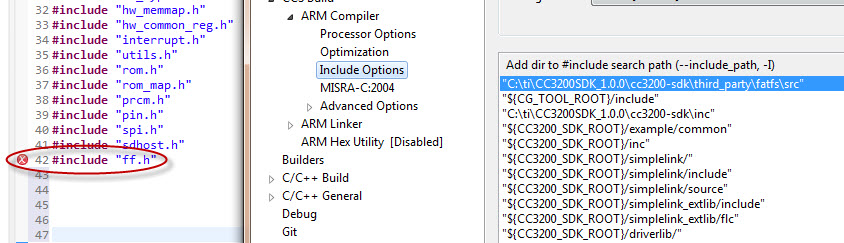
    Does the compiler's include path point to the exact directory where ff.h is located? Please show a screenshot of the compiler include paths as specified in CCS, and also the build error as it appears in the CCS build console (you can copy and paste the entire contents of the build console to a text file and attach it here).

  • I tried that, but then there are files included within it that are required, and I don't think it's right to start copying all the library files into my project. For example, after copying ff.h, it complains about integer.h. If I copy that also it gives other errors.
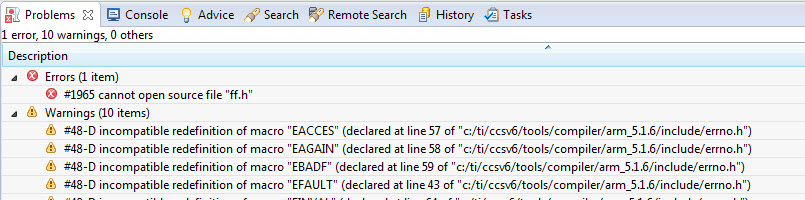
  • Sorry I had pasted a screenshot in the post but it didn't stick apparently.  I'm attaching images.  The build console shows:  fatal error #1965: cannot open source file "ff.h"

  • The include path looks ok so I'm not quite sure why it is giving the error. Can you still generate the build log from the CCS build console (not the Problems view) and attach it here? You can generate the log using the icon shown below.

    The other thing to try would be to see if one of the examples in the SDK that uses fatfs builds ok. Try importing and building the sdhost_fatfs example and let us know if that builds without errors.

  • Yes, I can build the sdhost_fatfs project no problem. It's even in the same workspace. Looking at the build log I see that the include path is not listed, even though it appears in the properties. I'll send the log to you.
  • AQ said:
    Looking at the build log I see that the include path is not listed, even though it appears in the properties

    Yes, I see that too, and that is very odd, but that is the reason for the error. As to why it is not getting passed to the compiler I am not sure. Can you check the file specific options for those source files that generate the error, and check if that include path is left out? It is possible to set custom options on source files, so I wonder if those source files are missing that specific include path.

  • Thanks AartiG, I didn't know you could do that, but this wasn't the case for me.

    I noticed that there was this warning (which interestingly doesn't seem to appear in the build log):

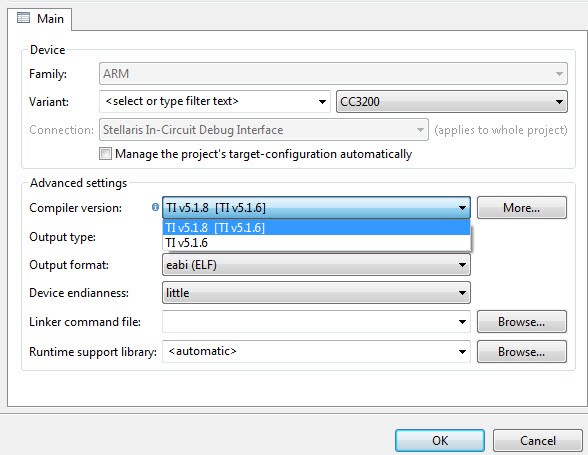
    This project was created using a version of compiler that is not currently installed: 5.1.8 [ARM]. Another version of the compiler will be used during build: 5.1.6. Please go to <a href="liveaction:OpenAppCenter">CCS App Center</a> to install the compiler of the required version, or migrate the project to one of the available compiler versions by adjusting project properties.

    In the CCS General settings the compiler version shows TI v5.1.8 version selected but apparently this version isn't installed. I'm not sure how this happened since I just installed the latest CSS available and didn't change this setting.  I noticed this warning before but didn't suspect it was related, since the warning indicates it was using v5.1.6 anyway.  I tried to change it to v5.1.6 explicitly and this made the problem go away.  Now the console log shows the additional include path added to the compile command.

  • AQ said:
    I tried to change it to v5.1.6 explicitly and this made the problem go away.

    That is odd that simply setting the compiler version to 5.1.6 explicitly (when it was using that version for the build anyway) made the error go away. In any case, I am glad the issue is resolved. Thank you for the update.