This thread has been locked.

If you have a related question, please click the "Ask a related question" button in the top right corner. The newly created question will be automatically linked to this question.

Code Composer v6 takes 20 seconds to step

Other Parts Discussed in Thread: AM3352

Hi,

     We are using Code Composer v6.0.1.00040 and have been running on our AM3352 platform for a long time. The latest project built fine and the Blackhawk USBv2 system trace loads the code without issue. When we go to 'step over', source code or assembly, code composer hangs for about 20-25 seconds and then returns after having completed the step. We have switched to a different project on the same hardware and everything runs fine, so it seems it is related to this specific project. When we shift to a XDS100v2 debugger tip it takes over a minute between steps. We tried creating new Debug configurations without success. Any ideas as to what is going wrong with this project?


Thanks,

     John C.

  • Hi John,
    Could you tell me a bit more about your project? Is it a CCS project? Which compiler did you use? TI or GCC? Are you using a CCS project to debug (or is this a "project-less" debug session)? And how large is it?

    Thanks
    ki
  • Hi Ki,

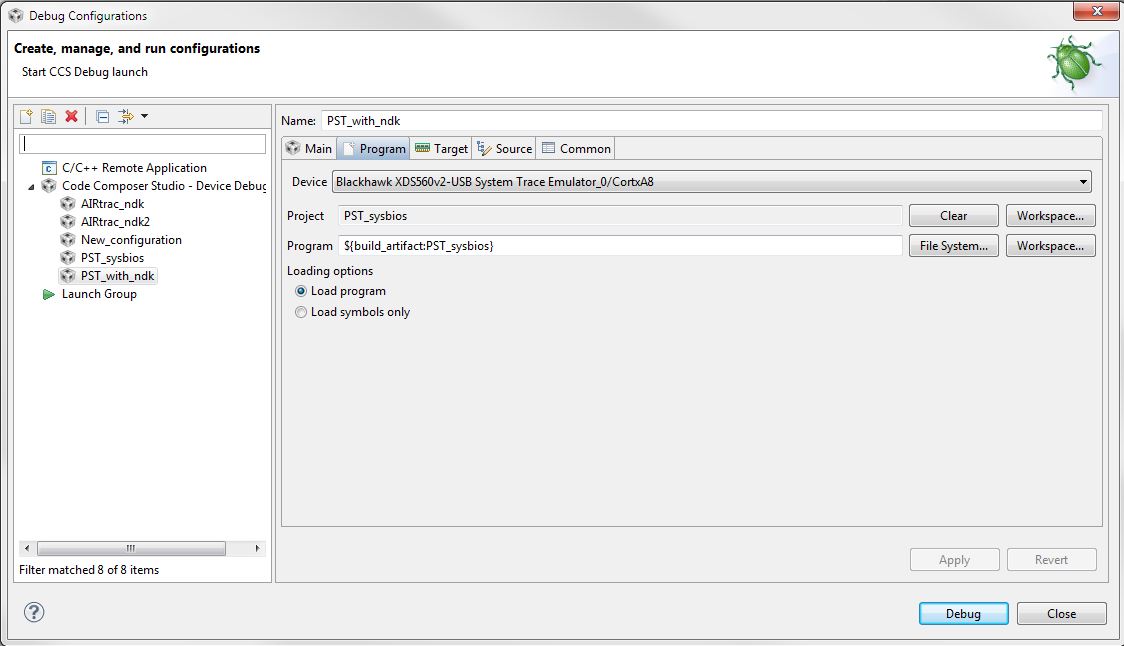
    Yes it is a CCS project with the following versions: Processor AM3352, Code Composer Version: 6.0.1.00040, Compiler TI v5.1.6, SYS/BIOS 6.40.3.39, XDCTools 3.30.3.47_core and NDK 2.24.0.11.

    I am debugging via the CCS Debug configuration:

         The binary image file is about 900k in size, so it is not to big. I don't think that size is related as when we load a different project that is almost identical in size there is no issue.

    Thanks,

    John C.

  • How are you setting up the debug source search path (how are you instructing the debugger where your source files are for source level debug)?
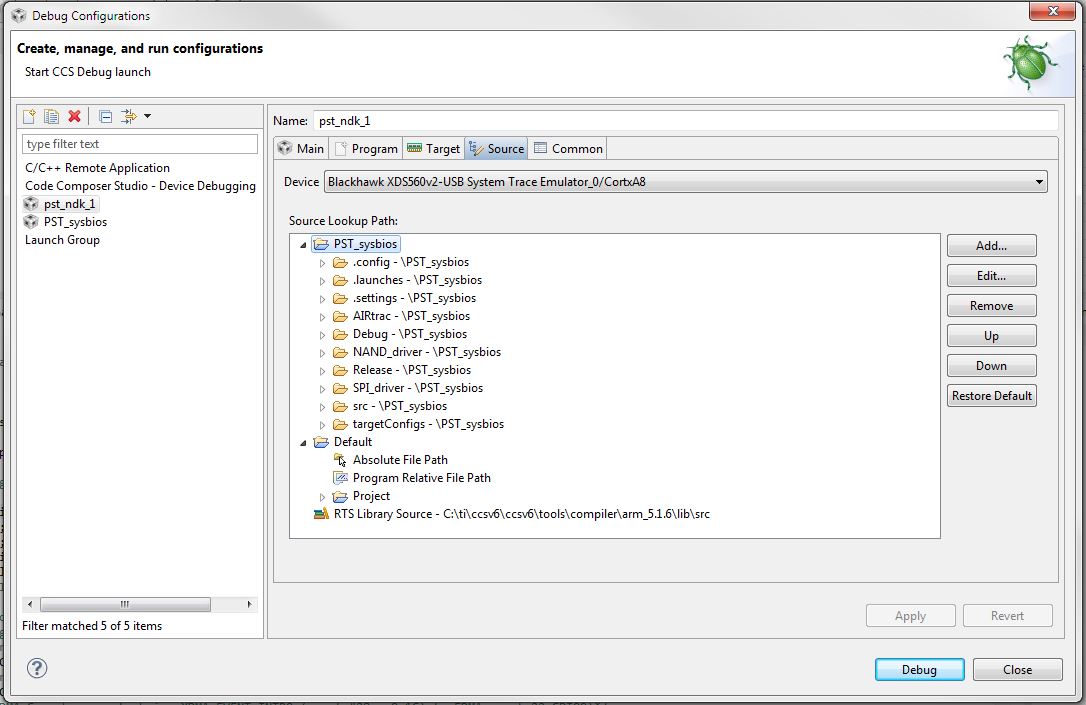
  • The debug setting are set in CCS->Run->Debug Configs. There is not an issue locating the source:

  • I am asking about source look up paths because they can have an impact in debugger performance. For example, if you are relying on source lookup paths in the "Source" tab of the Debug Configuration properties with "Search Subfolders"enabled, this can have a big impact if the directory specified has many subfolder with a lot of files.
  • The source path is just the default one which is pretty short.

  • Looks like you don't have any paths defined there.

    It does look like you have a project in the workspace that has all the source file added to it and that is how the debugger is finding all the source files. Please correct me if i am wrong.

    As a test, could you close all other windows/views except the debug view (ROV, etc) and try single stepping and see if that helps any?

    Thanks
    ki
  • Hey Ki,

               I continue to have this issue. I had gotten around it before by importing the code to a new project and the debugger ran fine. Then about 3-4 weeks ago something happened and I'm back to very slow stepping in debug. The Debug Configuration source tab has the look up paths. I see a few errors at the end of the log file that seem to indicate some type of timeout. Is there any other log files I could look into to see what is going wrong.

    Thanks,

              John C.

    !ENTRY org.eclipse.jface 2 0 2015-05-11 13:50:35.364
    !MESSAGE Ignored reentrant call while viewer is busy. This is only logged once per viewer instance, but similar calls will still be ignored.
    !STACK 0
    java.lang.RuntimeException
        at org.eclipse.jface.viewers.ColumnViewer.checkBusy(ColumnViewer.java:781)
        at org.eclipse.jface.viewers.AbstractTreeViewer.setExpandedState(AbstractTreeViewer.java:2495)
        at com.ti.dvt.gridview.ViewTreeContentProvider$OurTreeDecorator.getCellText(ViewTreeContentProvider.java:915)
        at com.ti.dvt.ui.internal.TableLabelProvider.getColumnText(TableLabelProvider.java:122)
        at org.eclipse.jface.viewers.TableColumnViewerLabelProvider.update(TableColumnViewerLabelProvider.java:70)
        at org.eclipse.jface.viewers.ViewerColumn.refresh(ViewerColumn.java:152)
        at org.eclipse.jface.viewers.AbstractTreeViewer.doUpdateItem(AbstractTreeViewer.java:953)
        at org.eclipse.jface.viewers.AbstractTreeViewer$UpdateItemSafeRunnable.run(AbstractTreeViewer.java:113)
        at org.eclipse.core.runtime.SafeRunner.run(SafeRunner.java:42)
        at org.eclipse.ui.internal.JFaceUtil$1.run(JFaceUtil.java:49)
        at org.eclipse.jface.util.SafeRunnable.run(SafeRunnable.java:175)
        at org.eclipse.jface.viewers.AbstractTreeViewer.doUpdateItem(AbstractTreeViewer.java:1033)
        at org.eclipse.jface.viewers.StructuredViewer$UpdateItemSafeRunnable.run(StructuredViewer.java:485)
        at org.eclipse.core.runtime.SafeRunner.run(SafeRunner.java:42)
        at org.eclipse.ui.internal.JFaceUtil$1.run(JFaceUtil.java:49)
        at org.eclipse.jface.util.SafeRunnable.run(SafeRunnable.java:175)
        at org.eclipse.jface.viewers.StructuredViewer.updateItem(StructuredViewer.java:2167)
        at org.eclipse.jface.viewers.AbstractTreeViewer.createTreeItem(AbstractTreeViewer.java:848)
        at org.eclipse.jface.viewers.AbstractTreeViewer.updateChildren(AbstractTreeViewer.java:2773)
        at org.eclipse.jface.viewers.AbstractTreeViewer.internalRefreshStruct(AbstractTreeViewer.java:1923)
        at org.eclipse.jface.viewers.TreeViewer.internalRefreshStruct(TreeViewer.java:721)
        at org.eclipse.jface.viewers.AbstractTreeViewer.internalRefresh(AbstractTreeViewer.java:1898)
        at org.eclipse.jface.viewers.AbstractTreeViewer.internalRefresh(AbstractTreeViewer.java:1855)
        at org.eclipse.jface.viewers.AbstractTreeViewer.internalRefresh(AbstractTreeViewer.java:1841)
        at org.eclipse.jface.viewers.StructuredViewer$7.run(StructuredViewer.java:1508)
        at org.eclipse.jface.viewers.StructuredViewer.preservingSelection(StructuredViewer.java:1443)
        at org.eclipse.jface.viewers.TreeViewer.preservingSelection(TreeViewer.java:403)
        at org.eclipse.jface.viewers.StructuredViewer.preservingSelection(StructuredViewer.java:1404)
        at org.eclipse.jface.viewers.StructuredViewer.refresh(StructuredViewer.java:1506)
        at org.eclipse.jface.viewers.ColumnViewer.refresh(ColumnViewer.java:544)
        at org.eclipse.jface.viewers.StructuredViewer.refresh(StructuredViewer.java:1465)
        at com.ti.dvt.gridview.RovGrid.refreshLHS(RovGrid.java:453)
        at com.ti.dvt.gridview.RovGrid.refreshAll(RovGrid.java:426)
        at com.ti.dvt.gridview.RovGrid.setInput(RovGrid.java:115)
        at com.ti.dvt.gridview.RovGrid.refresh(RovGrid.java:439)
        at com.ti.dvt.gridview.GridView$ParameterChangeListener$4.doRun(GridView.java:239)
        at com.ti.dvt.ui.internal.UIRunnable.run(UIRunnable.java:40)
        at org.eclipse.swt.widgets.RunnableLock.run(RunnableLock.java:35)
        at org.eclipse.swt.widgets.Synchronizer.runAsyncMessages(Synchronizer.java:135)
        at org.eclipse.swt.widgets.Display.runAsyncMessages(Display.java:4145)
        at org.eclipse.swt.widgets.Display.readAndDispatch(Display.java:3762)
        at org.eclipse.e4.ui.internal.workbench.swt.PartRenderingEngine$9.run(PartRenderingEngine.java:1113)
        at org.eclipse.core.databinding.observable.Realm.runWithDefault(Realm.java:332)
        at org.eclipse.e4.ui.internal.workbench.swt.PartRenderingEngine.run(PartRenderingEngine.java:997)
        at org.eclipse.e4.ui.internal.workbench.E4Workbench.createAndRunUI(E4Workbench.java:138)
        at org.eclipse.ui.internal.Workbench$5.run(Workbench.java:610)
        at org.eclipse.core.databinding.observable.Realm.runWithDefault(Realm.java:332)
        at org.eclipse.ui.internal.Workbench.createAndRunWorkbench(Workbench.java:567)
        at org.eclipse.ui.PlatformUI.createAndRunWorkbench(PlatformUI.java:150)
        at org.eclipse.ui.internal.ide.application.IDEApplication.start(IDEApplication.java:124)
        at org.eclipse.equinox.internal.app.EclipseAppHandle.run(EclipseAppHandle.java:196)
        at org.eclipse.core.runtime.internal.adaptor.EclipseAppLauncher.runApplication(EclipseAppLauncher.java:110)
        at org.eclipse.core.runtime.internal.adaptor.EclipseAppLauncher.start(EclipseAppLauncher.java:79)
        at org.eclipse.core.runtime.adaptor.EclipseStarter.run(EclipseStarter.java:354)
        at org.eclipse.core.runtime.adaptor.EclipseStarter.run(EclipseStarter.java:181)
        at sun.reflect.NativeMethodAccessorImpl.invoke0(Native Method)
        at sun.reflect.NativeMethodAccessorImpl.invoke(Unknown Source)
        at sun.reflect.DelegatingMethodAccessorImpl.invoke(Unknown Source)
        at java.lang.reflect.Method.invoke(Unknown Source)
        at org.eclipse.equinox.launcher.Main.invokeFramework(Main.java:636)
        at org.eclipse.equinox.launcher.Main.basicRun(Main.java:591)
        at org.eclipse.equinox.launcher.Main.run(Main.java:1450)


  • A debug server log would also be useful. You can just enable it just before you do a step to keep the log size down. Zip it up (it compresses really well) and attach it to this thread.
    processors.wiki.ti.com/.../Troubleshooting_CCSv6

    Thanks
    ki
  • Hey Ki,

                 Here is the log file.

    Thanks,

        John C.

    debug_log_file1.zip

  • Hey Ki,

    Have you had a chance to look at the log file ?

    Thanks,

    John C.

  • Sorry for the delay John. I had the engineers analyze the log and they see a lot of memory access on each halt. We're wondering if the ROV may be a culprit. Can you close it and see if that helps any?

    Thanks
    ki
  • Hey Ki,

         Yea that was it. The ROV window was on, and it was requesting task 'details' (which takes forever.)

    Thanks for all the help.

    John C.

  • Good to hear the workaround worked for you.

    Just curious - how big is your application? We are currently investigating some other ROV performance issues for very large applications. I'm wondering if your issue is related.

    Thanks
    ki
  • Hey Ki,

    Our current uncompressed image is 962K. I'm sure that asking for Task details every time the debugger stops

    is going to be pretty slow.

    John C.

  • That is not that big. I'd like to file a bug against the ROV but I'll need to provide a test case. Would it be possible at all to provately provide a test case (executable and associated rov file)?