This thread has been locked.

If you have a related question, please click the "Ask a related question" button in the top right corner. The newly created question will be automatically linked to this question.

Debugging Problems with MSP430F5510 using DriverLib and USB support

Other Parts Discussed in Thread: MSP430WARE, MSP430F5510, MSP-FET

Hi

I'm currently evaluating Code Composer  Version: 6.0.1.00040

I've go the latest version of MSP430ware, and running the TI compiler V4.4.3

My target is MSP430F5510 and i'm using the MSP-FETU430IF and SWB port.

Having a problem when I run the debugger, the debug does not start at main, and run instantly, if I pause the debugger it states "source not available", and reset takes me back to

/*****************************************************************************/
/* C_INT00_NOINIT_NOEXIT() - Specialized version of _c_int00 that does not   */
/*                           perform auto initialization and calls abort     */
/*                           directly.                                       */
/*****************************************************************************/
#pragma CLINK(_c_int00_noargs_noexit)
CSTART_DECL _c_int00_noargs_noexit()
{
   STACK_INIT();
   if (_system_pre_init() != 0) _auto_init();
   main(0);
   abort();
}

there are not warnings or errors in the code flagged.

I've tried clean, and rebuilding all.

rebooting  (PC , MSP-FET and DUT)

I will play around for ages, and find a line in the code it doesn't like... (I say doesn't like, but there are no errors or warning), comment out the line, and then the debugger runs.


Sometimes the line is some really basic, like a  OR of some constants into a unsigned char.  And commenting it out makes the bugger work.  Then I will play around with some other code, and put the line back in, and the bugger works again. . D'oh

It is making evaluation a nightmare.

Nick

  • Nick Price said:
    Having a problem when I run the debugger, the debug does not start at main, and run instantly, if I pause the debugger it states "source not available",

    It is possible that the MSP430 watchdog is timing out during startup. This can happen if you have a large number of variables to be initialized during startup, and the symptom of this usually is not reaching main. 

    http://processors.wiki.ti.com/index.php/MSP430_FAQ#WDT_fires_during_C_startup_code

    You mentioned using compiler v4.4.3. I believe new projects created with this compiler version will enable the option --cinit_hold_wdt=on by default, which should avoid this issue. However, if your project was created using an older compiler version, it is possible that this option is not enabled. Could you please check if that is the case and confirm if the issue persists even with this option enabled? 

  • Hi

    Yes, the wdt hold is on.

    But this doesn't explain why it will worked, when stop, and comment out a line of code and make it work. Please read the whole of my first report again.

    Another engineer i know at a sister company is also having the same problems.


    Nick

  • If I set the compiler to version 4.3.3 the debugger works fine, everything!!!!!

    Version 4.4.3 and 4.4.2 do not work.

    I will work through the other versions in between.

    Nick
    Signatrol Ltd.
  • Finish testing call the compiler version I have.

    4.3.3 OK
    4.3.6 OK
    4.3.7 OK

    4.4.2 BAD
    4.4.3 BAD

    At one stage went back to 4.4.3 and it was ok, but the second debug run on 4.4.3 it want wrong again. So I'm sticking with 4.3.7 for now. I will let you know how it goes.

    Nick
    Signatrol Ltd.
  • Stop, it got the problem in 4.3.7 now, maybe it's not the compiler but something in the linker or FET.... any ideas.
  • swapped the MSP-FETU430IF for a MSP430F5959-LaunchPad (ez-FET). Made no difference, still the same problem.

    Help PLEAZE.
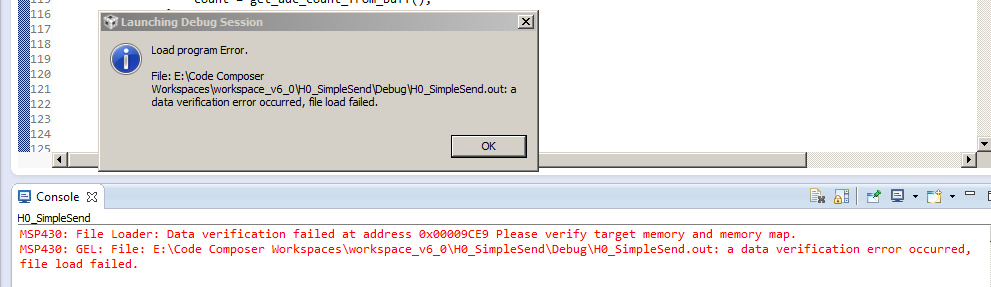
  •  If I set Full Verification I get the following error

  • Same problem with the standard library example "H0_SimpleSend" , just changed Target to F5510 instead of F5528

  • Also tried this on my other computer, running Windows XP. Same problem with TI HI_SimpleSend Demo. GEL File error.

    I need to get this resolve ASAP,

    I've never used Code Composer before this, until recently used CrossWorks, and before that IAR. Very frustrating.
  • Just found out there was an update from CCS 6.01 to 6.1

    Removed the old one and installed 6.1.

    Took 2 hours to install, failed the first time.

    Looks like it has fixed the problem (so far). Debugging working normally.

    Again, have to mention I'm evaluating this software, and it isn't going well.


    I'm running a Quad Core PC, Win7 with 6GB RAM, and it's so slow.

    I normally run CrossWorks (Rowley), and that runs so much faster. I'm contemplating porting the USB hander from CCS to Crossworks due to the speed.

    I know it's probably down to the Eclipse backend, I've used Eclipse before you code Java for the TC65i modem and that was slow also.

    Maybe TI should drop CCS, and work closer with Crossworks.


    Nick

    Signatrol Ltd.

  • After a few hours of working with the newer Code Composer 6.1 (MSP430) the dreaded GEL FILE error returning during DEBUG.

    Got to a point, I can't trust Code Composer will work reliably, and also frustrated with the slow speed. Will move back to my super fast and reliable Crossworks compiler.

    Never heard back from any from TI, and even left message on support number to call me back, but no response.

  • Nick Price said:
    My target is MSP430F5510 and i'm using the MSP-FETU430IF and SWB port.

    Is the MSP430F5510 fitted to a custom board, or a standard evaluation board?

    To try and rule out if a CCS software problem or a target hardware problem, can the same target board be debugged reliably using CrossWorks?

    [Sometimes a hardware fault can make the debugging intermittent. E.g. incorrect supply voltage or missing or incorrect capacitor at VCORE]

  • Thanks for reply.

    I've moved back over to the CrossWorks compiler now. Never fails.

    Voltages and Vcore fine.

    The problem is the loading of the source using SWB as the debug starts up. (GEL FILE error)

    Just talked to Crossworks , and I'm happy to say there will be a new version soon supporting all the latest MSP430 Parts.
    I will port the USB code for the HID to Crossworks and keep away from Code Composer until such time is it is more useable.

    Nick
  • Nick,

      This thread is somewhat stale, though I have just upgraded my CCS to 6.0 and I'm having all sorts of trouble with debugging and the IDE in general. I noticed after reading your comments that I am also using the MSP430 4.4.3 compiler. Never had any of these problems with CCS 5.x versions. I'm going to try to go back to a previous compiler and see if that takes care of anything.

     CCS 5.x was always a rock. CCS 6.0 is literally unusable for me, at present.

    -Rich

  • Just wanted to note. I completely uninstalled CCS 6.0 IDE and deleted any leftover files and directories, downloaded the latest CCS 6 version, which came with a different compiler, recopyed all of my CCS 5 projects into the new CCS 6, and CCS 6 is up and running great for me now!

      Glad to have it back, though a bit cranky at losing over 2 days of work. Still a great IDE!

    -Rich