This thread has been locked.

If you have a related question, please click the "Ask a related question" button in the top right corner. The newly created question will be automatically linked to this question.

Install issue on MacOS

Other Parts Discussed in Thread: ENERGIA

Is anyone having problems installing the software? I am trying to install in Yosemite (10.10.2). When I double click 

ccs_setup_6.1.0.00030.app, I can see the icon in the dock for a few seconds then it silently disappears. No error message. No messages in the system log as far as I can tell. 

I set the Security Preferences Allow Apps from.. to Anywhere because of non-signed code issues I had with Energia releases in the past but that does not seem to help.

  • Hi Peter,
    Could you look in the /tmp folder for any bitrock*.log files, zip them up and post them? I'll take a look and see what's going on.
    thanks
    Danish
  • Here you go. And thank you for the prompt response.

    Edit: Took a minute to look at the log file and it appears that a library I installed through Macports is blocking/overshadowing the installer's. I think the relevant error message is:

    dlopen(/opt/local/lib/itcl4.0.2/libitcl4.0.2.dylib, 6): no suitable image found. Did find:
    /opt/local/lib/itcl4.0.2/libitcl4.0.2.dylib: mach-o, but wrong architecture

    Earlier in the logfile, I see that libitcl4.0.0 is loaded twice: 

    Unpacking /private/tmp/ccs_89650c91-8a63-42cc-714c-f8a50b36ff15/tcl/local/lib/itcl4.0.0/libitcl4.0.0.dylib
    Unpacking /private/tmp/ccs_89650c91-8a63-42cc-714c-f8a50b36ff15/tcl/lib/itcl4.0.0/libitcl4.0.0.dylib

    Later when it comes time to use libitcl4, it appears that macport's version is being used. I would try uninstalling the Macports version but I don't see the package that installed libitcl4 in the first place.

    bitrock_installer.log.gz

  • Another update:

    I ended up just deleting the Macport libitcl folder-- hope that doesn't come back to bite me in the rear. Can always reinstall I guess. Afterwards, the install goes a bit further but still problems with Macports.

    I have attached the new logfile. The relevant lines are:

    Script stderr:
     attempt to provide package Tk 8.6.3 failed: package Tk 8.6.1 provided instead
        ("package ifneeded Tk 8.6.3" script)
        invoked from within
    "package require Tk"
        invoked from within
    "showResults $results"
        invoked from within
    "Validation::preInstallChecks"
        invoked from within
    "set validationMsgs [Validation::preInstallChecks]"
        (file "/tmp/ccs_85d715b6-e056-43e5-69ca-760af71a6388/installer_tcl/main_frontend/main.tcl" line 563)
    
    Error running /tmp/ccs_85d715b6-e056-43e5-69ca-760af71a6388/tcl/bin/tclsh.sh "/tmp/ccs_85d715b6-e056-43e5-69ca-760af71a6388/installer_tcl/main_frontend/main.tcl" --installersrc "/Users/pjkim/Downloads/CCS6.1.0.00030_osx" --installertmp "/tmp/ccs_85d715b6-e056-43e5-69ca-760af71a6388"  --buildid 6.1.0.00030 --installer "/Users/pjkim/Downloads/CCS6.1.0.00030_osx/ccs_setup_6.1.0.00030.app"  --bitness 64-bit --os osx  : attempt to provide package Tk 8.6.3 failed: package Tk 8.6.1 provided instead
        ("package ifneeded Tk 8.6.3" script)
        invoked from within
    "package require Tk"
        invoked from within
    "showResults $results"
        invoked from within
    "Validation::preInstallChecks"
        invoked from within
    "set validationMsgs [Validation::preInstallChecks]"
        (file "/tmp/ccs_85d715b6-e056-43e5-69ca-760af71a6388/installer_tcl/main_frontend/main.tcl" line 563)
    [15:47:20] CCS_ERROR: Install exited with error code
    [15:47:20] 
    [15:47:20] attempt to provide package Tk 8.6.3 failed: package Tk 8.6.1 provided instead
        ("package ifneeded Tk 8.6.3" script)
        invoked from within
    "package require Tk"
        invoked from within
    "showResults $results"
        invoked from within
    "Validation::preInstallChecks"
        invoked from within
    "set validationMsgs [Validation::preInstallChecks]"
        (file "/tmp/ccs_85d715b6-e056-43e5-69ca-760af71a6388/installer_tcl/main_frontend/main.tcl" line 563)
    Executing chmod -R 666 "/tmp/bitrock_installer.log"
    Script exit code: 0

    So it appears that the Macports install of Tk is interfering with the expected Tk.

    8311.bitrock_installer.log.gz

  • Hi Peter,

    I'm trying to recreate the issue here so I can send you a fix, but you're right, the problem is another installation of tcl that's interfering with the installer.

    Danish

  • Danish,

    I don't know how much time you have been able to devote to this problem or whether you have make any headway in isolating the problem. I want to troubleshoot the install issue but the problem is that the installer deletes all the files making debugging rather difficult.

    How can I unpack the install files and then stop. What i want to do is manually run the .tcl install scripts to isolate and fix the problem of the wrong tcl and Tk packages being used.
    Peter
  • Hi Peter,

    I'm still trying to reproduce the issue here, but no luck, and any help would be much appreciated.

    You can run the installer with the following command line:

    open <cssinstaller>.app --args --test true 

    Note: those are double-dashes before args and test.

    It should leave behind a ccs_<guid> folder in the /tmp/ folder. If not, email me at d-innis@ti.com and I can send you a zip of the package separately.

    Thank you!

    Danish

  • OK. That allowed just enough of a toehold to find a solution. The problem is that the auto_path variable has an extra directory pointing to /opt/local/lib

    When I start tclsh.sh in the  /tmp/ccs_blahblah/tcl/bin directory, this is what I get:

    bash-3.2$ ./tclsh.sh 
    % echo $auto_path
    /tmp/ccs_blahblah/tcl/lib/tcl8.6 /tmp/ccs_blahblah/tcl/lib /opt/local/lib

    The third entry is what is causing things to mess up. I could not find out how to manually change the auto_path variable so I did a rather ugly hack. I changed the name of /opt/local/lib to /opt/local/lib2 and ran the installer. The install went off without a hitch and I changed the name of lib2 back to lib.

    Thank you once again.

    Peter

  • Thanks for your help, Peter. I've been scratching my head trying to reproduce the problem here. 

    Danish

  • Now that I have CCS installed, I can't seem to get it to connect to a Launchpad (5529 or FET). I get a dialog box stating "Problem occured. Launching LM4 Debug had encountered a problem. The file does not exist for the external tool named openocd. I tried searching in both the Texas-Instruments folder as well as the CCS.app bundle and can't find openocd. If I install openocd through Macports, I get another error:

    Open On-Chip Debugger 0.7.0 (2014-12-01-03:28)
    Licensed under GNU GPL v2
    For bug reports, read
    	openocd.sourceforge.net/.../bugs.html
    Error: The specified debug interface was not found (hla)
    The following debug interfaces are available:
    1: ft2232
    Runtime Error: /opt/local/share/openocd/scripts/interface/ti-icdi.cfg:10: 
    in procedure 'script' 
    at file "embedded:startup.tcl", line 58
    at file "ek-lm4f230xl.cfg", line 11
    in procedure 'interface' called at file "/opt/local/share/openocd/scripts/interface/ti-icdi.cfg", line 10

    When I look at the ti-icdi.cfg file, there is only an entry for the Stellaris board.

    So is CCS for mac supposed to supply its own openocd? (I don't see mention of it in the bitrock log) If not, where can I find the correct cfg file for openocd and how can I get CCS to use it?

  • Please disregard the last reply. I don't know what fixed the problem (perhaps quitting and restarting the application?) but CodeComposerStudio now can connect to the target board. Can't wait to try things out.
  • Peter,

    We are not using openOCD in CCS.  I am not sure where that openOCD message is coming from.

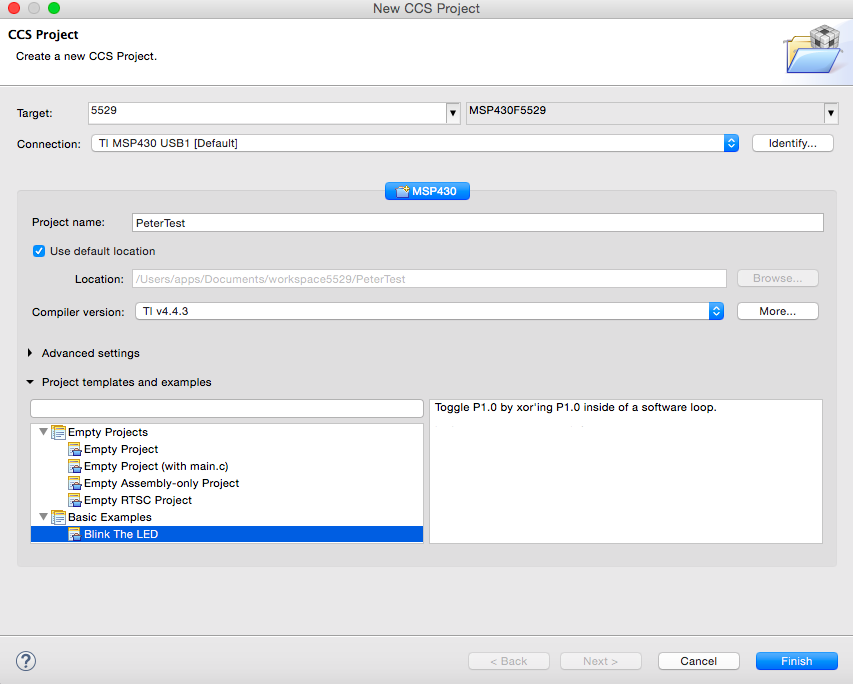
    In CCS if you go to the Project menu and select the "New CCS Project" menu item it will enable you to create a project for an MSP430 device.  The default debug connection will be the MSP FET (which will work for the standalone FET as well as the one built onto the 5529 LaunchPad).  Once you have created the project, clicking on the bug button will build it, launch the debugger, connect to the device, flash the program and run to main().

    Try filling out the project wizard so it looks like the capture below, then click finish and the click the bug button:

    Regards,

    John

  • One thing I should mention is that with the current build we are having issues with the older Grey FET and Yosemite. The newer black one works fine on Yosemite.

    John
  • Excellent. Which this Ugly workaround, the install works!!! Thanks so much. I'm using 10.11.3 El Capitan. It looks like macports was installed on this machine also. tk8.6 is installed.