This thread has been locked.

If you have a related question, please click the "Ask a related question" button in the top right corner. The newly created question will be automatically linked to this question.

CCS 6.1.0 problem while debugging

Other Parts Discussed in Thread: MSP430FR5739

Hello ,

This morning I did an update of the code composer studio.

The current version is 6.1.0.00104 installed on a 64bit Windows7.

When i try to debug my project the debugging session launches and the only button visible is the terminate button.

When I disable the autorun to main option, the debugging sesion works just fine (I can run and pause it).

But when the autorun to main option is enabled I can only terminate the session and not start it.

This wasn't a problem before the upgrade this morning.

Does anyone have an idea what causes the problem?

With kind regards,

Wim 

  • Hello Wim,

    Wim Braekevelt1 said:
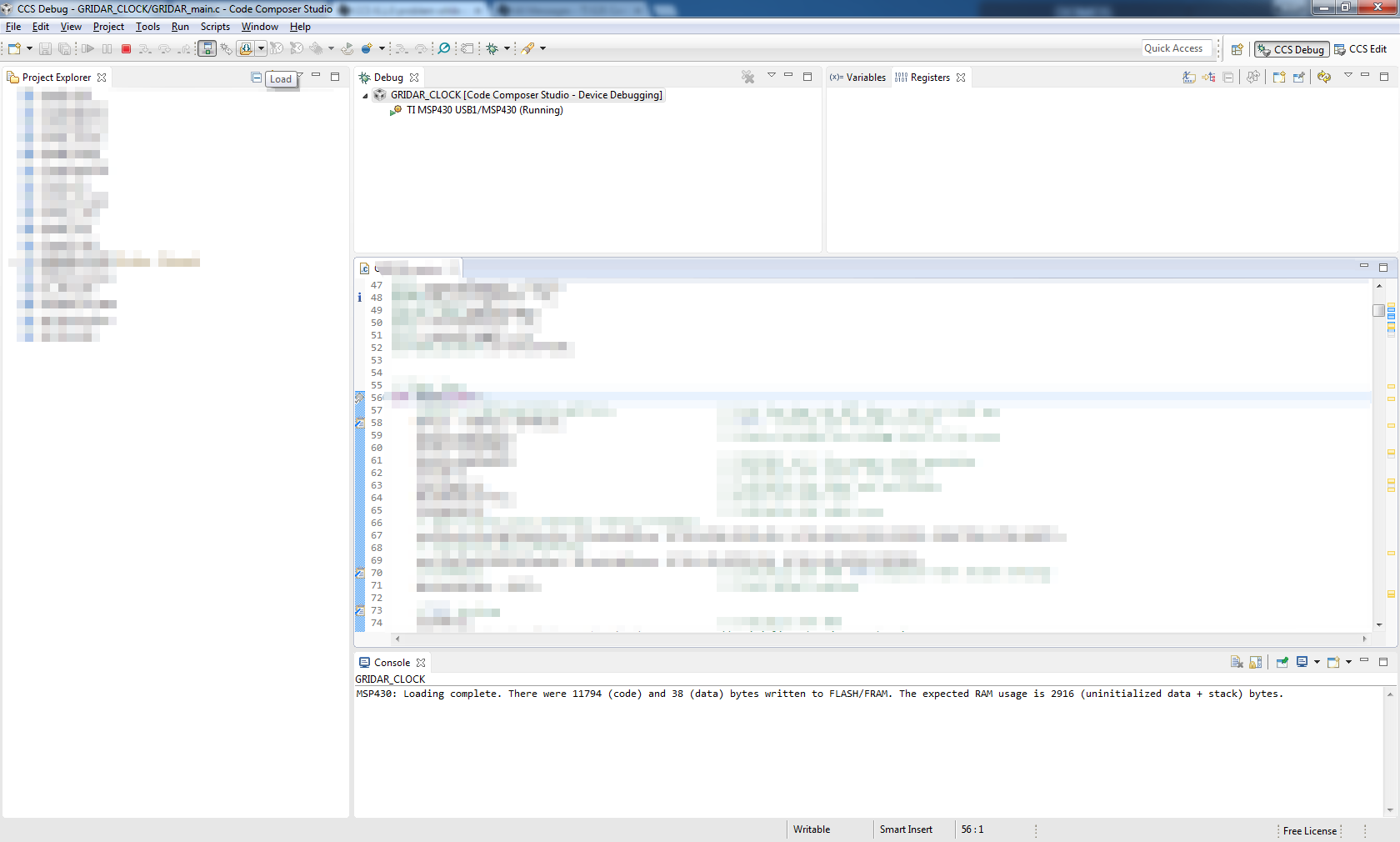
    When i try to debug my project the debugging session launches and the only button visible is the terminate button.

    What do you mean by "visible"? Do you mean that the terminate button is the only button that is available and the rest is greyed out? Or that icons for the other buttons are missing completely? A screenshot would help here.

    Thanks

    ki

  • Hello ki,

    The terminate button is the only one visible and the rest is indeed greyed out, as you can see in the attatched screenshot.

    The first debug after starting up CCS doesn't have the problem.

    With kind regards,

    Wim

  • Hello ki,

    I found the problem, somehow the configuration of my project was changed from 'Debug' to 'Release'.
    Changing it back to the 'Debug' configuration solved my problem.
    I don't think it had anything to do with the update, that was just bad timing :D.

    Thank you for the quick response,
    Wim
  • Hi everyone:

    I have the same problem, I did an update of the code composer studio ( Windows 8.1 x64) and now, some of the buttons are hidden

    I tried to change my project from Release to Debug, but that doesn't work.

  • Manuel Caballero said:
    I did an update of the code composer studio ( Windows 8.1 x64) and now, some of the buttons are hidden

    Which MSP430 device are you workng with? Would you be able to zip up your workspace folder and attach it here (or if you prefer you can send it to me via private conversation). Although couple of users have reported this type of issue after updating CCS, we have not been able to reproduce it locally, so it would really be very helpful to have something we can use to reproduce the issue. 

    Also is there a particular sequence of steps you go through that consistently produces this issue with the debug buttons being grayed out?

  • Manuel Caballero said:
    I have the same problem, I did an update of the code composer studio ( Windows 8.1 x64) and now, some of the buttons are hidden

    Your screen shot appears to show the same problem as others have seen with the "CCS Simple" perspective. See https://e2e.ti.com/support/development_tools/code_composer_studio/f/81/t/410823#pi316318=2 for a description of the problem and a work-around.

  • I am working on a project using the MSP430FR5739 device. Unfortunately, I had to uninstall the CCS and install it again and now, everything seems to work perfectly as it used to.

    Thank you anyway.
  • I'd like to share how I solved this problem for me.

    I had the exact same problem: When the debug session has started, everything was grayed out on the debug toolbar except the red Stop button. I'm using the MSP432P401R Launchpad and working with a project I was previously able to debug and run just fine. It may or may not be related, but I've also had to fight some CCS issues related to changes in driverlib files because the Rev. C production board/chips that were just released and I have just switched my Launchpad to the red Rev. C Launchpad.

     I was finally able to track my problem to a certain file I was using. Another forum post with this same type of issue had someone suggesting to try importing one of the example projects and editing the files already in there. I imported an example project, compiled and debugged into it and it had all the usual debugging buttons lit up. Everything worked as usual. I then copied all of my non-MSP432-specific code into the project, debugged into it, and it still worked like it should. Then I started copying startup files into it and eventually I was able to get it to break when I pasted in my version of the

    "system_msp432p401r.c"

    file. I'm going to start looking for what's truly different about my file, but that solved this big mess for me. Maybe there's a setting in there that can derail the debugger once it's attached. 

    I hope this helps,

  • Further searching for the root cause of this let me to find that my code was getting held up by faults happening before main.c. In the end, the debugging was working properly, it just was getting pulled into the faultISR()'s while(1) loop before it ever made it to my first breakpoint or the top of main.

    So it probably didn't have to do anything with that file at all. There was an extra initialization step I needed to add in resetISR() for it to setup the clocks correctly each time so it wouldn't get this fault.

    Hope it helps,