This thread has been locked.

If you have a related question, please click the "Ask a related question" button in the top right corner. The newly created question will be automatically linked to this question.

Missing Files

Other Parts Discussed in Thread: TIDM-BUCKBOOST-BIDIR, CONTROLSUITE

Hi,

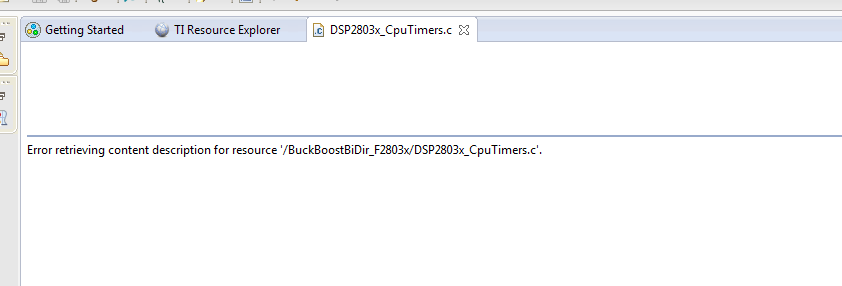
Opened project example for the Bi-Directional Buck Boost "TIDM-BUCKBOOST-BIDIR" --> Browse Project File" Then imported this project to CC. Most files can not be opened and message appears like this one "Error retrieving content description for resource '/BuckBoostBiDir_F2803x/DSP2803x_CpuTimers.c'."

 Beginner in CC here,  where these file are? do I have to install them separately? or what?
  • Hi Salah,

    I've experienced the same too! The best way is to clean the workspace (i.e copy the project folders only to another folder and delete rest of the folders) and import the projects back to the workspace.
    The above is the case of workspace corruption and might happen when you force close CCS or unexpected crashes.

    Regards,
    Gautam
  • Hi Gautam,

    Thanks for answering. I am new to CC and so installation is new and first time open a project. So expected my work space is too clean :). If someone can open the same files and see if this will happen again.

    BiDirectional.zip

  • Salah Zayouna said:
    Most files can not be opened and message appears like this one "Error retrieving content description for resource '/BuckBoostBiDir_F2803x/DSP2803x_CpuTimers.c'."

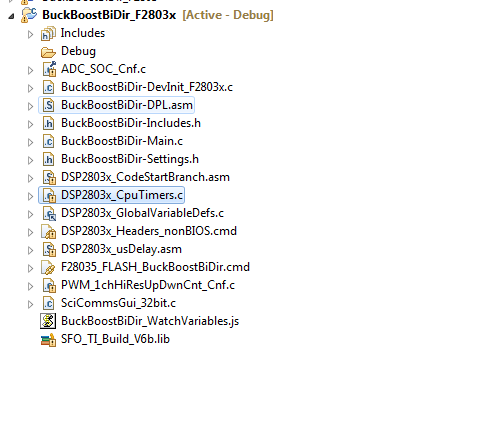
    Those files are linked relative to a variable rather than an absolute path. All files that show a yellow ! in the icon are affected. If you right-click on one of those source files, for example DSP2803x_CpuTimers.c and go into Properties, you can see that the Location is specified relative to variable CONTROLSUITE_F2803x_DEVICE_SUPPORT_ROOT, which is the device_support directory within ControlSuite installation. 

    If this variable is not defined in your project or workspace, the path to source file will not be resolved correctly, as is your case. To resolve the error, go into menu Workspace->Preferences and define these variables (there may be more than one, please check each source file with a ! sign to identify the variables). If you are using CCSv6, this wiki page shows how to create variables.

  • Yes, I should had imported the project from where it is originally located. It looks when I click the "Browse Project" it will only the main folder to files related, and all other relative files on other folder will be missed. When I copied the files, other folders files will be lost as it is relatively connected to the project. Thanks