This thread has been locked.

If you have a related question, please click the "Ask a related question" button in the top right corner. The newly created question will be automatically linked to this question.

CCS6.1.0.00104 Hangs when Connect or Test Target

Other Parts Discussed in Thread: MSP430F5528, ENERGIA, TMS320F2808, MSP430WARE, MSP430F5527, MSP-FET

CCS6 used to be working with my  target of Blackhawk USB510L but after this update CSS6 always hangs when connecting the target.

It's running on Windows 7 64bit.

Any help would be appreciated.

-JC

  • Ditto working with CCS 6.1 and an MSP430F5528.  I completely uninstalled CCS, reinstalled fresh - got ONE successful compile and flash and now it's totally broken again.  Can't run/resume, can't pause, can't do anything.

    6.0 worked fine.  6.1 is badly broken.

    FIX THIS TI!!!

  • Let me forward this to an expert.

  • This morning I was hoping to come into work with an update that fixed this and was disappointed.

    I did find one more tidbit of detail though. The first compile/flash when I started up my computer worked. Then I disconnected and tried to flash again and I get the same hanging behavior again. It doesn't error - it just says "Loading Complete" in the console and looks like it works, but the Resume and Suspend buttons are greyed out and the only thing I can do is disconnect.

    This is literally holding up the show - I can't get any development work done w/o being able to resume the target. TI - please fix this ASAP!
  • I found a temporary work-around.

    If I flash the target, then click on the "Disconnect Target" button (also under Run -> Disconnect Target) then click on "Connect Target" suddenly my resume & pause functions come back.  I have to do this every time I flash which is very annoying, but at least I can keep working until this is fixed.

  • Nathan,

    Are you using the CCS Simple mode? If so, there is a known bug - please take a look at this post.
    Let us know if the issue you are seeing is the same and if the workaround mentioned in that thread helps.

  • I just noticed your screenshot and that you are using CCS Debug and not CCS Simple mode. In that case the issue you are seeing is something different. I'll try to see if I can reproduce it.
  • CCS Edit or CCS Debug - I get the same behavior. I don't use simple mode or Energia. The symptoms described in the other thread are identical, but I'm not using that perspective.
  • Nathan,

    Could you provide the exact sequence of steps you follow?

    For instance, do you first use the green bug button to debug your project for the first time?
    Then after the first initial flashing of code, you disconnect from target using the Disconnect icon?
    Then what do you do next - click the green bug button again, or something else?

    I've tried a few different sequences and have not been able to reproduce this so far. If you can provide your exact sequence of steps it might help.

  • Hi Aarti,

    I just tried this exact sequence:

    1) Open CCS (this time I started in CCS Debug perspective, but usually I start in CCS Edit)
    2) Because I usually start in CCS Edit - I switched to that perspective first
    3) I clicked on the green "Debug" icon
    3) Target flashes ok, I'm now in "CCS Debug" perspective
    4) This time my "Resume" and "Suspend" buttons were greyed out on the first try.
    Before - I'd get one normal flash and "Resume" would be enabled
    I'd click on "Resume" then I'd always click on the red "Terminate" button to stop debugging
    5) To recover I click on "Disconnect Target" then "Connect Target"
    6) Now I can click on "Resume"
    7) I finish by clicking on the red "Terminate" button
    8) I'm back in CCS Edit perspective
    9) If I click on the green "Debug" button again from here I go to Step 4 again -> CCS Debug perspective, Resume is greyed out (along with all the other Step into/over/return debug buttons).

    FYI - my version is 6.1.0.00104 on a squeaky clean install - everything up to date.
  • I suspected it might be related to the switching of Perspectives, but despite my efforts to change the default perspective to Debug - CCS seems determined to put me in CCS Debug when debugging and back in CCS Edit when I terminate.

    If I start in Debug or Edit and flash w/o changing perspectives I get one successful flash and Resume is enabled. As soon as I terminate though it kicks me from Debug to Edit and the next time I flash, resume is disabled again. I tried the 2nd flash from Edit or Debug perspective - doesn't matter - second flash always results in Resume being disabled.
  • Hello Aarti,

    In my CCS6, it hangs after I simply do:

    (1) create a new target for Blackhawk USB510L with TMS320F2808

    (2) save it

    (3) click "Test Connection"

    Then the pop-up window shows some commands but never shows any "successful" signs.

    (4) Then I close the pop-up window

    Now CCS6 starts showing the busy circle and stays being hung forever, and only thing I can do now it to forcefully close the whole CCS6.

    Thank you (and Nathan, too) for continuing the effort of investigating the problem.  My situation is like Nathan's, my application development is stopped by this hanging issue of CCS6.


  • I seem to have broken my own workaround.  I tried creating a custom perspective.  I start in that - flash - it still kicks me into CCS Debug perspective, but now Terminate is also greyed out and my Disconnect/Connect from target trick doesn't work any more.  Everything stayed greyed out and now there's nothing I can do.  ACK!

    So I went back to CCS Edit and tried debug again.  Now Resume and Terminate aren't just greyed out - they're GONE!

    I tried going to "Customize Perspective" and the Debug group is not available.  So I click the check box and "OK" and nothing happens.  When I go back to this menu the check box is unchecked again.  What is happening??

  • Sorry for all the post spam. I closed my custom perspective and went back to the default CCS Edit & CCS Debug and restarted CCS. I am back to where I started at least. I get one flash then have to use my disconnect/connect to target trick (which is also working again).

    Custom perspective = bad (apparently). I leave the rest to the TI engineers - I have a functioning work-around for now so I'm gunna get back to development.
  • Nathan,

    I am still going to give your sequence of steps a try to see if I can reproduce the behavior. In the meantime, one quick question. When you started up CCS 6.1, did you open a new workspace or an existing one that was created with an older version of CCS (even CCS 6.0.1). If it is an older workspace, could you try starting up CCS with a new clean workspace, import your project into the new workspace and see if the same problems are still there?

  • I installed CCS fresh on a different drive and also set it up with a new, clean workspace on the other drive - no projects on first launch. Then I imported my projects without copying into the workspace (they are both GIT repositories).

    I just closed and deleted both projects from the project explorer. Then imported them again only this time I copied both to the (new) workspace.

    First flash 'Resume' was still disabled, but my disconnect/connect trick still rescued it.

    So I closed & restarted CCS. First flash - everything works fine. Resume. Terminate. Flash again - Resume is disabled again. Disconnect/Connect rescues debug functions still.

    So - that doesn't seem to make any difference.
  • Nathan,

    I followed your sequence of steps but still haven't had any luck reproducing the issue. Do you see this issue only with specific projects or all projects? Do example projects from TI MSP430Ware also exhibit the same behavior?

    Would you mind giving one more thing a try when you have a few minutes? Follow the steps here to delete the debug launch configuration and target cache files, then close and restart CCS and see if that helps.

  • This thread deals with issues of different nature and behaviour. I am dealing with the OP's original problem of connecting to a BH510L.

    Joe,

    I was able to partially reproduce the issue you observed with BH510L and a F28x device. When I issue the Test Connection button I get an application error as shown below:

    Also, when connecting I get the following error message that mentions FTDI (despite the BH510L does not have such device).

    I am using CCSv6.1.0.00104, Blackhawk emulators component 6.0.0.344 and TI Emulators component 5.1.641.0. This issue also happens with CCSv6.0.1 with the same Blackhawk emulators component version and TI Emulators component 5.1.636.0.

    I will contact Blackhawk and see if they see this issue as well. It is possible they will reply to this thread directly.

    Regards,

    Rafael

  • Sorry Joe - didn't mean to hijack your thread - I thought these were related issues.  If you TI guys can split the thread -  I think that would make sense.

     - Deleting the debug configs & cache files had no effect.  I tried a "blink" project though and that works fine - resume is available every time.  So it appears it is related to the project.

  • Nathan Crum said:
    So it appears it is related to the project.

    Would you be willing to share the project? You can zip up the entire folder and attach it here or start a private conversation with me if you wish to share it privately.

  • Joe,

    Blackhawk returned to me saying they couldn't reproduce the issue. I then came back and tried to better characterize it but unfortunately I couldn't anymore - the BH510L started to work fine for me as well.

    Therefore I am at a loss as to what could have caused this particular glitch in my system, therefore at this point I can only suggest a few things that sometimes can cause connectivity problems:
    - Try to connect to a "pure" USB2.0 port and avoid any HUB. In my case, the glitch happened with both USB2.0 and USB3.0 ports, but it does not hurt trying.
    - Try to disconnect from your host PC other peripherals that are based on the FTDI chipset, such as XDS100v1 or v2 JTAG debuggers or USB-to-serial converters. I had two of these devices connected (XDS100v2 and Flyswatter2 JTAG debuggers) at the time the glitch happened (as well as without the glitch).
    - Double-check if the BH510L is properly instantiated in the Device Manager of the Windows Control Panel.
    - Change the USB cable to see if any bad contacts or loose connections may be causing USB data transfers to be severely slow and therefore locking up CCS.

    I will keep testing the connections here and will report back if I find anything that can help you.

    I apologize for the inconvenience,
    Rafael
  • Hi Rafael,

    First, thank you so very much for  helping me. 

    Rest is assured that my PC is not using any external USB HUB.  However, I will follow your suggested procedures for isolating the issue, since I do have some other FTDI chip devices connected to the PC.

    Thank you again,

    --Joe

  • AartiG said:
    Would you be willing to share the project? You can zip up the entire folder and attach it here or start a private conversation with me if you wish to share it privately.

    Nathan, thanks for sharing the project privately. I was able to reproduce the behavior with CCS 6.1.0, MSP430F5527 target board and newer (black) MSP-FET. I did not see the issue with the older MSP-FET.

    To summarize, here are the steps that duplicate the issue:

    - First time I debug the project (by clicking the Debug button) all debug buttons are visible. I run, halt and terminate the program
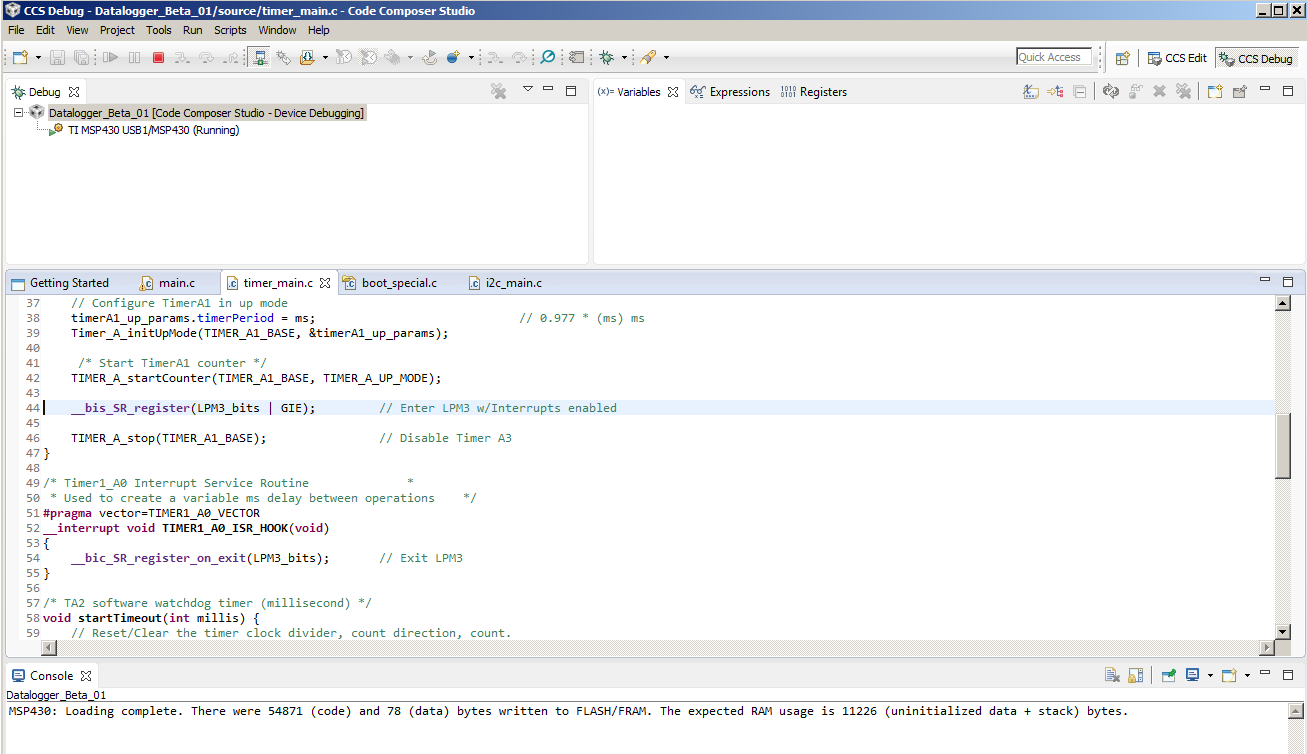
    - Next time I debug the project, the Debug view shows focus on the debug configuration and says that the device is running (when it is really not) and does not halt at main. All debug buttons other than Terminate are grayed out (see screenshot1 below)
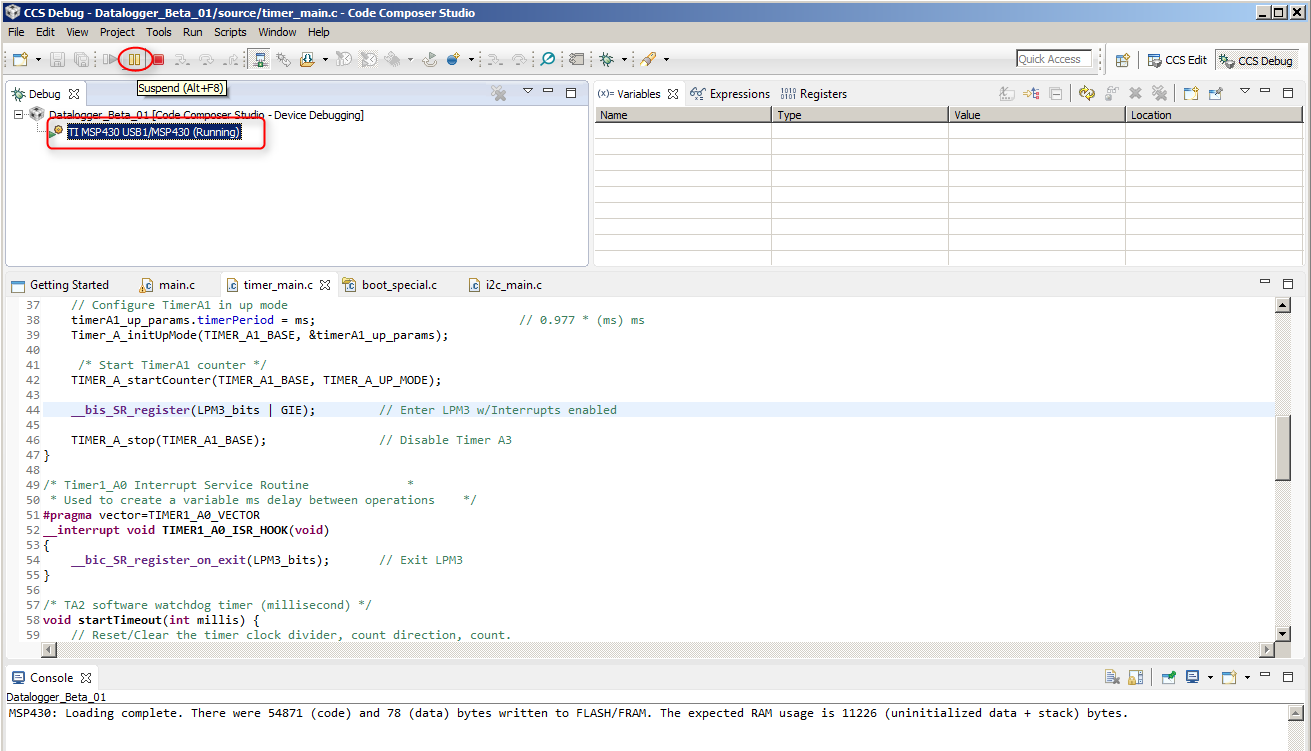
    - At this point, I can still click on the MSP430 device in the Debug view and click on Suspend, which puts the program at main (see screenshot2 below). And from here the debug buttons are activated again.

    Nathan, thanks for your patience and for confirming that this matches with the behavior you are seeing.

    I have filed bug # SDSCM00051805 to track this issue. 

  • Thanks Aarti - I'm officially impressed you stuck with it until you reproduced my apparently unique error. I appreciate it.