This thread has been locked.

If you have a related question, please click the "Ask a related question" button in the top right corner. The newly created question will be automatically linked to this question.

CCS V6.1 TMS320F28069 USB Driver Does Not Work

Other Parts Discussed in Thread: TMS320F28069

Customer cannot get the USB drivers working with CCS v6.1 for TMS320F28069 dev kit.  The drivers show up in Device Manager under USB Drivers, but the COM port does not show up under Ports (COM and LPT).  We've tried uninstalling and reinstalling the device drivers and CCS.  Customer is running Win 7 64-bit with administrative rights.  The OS and drivers are the same as my PC.  We've also tried uninstalling CDM Uninstaller 1.4 - Windows Device Driver Uninstaller: http://www.ftdichip.com/Support/Utilities.htm

I've run out of ideas to try.  Any suggestions would be appreciated.

Thanks,

Mark

USB_Driver.zip

  • Mark,

    I assume you already tried pointing to the xds100 drivers in the CCS installation and tried a driver reinstall? That seemed to resolve a similar issue in this thread.

    Are they using the F28069 Experimenters kit, and do you know if this is a new or older kit? And has it ever been used successfully before? The reason I ask is because of this post which mentions an issue with some of the C2000 Experimenter's kits being recognized by Windows as "Dual RS232 USB Serial Bridge" instead of the XDS100 JTAG emulator. https://e2e.ti.com/support/microcontrollers/c2000/f/171/t/21086

    It is an old post but if the customer has never used the kit before, it may be a possibility. In this case, trying out a different kit might also help isolate whether the issue is related to the kit itself or just driver installation. If this does not help, or if you have specific questions about this known issue I would suggest posting to the C2000 forum for additional details.

  • Hi Aarti,

    Thanks for the suggestions. Adding the customer to the thread. Sorry, I should have mentioned the customer’s hardware worked on my PC. We also tried my known good hardware on his PC. But it did not enumerate the COM port. So it’s definitely a driver issue. We tried reinstalling drivers. Any other suggestions? Do we need to remove registry entries for the driver?

    Regards,
    Mark
  • Hi Aarti,

    Please let me know what else we can try. The customer is getting very frustrated. I've suggested removing FTDI and TI drivers from Windows Uninstall Programs.

    Regards,
    Mark
  • Hi Mark,

    I'm running out of ideas too. I'll check if anyone else has other suggestions.

    Can they attach a screenshot of their Device Manager for us to look at? 

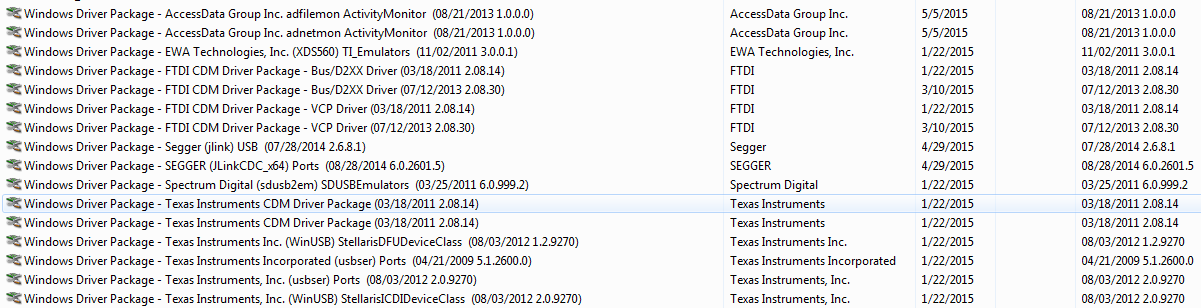
  • Included below is the customer driver screenshot.  Let me know if you have suggestions.

    Thanks,

    Mark

  • Mark,

    Nothing really stands out from this screenshot. What I was actually asking for though was the Device Manager screenshot that shows the COM ports and XDS100 channels.

    You mentioned that CCS has already been uninstalled/reinstalled. Were the device drivers also completely removed during that process?
    This wiki page describes the procedure to completely remove the JTAG device drivers. If the customer hasn't been through this already, it might be worth a try to uninstall CCS and follow the procedure in this page to make sure everything is cleaned out and there aren't any device driver conflicts. Then CCS can be reinstalled again.
    http://processors.wiki.ti.com/index.php/Troubleshooting_CCSv6#Installation

    I realize the ultimate goal is to get this working on his PC, but if feasible, and if the customer has access to another PC in his company that does not have a previous CCS installation, it might be worth it to give that a try. It might help isolate if the issue could be related to something specific either in his PC hardware or Windows installation.