This thread has been locked.

If you have a related question, please click the "Ask a related question" button in the top right corner. The newly created question will be automatically linked to this question.

Error connecting EVMC6472

Other Parts Discussed in Thread: TMS320C6472

Hi,

I am getting an error while trying to debug a clock example on a EVMC6472. What exactly is error 0x80000244/-1265?


Tools Version:

CCS:  4.1.1.00014

DSP/BIOS: 6.21.01.16

Inter-processor Communiction: 1.00.05.60

XDCtools: 3.16.03.36

XDAIS: 6.25.01.08


Error message:

Error connecting to the target:
Error 0x80000244/-1265
Fatal Error during: Register, Initialization, OCS,
The TAP ID for the DAP, read as 0x00000000, does not match with the default ID or the one provided in the board file.


Help is highly appreciated..

Thanks,

Dominic

  • Hi Dominic,

    What emulation are you using to communicate with the target? And what does you target configuration file look like?

    Thanks

    ki

  • Hi Ki,


    I am using the onboard USB emulator to communicate with the target. As for the target configuration, I have tried using the followings and all of them gave the same error.


    Spectrum Digital DSK-EVM-eZdsp onboard USB Emulator-> TMS320C6472 (CPU Registers, Fast Start)

    Spectrum Digital DSK-EVM-eZdsp onboard USB Emulator-> TMS320C6472 (Full Peripheral Register set)


    Spectrum Digital DSK-EVM-eZdsp onboard USB Emulator-> TMS320TCI6486 (Full Peripheral Register set)

    Spectrum Digital DSK-EVM-eZdsp onboard USB Emulator-> TMS320TCI6486 (Full Peripheral Register set)


    Thanks,


    Dominic


  • Dominic,

    I don't believe that board is made by Spectrum Digital.  If it is not a Spectrum Digital board then it will not have Spectrum Digital onboard emulation on it.  Do you have a standalone emulator that you can use with the board?  I see on our website that it lists this board as having onboard emulation.  I remember one that was built with blackhawk onboard emulation and another with XDS100.  I will check with the product group to see what is on this board.

    John

  • John,

    not sure if this is what you are looking for:

    http://www.einfochips.com/TI/evm6472-support.php

  • Yeah that helps.  It is an eInfoChips board and not Spectrum so using a Spectrum Digital onboard usb connection in CCS will not work.  If you look close to the usb connector on the board is there an FTDI chip?


    John

  • I downloaded and installed a package from the eInfoChips site.

    Now I have an import config present here <installdir>\ccsv4\emulation\boards\evmc6472\target_configuration

    Try the following:

    Create a new target configuration and select the advanced tab (at bottom), click import button, scroll to the bottom and select browse, choose the EVM6472_XDS100USB file in the folder noted above.  This should create a config that will work with the board (assuming the onboard emulation is an XDS100).


  • Hi John,


    Yes, it's a FTDI chip. I followed your steps as suggested but I am still getting the same error.

    My configuration files looks like the following. In addition, I have tried the following configurations as well, but there is still no luck.

    • Texas Instruments XDS100v1 USB Emulator - TMS320C6472 (Full Periperhal Register set)
    • Texas Instruments XDS100v1 USB Emulator - TMS320C6472 (CPU Registers, Fast Start)
    • Texas Instruments XDS100v2 USB Emulator - TMS320C6472 (Full Periperhal Register set)
    • Texas Instruments XDS100v2 USB Emulator - TMS320C6472 (CPU Registers, Fast Start) 


    Thanks,

    Dominic


    <?xml version="1.0" encoding="UTF-8" standalone="no"?>
    <configurations XML_version="1.2" id="configurations_0">
    <configuration XML_version="1.2" id="Texas Instruments XDS100 USB Emulator_0">
            <instance XML_version="1.2" desc="Texas Instruments XDS100 USB Emulator_0" href="connections\TIXDS100usb_Connection.xml" id="Texas Instruments XDS100 USB Emulator_0" xml="TIXDS100usb_Connection.xml" xmlpath="connections"/>
            <connection XML_version="1.2" id="Texas Instruments XDS100 USB Emulator_0">
                <instance XML_version="1.2" href="drivers\tixds100icepick_c.xml" id="drivers" xml="tixds100icepick_c.xml" xmlpath="drivers"/>
                <instance XML_version="1.2" href="drivers\tixds100c64xp.xml" id="drivers" xml="tixds100c64xp.xml" xmlpath="drivers"/>
                <property Type="choicelist" Value="0" id="The JTAG TCLK Frequency (MHz)">
                    <choice Name="Fixed with user specified faster value" value="SPECIFIC">
                        <property Type="stringfield" Value="6.0MHz" id="-- Enter a value from 1.0MHz to 6.0MHz"/>
                    </choice>
                </property>
                <platform XML_version="1.2" id="platform_0">
                    <instance XML_version="1.2" desc="IcePick_C_0" href="Routers\icepick_c.xml" id="IcePick_C_0" xml="icepick_c.xml" xmlpath="Routers"/>
                    <router HW_revision="1.0" XML_version="1.2" description="ICEPick_C Router" id="IcePick_C_0" isa="ICEPICK_C">
                        <subpath desc="subpath_0" id="subpath_0">
                            <instance XML_version="1.2" desc="C64XP_0" href="cpus\c64xp.xml" id="C64XP_0" xml="c64xp.xml" xmlpath="cpus"/>
                            <property Type="numericfield" Value="16" id="Port Number"/>
                        </subpath>
                        <subpath id="subpath_1">
                            <property Type="numericfield" Value="17" id="Port Number"/>
                            <instance XML_version="1.2" desc="C64XP_1" href="cpus\c64xp.xml" id="C64XP_1" xml="c64xp.xml" xmlpath="cpus"/>
                        </subpath>
                        <subpath id="subpath_2">
                            <property Type="numericfield" Value="18" id="Port Number"/>
                            <instance XML_version="1.2" desc="C64XP_2" href="cpus\c64xp.xml" id="C64XP_2" xml="c64xp.xml" xmlpath="cpus"/>
                        </subpath>
                        <subpath id="subpath_3">
                            <property Type="numericfield" Value="19" id="Port Number"/>
                            <instance XML_version="1.2" desc="C64XP_3" href="cpus\c64xp.xml" id="C64XP_3" xml="c64xp.xml" xmlpath="cpus"/>
                        </subpath>
                        <subpath id="subpath_4">
                            <property Type="numericfield" Value="20" id="Port Number"/>
                            <instance XML_version="1.2" desc="C64XP_4" href="cpus\c64xp.xml" id="C64XP_4" xml="c64xp.xml" xmlpath="cpus"/>
                        </subpath>
                        <subpath id="subpath_5">
                            <property Type="numericfield" Value="21" id="Port Number"/>
                            <instance XML_version="1.2" desc="C64XP_5" href="cpus\c64xp.xml" id="C64XP_5" xml="c64xp.xml" xmlpath="cpus"/>
                        </subpath>
                    <property Type="filepathfield" Value="..\..\emulation\boards\evmc6472\gel\evm6472.gel" id="GEL File"/>
                    </router>
                </platform>
            </connection>
        </configuration>
    </configurations>

  • Ok we are trying to track down an EVM.  I know we have one of those as it was being used for some performance testing recently in our lab.


    John

  • I was able to connect to my EVM without issue.

    Dominic - what are your DIP switch settings for SW1 and SW2?

    Also I see this line in your ccxml file for IcePick

     <property Type="filepathfield" Value="..\..\emulation\boards\evmc6472\gel\evm6472.gel" id="GEL File"/>

    That gel file should be for the CPU, not the IcePick 


  • I set my DIP switch settings the same as 1 and 1a (both worked) as shown in the Quick Setup Guide (attached)


    TMDXEVM6472_QuickSetupGuide_V04.pdf
  • Dominic,

    I installed the software from the CD that comes with the EVM and managed to connect to the C6472 board using the embedded emulator (XDS100) without problems.

    - Installed the file <EVMC6472_SDK_Setup_v_0_1_beta.exe>

    - Opened CCSv4 and created a new target configuration, configuring it as listed at this page.

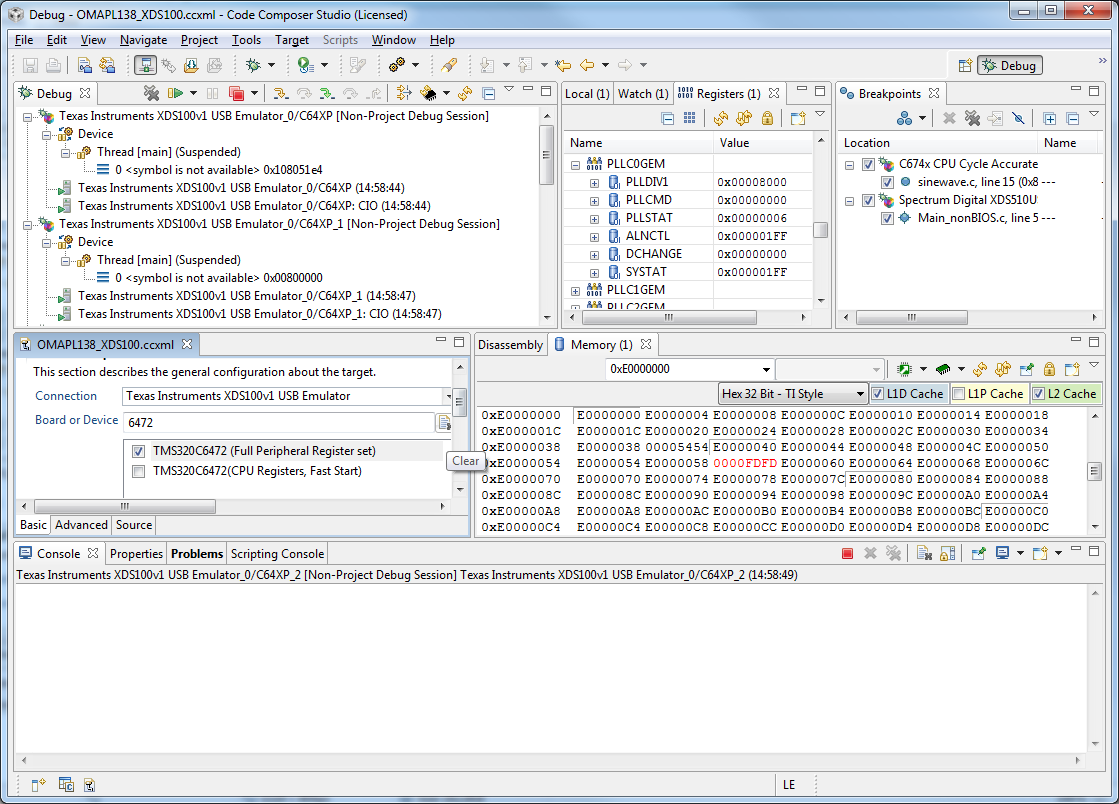
    - Connected to the target and managed to have access to all memory regions and peripherals (check the attached screen).

    I am using CCS 4.1.1.00014 on a Win7 64-bit PC and the board is a EVMC6472-Beta15. 

    One thing that I did not realize and got an error right from the start was the power supply requirements - the board requires 12V but I initially connected it to a 5V power supply as it is very common across other boards. This caused me errors similar to what you are experiencing.

    Another detail is to be sure the XDS100 device driver initializes properly when the board is connected to the PC - although this didn't happen with me this time, it happened a while ago with another board and it took me a while until I had to manually install the driver.

    Hope this helps,

    Rafael


  • All,

    I manually reinstall the driver and the EVM6472 SDK ( EVMC6472_SDK_Setup_v_0_1_beta.exe) and I am now able to connect to the EVMC6472.

    P.S. My DIP switches are identical to figure 1. in TMDXEVM6472_QuickSetupGuide_V04.pdf.


    Thanks for all your help.

    Dominic


  • Good to hear you are now able to connect.

    FYI: I noticed that you are still using a Beta version of the drivers. The ones I downloaded from eInfochips site is EVMC6472_SDK_Setup_3_1.exe. You may want to upgrade

    ki

  • Hi,

    I have a similar question with respect to setting up the target configuration for EVMC6472. When I try to import a target cofiguration, my system lets me import on files of type .xml and not .ccxml, the files that i have downloaded from einfoChip website are all of the type .ccxml.

    You know what I could do to fix this. I'd appreciate any kind of help.

    Thanks,

    Renuka

  • Renuka,

    You can add it to you project using the "Project->Add file to active project". Or you can copy it via windows explorer to C:\Documents and Settings\<user>\user\CCSTargetConfigurations so that it will appear under the 'User Defined' folder in the Target Configurations view

    Thanks

    ki

  • Hi Ki,


    I tried doing what you suggested and was able  to add the target configuration. Once I add the target configuration, should I go to the 'User Defined' folder in the Target Configurations view and launch this selected configutation. When do I connect to the device (Alt+C)

    Note: I am using the project in Release mode

    Also I am using the static IP as is described for the NAND Demo on C6472. Do I have to connect the ethernet port of C6472 through a network switch?

    Thanks,

    Renuka


  • yes, after a refresh, that ccxml file should appear there and you can right-click on it to launch that configuration. Then you can connect to it.

    Renuka Parlapalli said:
    Also I am using the static IP as is described for the NAND Demo on C6472. Do I have to connect the ethernet port of C6472 through a network switch?

    I'm not too familiar with the NAND demo for the 6472. Sorry. But you may have more luck in the C6000 forums.

  • On another note, I have been facing the following issues

    When I try to load my .out file onto my target (Tomahawk), I get the following error.


    1) C64XP_0: Trouble Writing Memory Block at 0x8bb4b8 on Page 0 of Length 0x214: Read verification failed at 0x8bb4b8

    Cannot write to target


    2) Also when I make changes to a source file in an existing project and try and save it I get an error which says “Already freed”  This happens with all my projects fi

    Have you faced something similar. Appreciate your help on this

    Thanks,

    Renuka