This thread has been locked.

If you have a related question, please click the "Ask a related question" button in the top right corner. The newly created question will be automatically linked to this question.

Not able to install ARM compiler for CC2650

Other Parts Discussed in Thread: CC2650

HI,

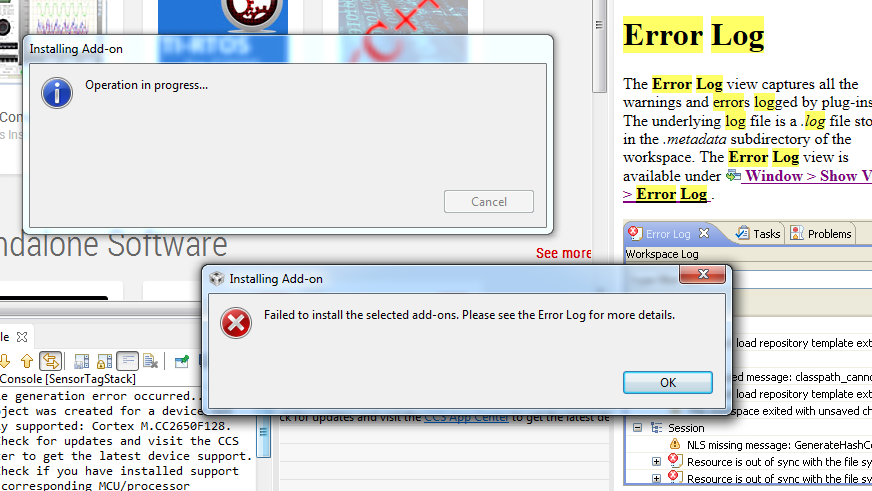
   I want to run the sensor tag for CC2650 in CCS. I am doing this for the first time. I am following the instructions in Software development guide. After I have installed CCS version 6.1.0, I am trying to install the TI ARM compiler. But it is giving me error that "Failed to install selected Add-ons. Please check error logs" Please check the attached snapshot.

Also I am not able to figure out where to get the ErrorLogs. I cannot see in the Windows->Show Views

Please help

Regards

Puneet
  • Puneet Wadhawan said:
    After I have installed CCS version 6.1.0, I am trying to install the TI ARM compiler. But it is giving me error that "Failed to install selected Add-ons. Please check error logs" Please check the attached snapshot.

    Are you trying to update the ARM Compiler tools from CCS App Center? If so, could you try the alternate method of going to Help->Check for Updates? That method should also allow you to get updates to the ARM compiler.
    http://processors.wiki.ti.com/index.php/Compiler_Updates

  • HI Aarti,

     Yes, I was trying to update using the App Centre. Now I also taken the compiler updates from Help-->Check Updates but still I am getting the following error:

    Description Resource Path Location Type This project was created for a device not currently supported: Cortex M.CC2650F128. Check for updates and visit the <a href="liveaction:OpenAppCenter">CCS App Center</a> to get the latest device support, or migrate the project to closest matching supported device by adjusting project properties. SensorTagStack project Problems

    This is not allowing me to do anything after this on CC2650.

    Regards

    Puneet

  • Puneet Wadhawan said:
    This project was created for a device not currently supported: Cortex M.CC2650F128.

    Did you make sure to select the CC26xx Device Support when installing CCS? If you had somehow missed this, you can re-run the CCS installer, point it to the same directory as your current installation and make sure to enable CC26xx Device Support. This will add on the necessary device support.

  • Hi Aarti,

       I actually re-installed the CCS and carefully set all the required features. Now I am able to compile and debug my code on CC2650. Thanks for the support.

    Regards

    Puneet