This thread has been locked.

If you have a related question, please click the "Ask a related question" button in the top right corner. The newly created question will be automatically linked to this question.

WRT in Trace Receiver Settings

Other Parts Discussed in Thread: OMAPL138

Hi,

There are a few terms/definitions we cannot find in TI documents or web.

For tracing an omapl138 chip using ETB,
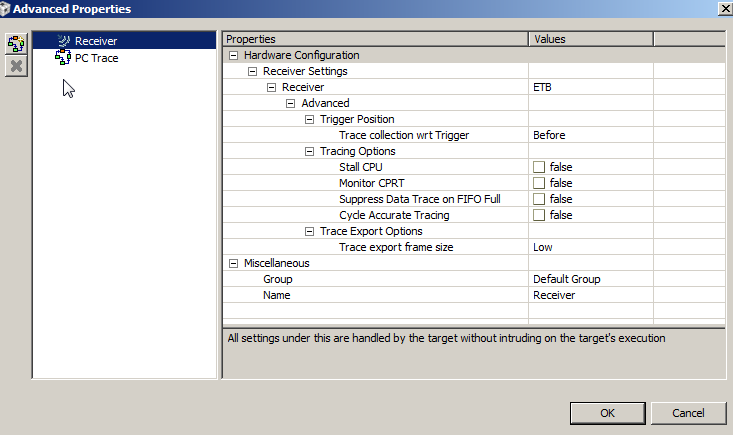
Questions without answer:

  1. “wrt” in “Trace Condition wrt trigger”, what is “wrt”? Maybe it is a short for something?
  2. The pull-down menu: what does “before”, “after” and “about” mean? Say if we run to a breakpoint, the basic understanding is that ETB is going to collect PC during the last run in its circular buffer, so perhaps it is more close to “(immediately) before”? Then what about the other two options?
  3. CPRT and “monitor CPRT” is also undocumented.


Questions with probable answer:

  1. “Suppress Data on FIFO full”. I guess this is equivalent to the old “circular” option as (1.2.1 Stop on buffer full and 1.2.2 Circular buffer)
  2. “Stall CPU”, likely as1.1 ETB Trace System Control.
  3. “Cycle Accurate Tracing”, likely 8.1 Cycle Accurate Trace Profiling with CCS Examples


Please advise us with the primarily the unknown questions, and confirm the remaining.


Lencho

  • "wrt" stands for "with respect to".  

    The "before", "after", and "about" items in the pull down menu control the data that is captured/retained with respect to the trigger.   Using the "before" selection will capture/retain the buffer full of trace data generated just prior to the trigger, the "after" will capture/retain a buffer full of trace data just after the trigger, while the "about" will capture/retain roughly a half of buffer worth of data both before and after the trigger.   Another way to look at it is where the trigger will fall in the captured data.  When using "before' setting the trigger will fall at the end of the captured data, using the "after" setting the trigger will fall at the beginning of the captured data, while using the "about" setting the trigger will fall in the middle of the captured data.

    CPRT is a co-processor register transfer caused by the execution instructions that  move data between the processor registers and the coprocessor ( MCR, MCRR, MRC, MRRC)

  • Hi Lencho

    Please see below

    1. “wrt” in “Trace Condition wrt trigger”, what is “wrt”? Maybe it is a short for something? 
      1. with respect to 
    2. The pull-down menu: what does “before”, “after” and “about” mean? Say if we run to a breakpoint, the basic understanding is that ETB is going to collect PC during the last run in its circular buffer, so perhaps it is more close to “(immediately) before”? Then what about the other two options?
      1. A trigger can be configured to have target tracing Before, Middle, and After. The setting specifies where this trigger will be located in the trace buffer. This option is works mostly with off-chip trace collection better. You may ignore this for now (we need to improve the US to fix this)
    3. CPRT and “monitor CPRT” is also undocumented.
      1. This is ARM Coprocessor Register Transfer (CPRT) tracing option. Specific to ARM ETM trace 


    Questions with probable answer:

    1. “Suppress Data on FIFO full”. I guess this is equivalent to the old “circular” option as (1.2.1 Stop on buffer full and 1.2.2 Circular buffer)
      1. When Data Trace is enabled, it uses significant trace bandwidth. In many cases, there may not be enough bandwidth to carry all the traces without gaps (when FIFO overflow occurs). This option lets user de-prioritize data trace for such overflow. 
    2. “Stall CPU”, likely as1.1 ETB Trace System Control.
      1. When needed bandwidth to export all the Trace less than the available bandwidth, trace FIFO overflows and trace gaps occur. If you want to avoid any gaps and its OK to stall CPU at the cost of perfect trace, use this option.  
    3. “Cycle Accurate Tracing”, likely 8.1 Cycle Accurate Trace Profiling with CCS Examples
      1. When cycle-accurate tracing is enabled, the captured trace has all the cycles taken by a region of code/program. When this option is disables, the number of cycles for of code/program will not be accurate. In both the cases, the program flow reflects the actual execution PC flow. Cycle-accurate tracing takes more trace bandwidth so this is another option to control the trace bandwidth if you are seeing trace gaps in your use case. If you don't care about exact number of cycles for a particular code sequence. no need to use this option.


  • Hi Craig and Vikas,

    For “before” ”after” “middle”:

    It seems like an enhanced version of breakpoint:

    Compare: the normal breakpoint doesn’t have any buffer, upon hitting the user examines the current state of the system;

    ETB/STM: “before” is easily understood; “after” perhaps not work with the most ordinary breakpoint, but should work with hardware breakpoint and AET such that: we may use a HW breakpoint or AET condition to trigger an “after”, and upon the moment the condition evaluates TRUE ETB/STM tracing starts until the next “stop” conditions.

    ? Does the above make sense?

    And is the assumed next “stop” condition include the “before” pull-down menu list explained?


    There is likely a GUI question: “Suppress Data on FIFO full” and “stall CPU” are likely have an “either” relationship and we cannot enable both at the same time? But the UI allowed me to select all of them. I understand this is very difficult to make an universal and self-contained UI for all processor, but please confirm with this.


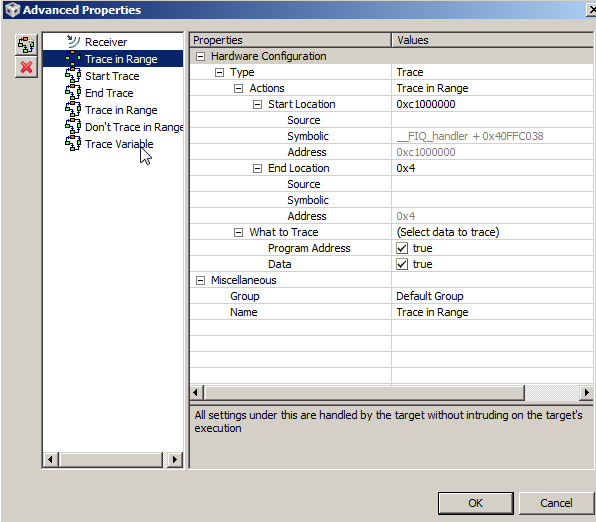
    I also see that the UI allowed multiple triggers to be added. Does actually work for all processors or it is just superficial allowed by the UI? As in the screenshot we have six triggered added, and there interrelationship can be very complicated. Besides, the ARM core doesn’t have AET, so likely this couldn’t be actually executed. Please also confirm this.


    A unified IDE/GUI like this is a huge project and might take the immense amount of development work like Visual Studio. As the AET is involved, and as a programmer I realizes how difficult wrapping these libraries together is, please also enlighten us on:


    CToolsLib is the collective name for a list of software, and as programmer we usually do not use these libraries directly, instead TI has implemented them to translate the formatted message into CCS’s graphical user interface:

    1. AETLib is used for converting trigger settings set in CCS GUI to command’s understood by AET hardware. Essentially it is AET driver.
    2. CPTLib is essentially CP_tracer format interpreter so the CP_tracer message can be understood and rendered into GUI.

    Perhaps it is appropriate to say they are the drivers, interpreters and software building blocks of CCS?


    Lencho