This thread has been locked.

If you have a related question, please click the "Ask a related question" button in the top right corner. The newly created question will be automatically linked to this question.

Code Composer 5.5 and SonarQube Plugin for Eclipse


I am currently working on a couple of TI Microcontroller platforms using Code Composer 5.5 as the IDE. Our code baseline is analyzed by SonarQube to produce metrics and issue identification against a set of rules and standards.

SonarQube website mention support for Eclipse via a plugin. Since Code Composer 5 is Eclipse based I was able to install it but I cannot finish the configuration by linking the project as described. When I right click on the project in the Project Explorer there is no option to Configure then Associate with SonarQube.

Is there a way to make this menu option show or a command line method to make this association?

Can I use this plug in in CCS 5.5?

  • Rafael,

    We don't have any experience with SonarQube.  I did go ahead and install the plug-in into both my CCSv5.5 and CCSv6.1 installations.

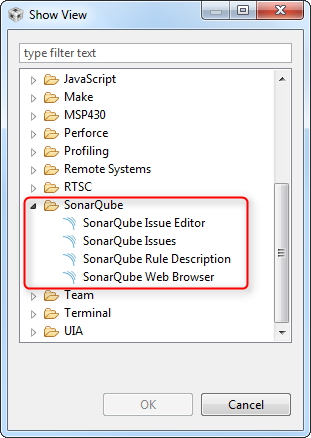
    After installing I do see a series of SonarQube views.  I see them if I go to Window -> Show View -> Other

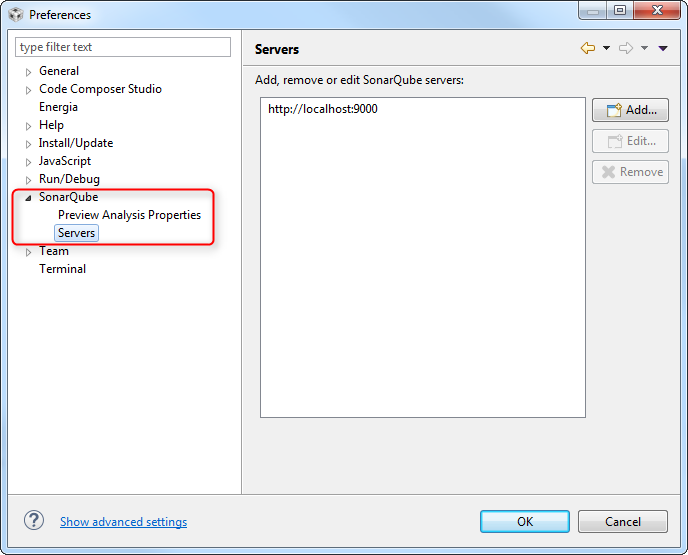
    I also see preferences for setting up the server

    Unfortunately as I don't use SonarQube I don't have a server to configure.  Did you enter your server here?

    Regards,

    John

  • Hi Jonh,

    Yes, I see the same results in my installation.

    But it is in the next step of the SonarQube plug in configuration that Code Composer seems to be missing a menu option.

    After the plugin is installed, their steps (docs.sonarqube.org/.../Configuring+SonarQube+in+Eclipse) call for a right click on the project in the Project Explorer tab.  This action should pop up a menu with a Configure option then a sub-option called "Associate with SonarQube".

    I installed Eclipse Juno 3.2.8, then CCS 5.5 on top, then the SonarQube plugin.  Through this installation I get the proper menu options to complete the configuration.

    After selecting this "Associate" option in the Eclipse installation this made changes to my CCS5 .project file that added a line like  <nature>org.sonar.ide.eclipse.core.sonarNature</nature>.   It also created a .settings/org.sonar.ide.eclipse.core.prefs file under my project folder.

    Now I opened my original CCS 5 installation and projects and SonarQube options show when I right click on the project in the Project Explorer Tab.

    I am still testing the plugin behavior but it looks like the CCS is some how not detecting and showing SonarQube options when you right click on the project.

  • I think it is perspective related. In CCS we use the CCS Edit perspective for editing. In stock Eclipse there is the C/C++ Perspective. If I switch to the C/C++ perspective in CCS then I see the menu item.