This thread has been locked.

If you have a related question, please click the "Ask a related question" button in the top right corner. The newly created question will be automatically linked to this question.

driverlib not in workspace error

Other Parts Discussed in Thread: CONTROLSUITE, TMS320F28027, TMS320F28027F

Hi All,

I have updated CCS from 6.0.1 to 6.1.0 (as requested by the software) and now I have got the following error:

**** Build Finished ****
Buildfile generation error occurred..
Referenced project 'driverlib' does not exist in the workspace. Project 'Example_F2802x_Tim01_ADC_SPI_DAC' may not build as expected.
Build stopped..

The driverlib.lib file is still there like before. I also have some path and compiler Warnings. See screenshot.
Anybody any idea what's happened?

Regards, Bart

  • Bart Roodenburg said:
    Referenced project 'driverlib' does not exist in the workspace.

    This message seems to indicate that 'driverlib' is a project being referenced by 'Example_F2802x_Tim01_ADC_SPI_DAC'. If this is the case, then the 'driverlib' project needs to be imported into the workspace also so it can be built prior to building 'Example_F2802x_Tim01_ADC_SPI_DAC'. 

    To check if this is the case, right-click on the project Example_F2802x_Tim01_ADC_SPI_DAC in the Project Explorer view, go to Properties. Click on Build in the left pane and go to Dependencies tab on the right pane. Is driverlib listed there as a dependent project?

  • Dear AartiG,

    Thanks for your response, the problem is unfortunately still not solved...

    Yes, the driverlib is listed under the depencies tab, however, this was also the case before the update, like in v6.0.1. Since I have installed the CCS updates (now I have v6.1.0) all my projects give the same error and they can no longer be build and flashed...

    If you look in the screenshot, the driverlib.lib is still in the workspace (listed under the project). Or should I Import it manually? How, and where can I find this project?

    When I remove the driverlib it is only possible to build and load the program in RAM. No longer Flash. When I select Flash again (driverlib is needed) and the error returns

    Regards,
    Bart
  • Bart Roodenburg said:
    Yes, the driverlib is listed under the depencies tab, however, this was also the case before the update, like in v6.0.1. Since I have installed the CCS updates (now I have v6.1.0) all my projects give the same error and they can no longer be build and flashed...

    I am not sure why performing the CCS update would affect the build. However, I can say that if driverlib is listed in the Dependencies tab, then a 'driverlib' project needs to be imported into the workspace as CCS will try to build the dependent project prior to building the main project, as described here.

    Bart Roodenburg said:
    If you look in the screenshot, the driverlib.lib is still in the workspace (listed under the project).

    The driverlib.lib is the library which is linked to the project. It is not the dependent project itself that I referred to earlier. Typically if there were a driverlib project, it would generate the driverlib.lib at build time. In this case since your project already links in driverlib.lib, as long as the .lib actually exists in the directory where the project is looking for it, you should be able to remove the dependent project from the Dependencies tab, and build the project. However if driverlib.lib does not exist, then you would need the driverlib project to generate this .lib.

    Is this an example project from ControlSUITE or your own project? If it is an example and if you could point me to its location, I can try to build it myself and provide more clear steps on how to resolve the build error.

  • ***
    Is this an example project from ControlSUITE or your own project? If it is an example and if you could point me to its location, I can try to build it myself and provide more clear steps on how to resolve the build error.
    ***
    Yes it's an ControlSuite example (Example_F2802xLEDBlink from ControlSuite v2.9) that has been imported as project via the Example Browser in CCS v6.0.1. It is renamed and after that I have changed the C-code to the functionality I need.

    The project is succesfully exported- and imported to another computer once.

    Computer 1: CCS v6.0.1, ControlSuite v2.9
    Example exported to computer 2: CCS v6.0.1, ControlSuite v3.3 (no problems)
    Updating computer 2 to CCS v6.1.0, ControlSuite v3.3 (error as described above)

    Regards,
    Bart
  • Bart Roodenburg said:
    Yes it's an ControlSuite example (Example_F2802xLEDBlink from ControlSuite v2.9) that has been imported as project via the Example Browser in CCS v6.0.1.

    If I import the Example_F2802xLEDBlink project from my version of ControlSuite (v3.1.1) I do not see 'driverlib' listed under Dependencies either under the RAM  build configuration or Flash build configuration. So I can't tell for certain why it is there in your project - it may be that the older version of the ControlSuite example had it that way or is it possible that you or another user added it?

    In any case, did you try removing the driverlib project from the Dependencies tab of your project and rebuild, and does that work?

  • Dear AartiG,

    First of all, thank you for your help. The driverlib is for sure added by CCS.

    I have tried to remove driverlib from the dependencies tab, however, two things happen now:

    1): If I load the program to the LaunchPad in RAM the program works fine. (Fig.1)

    2): If I Flash the program to the LaunchPad the AD conversion channel 6 and 7 fail, see "Expressions" in debugger mode. (Fig.2)

    How can I add the driverlib.lib project? If I press the "add" button in the dependencies tab I'm unable to select it again ...

    Regards,
    Bart

    p.s.: What's the best thing I can do now?  Load the example in the new version and copy paste my own C-code in the new example? Reinstall old version. Or...

    Fig. 1: program loaded in RAM, ADC readout is conform the input voltage.

    Fig. 2: program loaded in Flash Mem, ADC readout is a fixed value and does no longer follow the AD input voltage

  • Bart Roodenburg said:
    p.s.: What's the best thing I can do now?  Load the example in the new version and copy paste my own C-code in the new example? Reinstall old version. Or...

    I would recommend loading the example from the latest version of ControlSuite and adding your own code to it. Also to be safe, I would also recommend a full reinstall of CCS.

    What I mean by that is to download and install CCS 6.1 in a separate directory. Earlier you had updated 6.0.1 to 6.1.0 by running the update in CCS and I just want to eliminate the possibility of that update contributing to any these quirks.  I understand it is inconvenient to go through another installation, but may save you time and effort in the long run. You can keep your existing installation as-is and simply install CCS 6.1 (download installer from here) to a different directory. Then import the example project from latest ControlSuite, make your code additions/updates to it and go from there. Hopefully that should get you back on track.

    Thanks again for your patience while working through these issues.

  • Dear AartiG,

    Thanks again. I have done a complete reinstall already twice. What are the preferred steps, because there are always updates needed?

    A) Install CCS >> Install CCS updates >> Install ControlSuite OR
    B) Install CCS >> Install ControlSuite>> Install CCS updates?

    About loading the examples and the used target I also have some doubts/questions.

    1) I 'm using a C2000 LaunchPadXL, with a TMS320F28027F (this "F" uC is not in the target list...) I choose C2000 and TMS320F28027. Is this correct?
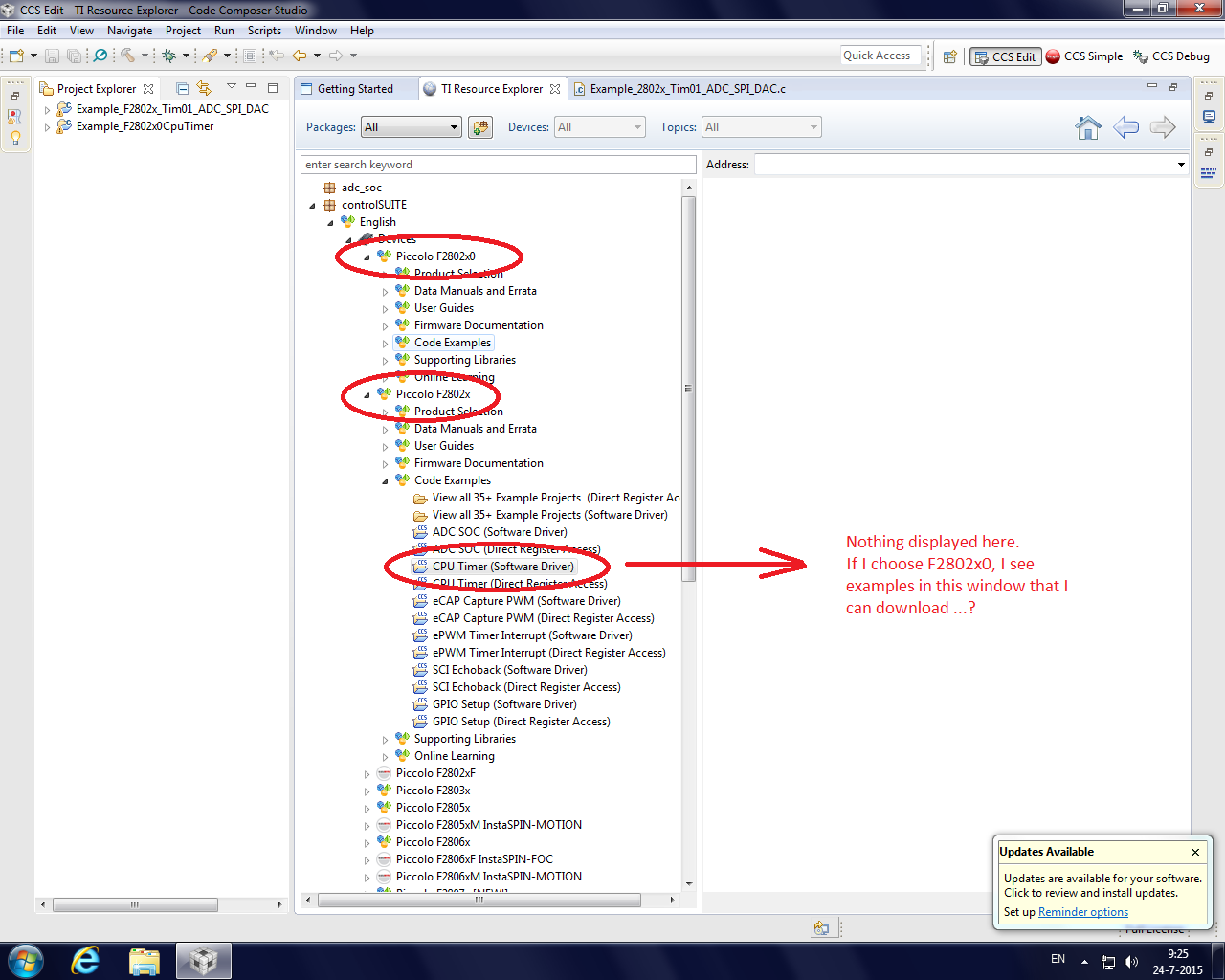
    2) From the examples I'm not able to load "F2802x" examples. I can only load "F2802x_0" examples. Is this correct? See attached screen dump.

  • Bart Roodenburg said:

    What are the preferred steps, because there are always updates needed?

    A) Install CCS >> Install CCS updates >> Install ControlSuite OR
    B) Install CCS >> Install ControlSuite>> Install CCS updates?

    Either of these should be fine.

    Bart Roodenburg said:
    1) I 'm using a C2000 LaunchPadXL, with a TMS320F28027F (this "F" uC is not in the target list...) I choose C2000 and TMS320F28027. Is this correct?

    Yes.

    Bart Roodenburg said:
    2) From the examples I'm not able to load "F2802x" examples. I can only load "F2802x_0" examples. Is this correct? See attached screen dump.

    I see the same issue with the Code Examples under certain device families. This appears to be a bug. You do want to use the examples under F2802x though, so an alternate method would be to import projects directly from the ControlSuite folder by going to CCS menu Project->Import CCS Projects, and browsing to the folder within ControlSuite where the examples are.

  • Dear AartiG,

    I have downloaded and installed (again) the latest versions of CCS and ControlSuite. By copying my code in an example of the newer version my program works again.

    I have tried again to import an old CCS project, however, without succes. It's still strange to me that it isn't possible to export a project from version 6.0 to 6.1 of CCS. So it is in principle not upwards compatible ...

    Thanks again for your help this week.
    Regards,
    Bart
  • Hello,

    I was exactly the same problem with the examples of F2802X family, after installing and uninstalling and re-INSTALLING all over again, the problem remained.
    The solution I found for now is only the same answer for themselves selected.
    But I lost so much time, and after all it is a widespread problem.