This thread has been locked.

If you have a related question, please click the "Ask a related question" button in the top right corner. The newly created question will be automatically linked to this question.

CCS locks 50% during flash writing

Hi

I am using CCSv6.1 to debug TM4C1294XL launchpad and most of the time ( +- 50% ), it locks when I download the code into flash. I use to click the debug icon, that is all.

What am I missing to correct download the code into flash without locking?

Sergio

  • Hi Sergio,

    Does the flash process get stuck in between frequently? or is it smooth enough?

    Regards,
    Gautam
  • Hi Gautam

    The flash process is done in 3 steps with a pause of +- 2 s between: 1/4, 2/4, 1/4. The locking occurs frequently in first 1/4. When locking occur, CCS complains saying that lost communication with the board.

    50% of time, the process is completed, but through these 3 steps.

    When the processor is already halted ( flash erased ), due previous locking, the flash process NEVER locks.

    So, I am wondering if it is possible to me halt the processor just before download into flash. I didn't see any resource in CCS to halt it, only in debug process. Is that possible?

    Sergio
  • Sergio,

    Does the CCS lock-up happen when the Flash is being erased or when it is being programmed? To isolate this further, you can launch the debugger manually (instead of clicking the Green bug button to Debug), then connect to the target, and then go to the On-Chip Flash Tools to manually erase the flash, followed by manually loading the program using the menu menu Run --> Load --> Load Program.

    Once you have isolated the step in which it locks up, then please try to capture the debug server log and send to us for analysis.

  • AartiG

    Good afternoon.

    CCS locks when it is being programmed.

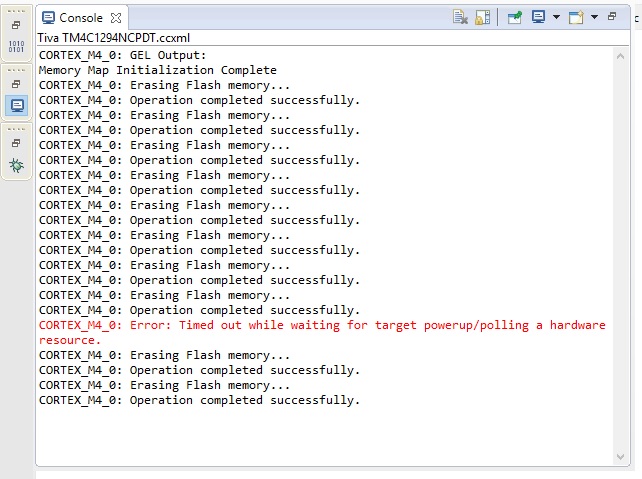
    I did debug manually, as you told, and erase and programming were done successfully but with some warnings:

    But, when I try to use the green bug icon, the locking issue appears:

    I need to disconnect the USB cable to power-off the board to resume.

    Sergio

  • Does this behavior happen when downloading all projects (like even the Tivaware example projects) or only with certain projects?

    I found a couple of related threads in the TM4C microcontrollers forum with similar symptoms. In those cases, there was usually a combination of factors that led to the unpredictable behavior: host OS, usage of USB hub, USB 3.0 port etc. Maybe those threads will give you some pointers in the right direction.

    https://e2e.ti.com/support/microcontrollers/tiva_arm/f/908/p/347737/1360624#1360624

    https://e2e.ti.com/support/microcontrollers/tiva_arm/f/908/p/348885/1223708#1223708

    If these references do not help I would suggest starting a new post in the TM4C forum as they seem to have heard of this issue a couple of times and may have additional ideas.

  • Hi AartiG

    Reading the posts you linked, I saw that Clark Leach said that Stellaris In-Circuit Debug Interface doesn't like USB hubs.

    In fact, deplugging my TM4C1294XL board from my USB HUB and plugging it directly to a PC USB port, the locking issue JUST DISAPPEAREAD.

    So, my conclusion is that STELLARIS IN-CIRCUIT DEBUG INTERFACE it is not 100% compatible with USB HUBs. Perhaps is it draining more current than the USB HUB can supply? In my case, I am not using its power supply, due conflict with internal +5VUSB of the PC power supply ( lack of a diode ).

    Problem solved.

    Thanks a lot.

    Sergio