This thread has been locked.

If you have a related question, please click the "Ask a related question" button in the top right corner. The newly created question will be automatically linked to this question.

GUI Composer Timestamp


I am trying to implement a simple GUI Composer timestamp function but have been unsuccessful.  I am collecting data from sensors and plotting that data using the scalar line graph with no problems.  I have text boxes displaying the values being plotted and that all works as expected.  I'm trying to add a textbox for displaying the time that a particular value is plotted.  I have created a simple Javascript function that returns the time  in hrs:min:sec:msec format.  This function works fine and works as expected.  I tried binding this function as a preprocessing function for the timestamp textbox.  It displays the time correctly when I start collecting data - e.g. 10:34:47:988 .  However, I cannot figure out how to get it to update automatically while collecting data.  The timestamp never changes.  If I click in the text box and modify the value, the value gets updated to the correct time so I know I'm getting the computer clock time continuously.  I just can't seem to update the text box.  I want to post the timestamp to the textbox whenever my sensor data changes.

Any help or pointers would really be appreciated.  I'm sure I'm missing something really simple and fundamental here but just can't see it.  Seems like a timestamp would be something needed in a lot of GUI composer applications.

I'm using GUI Composer 6.0.0.0 and Code Composer Studio 6.1 targeting a TM4C123.

Thanks in advance.

Dan

  • Have you tried using GUIVars? GUIVars allows you to bind to a target variable and perform an action (such as update a widget) when the value of the variable changes. Maybe that will work better in this case.

    See this post for an overview of how GUIVars works. You should be able to set the onPropertyChanged of the GUIVar to point to the function that returns the timestamp.

    There is also an example of using GUIVars (starting at slide 61) in the hands-on lab (Lab 1) of the GUI Composer presentation found here:
    http://processors.wiki.ti.com/index.php/CCS_Modules_Library#GUI_Composer

    Hope this helps.


  • Hi Dan,

    With target variables the backend runs on a timer to trigger target refresh and if value is changed, then it sends it to display for update. This update is what causes the graph to update. In the case of your timestamp box there is nothing to "trigger" an update. You could have a timer in your javascript and explicitly set the timestamp widget, but it wouldn't necessarily match when graph is updated. 

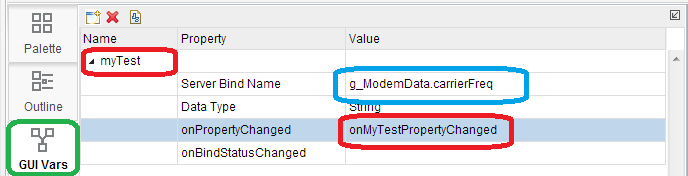
    Probably the simplest way to do this is to create GUI Variable that is tied the same target variable name that your scalar graph is tied to. GUI Variables are equivalent of display local variables and you can use it as a trigger to update the timestamp. You would change its property change callback to set timestamps' widget value to the timestamp from your javascript function.

    See picture below for an example. Activate GUI Vars tab, enter any name for your GUI Variable name (in my case it is myTest), Server Bind Name is the name of your target variable that is used to update ScalarGraph. Clicking in onPropertyChanged field (where red box is) should pop up a dialog that will prefill a function name, you can then click on "Edit" to add that callback. This is where you would then make a call to your timestamp javascript function and update your text widget with the value from timestamp function. After the picture is a snippet of my property function change. The widgetID needs to match the id of your text box where you want the time stamp to be displayed.  

    function onMyTestPropertyChanged( propertyName, newValue, oldValue) {
    // var t = $TI.GUIVars;
    // get value from another GUI variable
    // var v2 = t.getValue('prop2');
    // var v3 = newValue + v2;
    //
    // set value to another GUI variable
    // t.setValue('prop3', v3);
    //
    // set value to a widget

    var time = 1000+newValue;
    dijit.byId('widget_35671').set('value', time);
    }

  • Thanks. I have tried GUI VARS and was not successful but I have decided it was to a more fundamental problem - I am unable to save changes to the GUI. I'll post this on a different thread but thanks for the suggestions.

    Dan
  • Martin:
    I finally got a chance to implement the time stamp. Fixed the other problems that were slowing me down. You solution worked perfectly. It was exactly what I was looking for. This is one of the clearest examples I have seen. One clarification in the case of my implementation which might help others. The next to last line in my function is:

    var time = getComputerTime(); // where getComputerTime() is the Javascript function for returning time in a hr:min:sec:msec format.

    I also used this same technique for getting the date in month:day:year format.

    Your example was really helpful. Thanks again.

    Dan