This thread has been locked.

If you have a related question, please click the "Ask a related question" button in the top right corner. The newly created question will be automatically linked to this question.

Debugging ARM Core project shows confusing variable expression.

Other Parts Discussed in Thread: 66AK2H12

Hello everyone

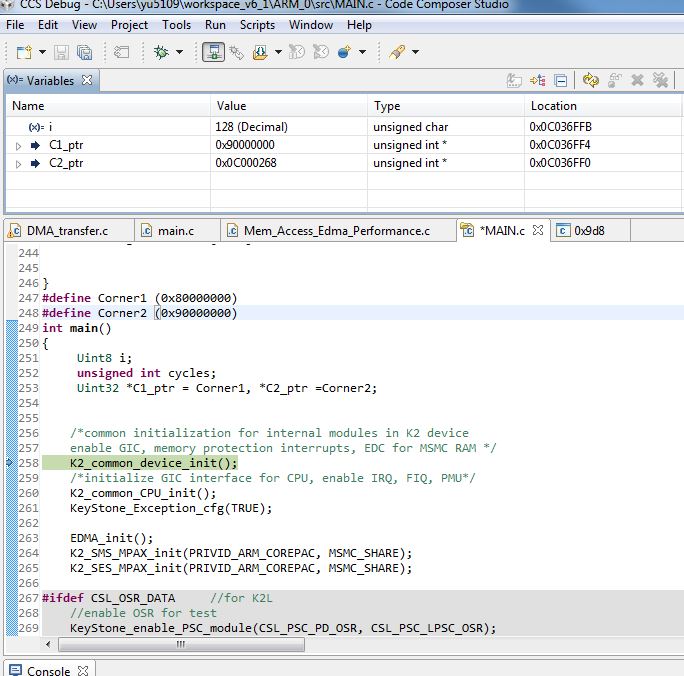
I am using CCS5.5 to debug 66AK2H12 ARM project (I compile the ARM project in the CCS 6.1.0). I found that the variable shows different value than it should be. The below figure shows that the C1_ptr should be 0x80000000, however, in the Debug window it shows 0x90000000. In the later part, I would assign an new value to *C1_ptr. But at this time the value is successfully assigned to the address 0x80000000. From the below figure, you could also notice that C2_ptr has strange value too. Can anyone tell me why this happens?

Thanks.

Xining 
  • Hello Xining,

    I think the reason may be that the expression window is getting confused because your variables are on the stack or in registers.  Check the assembly with source listing. I know that the expression window doesn't work well when the code is optimized.

    However, there may another reason.

    Stephen

  • Xining Yu said:
    I found that the variable shows different value than it should be. The below figure shows that the C1_ptr should be 0x80000000, however, in the Debug window it shows 0x90000000

    This might be a bug in CCS 5.5 when displaying local variables in code built with GCC. Can you load the same executable using CCS 6.1.1 and see if it exhibits the same behavior? I know you are currently unable to build with 6.1.1 (due to bug SDSCM00052303) but can you still build with 6.1.0 and load that executable and debug using 6.1.1?

  • Hi AartiG

    In the CCS 6.1.1, it does not have this error. It may be the bug existing in the CCS 5.5.

    Xining