


Other Parts Discussed in Thread: AM3359
Hi,
I would like to connect to my Beaglebone Black using the built-in JTAG emulator. I tried to follow this tutorial: http://beagleboard.org/static/Docs/ccs-jtag-simple.htm.
I modified the Target Configuration file provided by the tutorial as the original one cause errors in both CCS 5.5 and CCS 6. I simply replaced all occurrences of 'AM335x' with 'AM3359'.
After launching the Target Configuration I tried to connect to the CortxA8 Entry (just as shown in the referenced tutorial). I get the following error message:
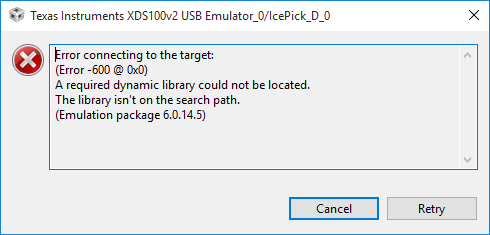
The error occurs everytime I try, on two different machines (both running Windows 10 if that makes a difference) and with both CCS 5.5 (Full-feature install) and CCS 6.
If I press the 'Test Connection' button of the Target Configuration, a similar error occurs. Here is the log:
[Start]

Execute the command:

%ccs_base%/common/uscif/dbgjtag -f %boarddatafile% -rv -o -F inform,logfile=yes -S pathlength -S integrity

[Result]


-----[Print the board config pathname(s)]------------------------------------

C:\Users\David\AppData\Local\.TI\4084209646\
    0\0\BrdDat\testBoard.dat

-----[Print the reset-command software log-file]-----------------------------

This utility has selected a 100- or 510-class product.
This utility will load the adapter 'jioserdesusb.dll'.

An error occurred while soft opening the controller.

-----[An error has occurred and this utility has aborted]--------------------

This error is generated by TI's USCIF driver or utilities.

The value is '-600' (0xfffffda8).
The title is 'SC_ERR_LIB_ANY_LOCATE'.

The explanation is:
A required dynamic library could not be located.
The library isn't on the search path.

[End]
I stumbeled upon a forum post describing a similar issue as mine (https://e2e.ti.com/support/development_tools/code_composer_studio/f/81/t/113152), but it didn't help me in my case.
Thanks in advance for any advice!
David
