This thread has been locked.

If you have a related question, please click the "Ask a related question" button in the top right corner. The newly created question will be automatically linked to this question.

How to assign a variable prebuild?


I want to run a command or script in the prebuild section of my project and then assign a define to it but can't work out how.

I tried entering my command as I would on the command line in the form $VAR='git describe' expecting to be able to pick up on VAR as a define in my code but on compile and I see the output:

= git describe
v1.11-2-g0dbc598

in the console but VAR is undefined, I don't think I'm going about this the correct way. Is there a defined way to get the output of an executable or script into a define?

  • Hi Tom,

    You cannot define a macro for the build via the prebuild step.

    Tom Davies58 said:
    Is there a defined way to get the output of an executable or script into a define?
    One option is to have your project use an options/command file (--cmd_file). An options/command file is a text file that has additional build options and pulled in by the project manager on project build. You can have your script (which you can run as prebuild step) generate one of a specific name and have your project reference that file.

    You can specify an options/command file in the project properties under 'Build -> <ISA> Compiler -> Advanced Options -> Command Files'

    Thanks

    ki

  • Thanks for your response Ki.

    I'm still a little stuck as I'm unfamiliar with configuring these settings.

    I have two issues that I'm sure are simple mistakes - are there any pages that give examples of setting up the pre build steps and cmd files? Is a cmd file a linker command file or is the linker file a subtype of the command file?

    I tried included in batch file which is simply:

    echo "hello" > test.txt

    which runs when executed from the command line but when CCS runs it I just get the output in the console and no new file produced:

    ..workspace\project\Debug - project>echo "hello"  1>test.txt

    I tried just adding a static cmd file with:

    --define=MAC_ADDRESS=0x1234567

    but I get an undefined error on build.

  • Tom Davies58 said:
    are there any pages that give examples of setting up the pre build steps and cmd files?

    Pre-build steps are mentioned in the below link:

    http://processors.wiki.ti.com/index.php/Projects_and_Build_Handbook_for_CCS#Pre_and_Post_Build_Steps

    cmd/options files are documented in section 2.3.2 of the the ARM compiler user's guide:

    http://www.ti.com/general/docs/lit/getliterature.tsp?baseLiteratureNumber=spnu151&fileType=pdf

    I'm not sure which device you are using but the above information applies to all devices and compiler families

    Tom Davies58 said:
    Is a cmd file a linker command file or is the linker file a subtype of the command file?

    No for both. They are completely separate. A cmd/options file is simply a text file with additional compiler options to be passed to the compiler.

    Tom Davies58 said:

    I tried included in batch file which is simply:

    echo "hello" > test.txt

    which runs when executed from the command line but when CCS runs it I just get the output in the console and no new file produced:

    ..workspace\project\Debug - project>echo "hello"  1>test.txt

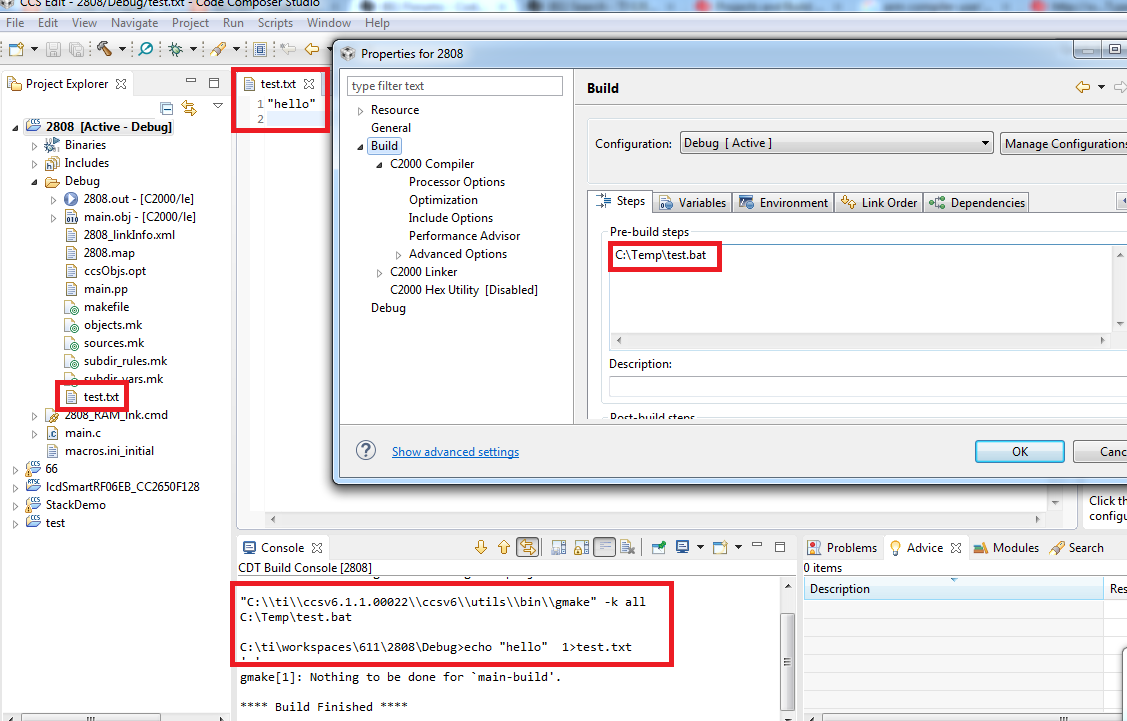
    This worked for me. Check the project configuration subfolder:

    Tom Davies58 said:

    I tried just adding a static cmd file with:

    --define=MAC_ADDRESS=0x1234567

    but I get an undefined error on build.

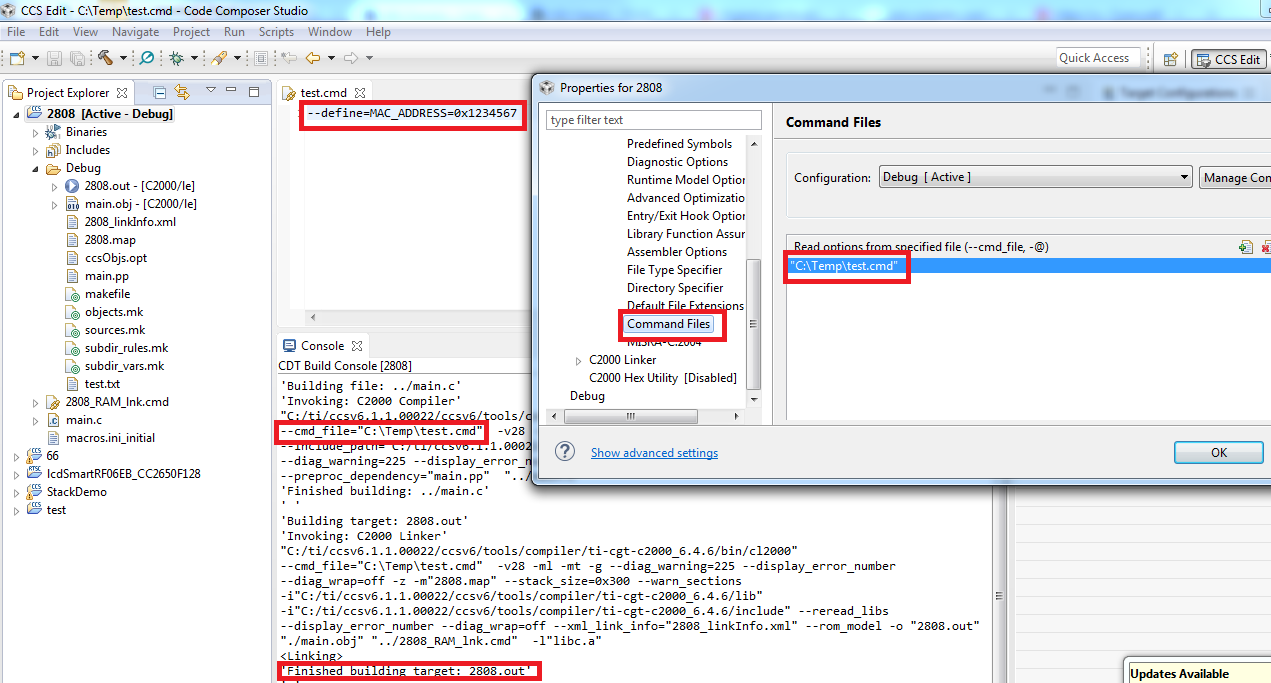
    This also worked for me (no errors, MAC_ADDRESS is used the the source and build was successful):

    Thanks

    ki

  • Thanks Ki. I wasn't able to do what I wanted with the cmd file but using the prebuild steps instead wrote a script to generate another header file to include which did everything I needed.