


Hello,
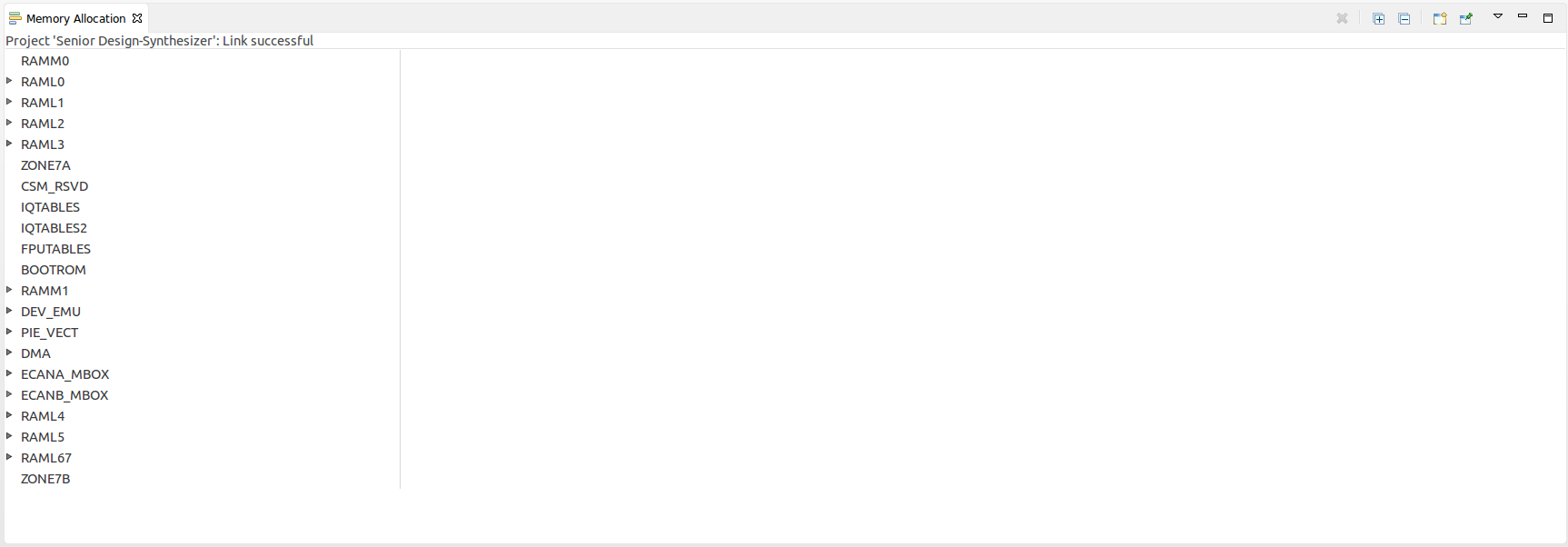
I have recently installed CCS v6.1 ( 6.1.1.00022 ) my ubuntu 14.04.3 LTS(64 bit) machine and am able to build and compile my C28x based project. However, when I try to view memory allocation using View->memory allocation. I see nothing (screenshot attached). Is there a way to get this working? I really enjoy this feature.
I followed install steps detailed here, Ubuntu install is fairly fresh with little modifications from stock

Also attached is output of /proc/cpuinfo
processor	: 0
vendor_id	: GenuineIntel
cpu family	: 6
model		: 15
model name	: Intel(R) Core(TM)2 Quad CPU    Q6600  @ 2.40GHz
stepping	: 11
microcode	: 0xb6
cpu MHz		: 1600.000
cache size	: 4096 KB
physical id	: 0
siblings	: 4
core id		: 0
cpu cores	: 4
apicid		: 0
initial apicid	: 0
fpu		: yes
fpu_exception	: yes
cpuid level	: 10
wp		: yes
flags		: fpu vme de pse tsc msr pae mce cx8 apic sep mtrr pge mca cmov pat pse36 clflush dts acpi mmx fxsr sse sse2 ss ht tm pbe syscall nx lm constant_tsc arch_perfmon pebs bts rep_good nopl aperfmperf pni dtes64 monitor ds_cpl vmx est tm2 ssse3 cx16 xtpr pdcm lahf_lm dtherm tpr_shadow vnmi flexpriority
bogomips	: 4787.68
clflush size	: 64
cache_alignment	: 64
address sizes	: 36 bits physical, 48 bits virtual
power management:

processor	: 1
vendor_id	: GenuineIntel
cpu family	: 6
model		: 15
model name	: Intel(R) Core(TM)2 Quad CPU    Q6600  @ 2.40GHz
stepping	: 11
microcode	: 0xb6
cpu MHz		: 1600.000
cache size	: 4096 KB
physical id	: 0
siblings	: 4
core id		: 1
cpu cores	: 4
apicid		: 1
initial apicid	: 1
fpu		: yes
fpu_exception	: yes
cpuid level	: 10
wp		: yes
flags		: fpu vme de pse tsc msr pae mce cx8 apic sep mtrr pge mca cmov pat pse36 clflush dts acpi mmx fxsr sse sse2 ss ht tm pbe syscall nx lm constant_tsc arch_perfmon pebs bts rep_good nopl aperfmperf pni dtes64 monitor ds_cpl vmx est tm2 ssse3 cx16 xtpr pdcm lahf_lm dtherm tpr_shadow vnmi flexpriority
bogomips	: 4787.68
clflush size	: 64
cache_alignment	: 64
address sizes	: 36 bits physical, 48 bits virtual
power management:

processor	: 2
vendor_id	: GenuineIntel
cpu family	: 6
model		: 15
model name	: Intel(R) Core(TM)2 Quad CPU    Q6600  @ 2.40GHz
stepping	: 11
microcode	: 0xb6
cpu MHz		: 1600.000
cache size	: 4096 KB
physical id	: 0
siblings	: 4
core id		: 3
cpu cores	: 4
apicid		: 3
initial apicid	: 3
fpu		: yes
fpu_exception	: yes
cpuid level	: 10
wp		: yes
flags		: fpu vme de pse tsc msr pae mce cx8 apic sep mtrr pge mca cmov pat pse36 clflush dts acpi mmx fxsr sse sse2 ss ht tm pbe syscall nx lm constant_tsc arch_perfmon pebs bts rep_good nopl aperfmperf pni dtes64 monitor ds_cpl vmx est tm2 ssse3 cx16 xtpr pdcm lahf_lm dtherm tpr_shadow vnmi flexpriority
bogomips	: 4787.68
clflush size	: 64
cache_alignment	: 64
address sizes	: 36 bits physical, 48 bits virtual
power management:

processor	: 3
vendor_id	: GenuineIntel
cpu family	: 6
model		: 15
model name	: Intel(R) Core(TM)2 Quad CPU    Q6600  @ 2.40GHz
stepping	: 11
microcode	: 0xb6
cpu MHz		: 1600.000
cache size	: 4096 KB
physical id	: 0
siblings	: 4
core id		: 2
cpu cores	: 4
apicid		: 2
initial apicid	: 2
fpu		: yes
fpu_exception	: yes
cpuid level	: 10
wp		: yes
flags		: fpu vme de pse tsc msr pae mce cx8 apic sep mtrr pge mca cmov pat pse36 clflush dts acpi mmx fxsr sse sse2 ss ht tm pbe syscall nx lm constant_tsc arch_perfmon pebs bts rep_good nopl aperfmperf pni dtes64 monitor ds_cpl vmx est tm2 ssse3 cx16 xtpr pdcm lahf_lm dtherm tpr_shadow vnmi flexpriority
bogomips	: 4787.68
clflush size	: 64
cache_alignment	: 64
address sizes	: 36 bits physical, 48 bits virtual
power management:
Thank you in advance!

