This thread has been locked.

If you have a related question, please click the "Ask a related question" button in the top right corner. The newly created question will be automatically linked to this question.

Need help to get CPU utilization for 5502 based board


Hi Guys,

I am new here. I am trying to use CCS to get the RTA to give me CPU load graph and/or CPU load values. Unfortunately every time I get RTA greyed out. I am using CCS 5.2.

Maybe if U can point me about

a) what is the latest version of CCS and DSP/BIOS that I should be using

b) any tricks in getting RTA to show the different options.

c) Any other tips/hints for debugging.

Appreciate any help.

Regards

Sam

  • Hi,

    Moving your post to right forum to be better answered.

    Thanks & regards,
    Sivaraj K
  • Hi Sam,

    1) I'd recommend you update to the latest CCSv5 version - CCSv5.5. It comes with DSP/BIOS 5.42.01.09

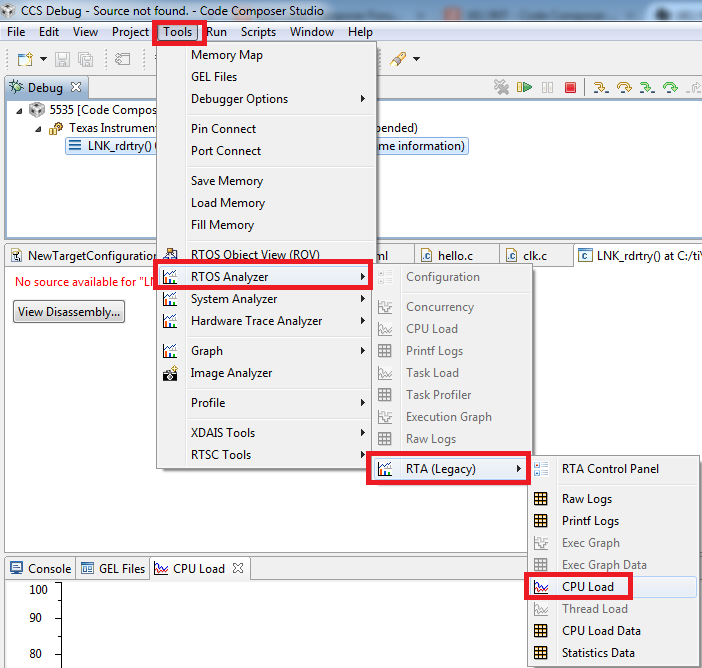
    2) Note that the DSP/BIOS RTA features are under:

    3) Check out the v5 Training page:


    Thanks

    ki

  • Hi Ki,

    Thanks for replying. I have so far tested with 4.1, 5,2, 5.5 and latest 6 and all of them had the same result. I have finally managed to hack the tcf file to at least show the RTA Analyzer options. but I am not getting any data. Al the panels show no data. I ran the same software in simulation and I am getting data but it is all zero. Same files using Simulator instead of JTAG and using TI Simulator instead of Blackhawk connector.

    Now Code Composer does not even work correctly. It freezes when I start debug option. Kind of horrible experience so far. Most of the TI document information actually don't match to the software. The tools and what they support is impossible to figure out. Most of the engineers I talked to said stay away from Code Composer. It is really surprising to hear such a bad reputation.

    Code Composer 5.5 is really worse than 5.2. It does not allow me to select the BIOS that is on the board. Even though it asks me when I start CC if I want to install it. Then it complains that it is conflicting with my existing version. on 5.2 I can select 4 from the list. Isn't that is the purpose of the drop down list anyway?

    The CC does not open the gprof for TCF file anymore it just complains that it coold not create ObjServer and quits. I am using -clean option when starting CC, but no luck. seems like CC is getting worse. And I have been using CC only since last Friday.

    But appreciate your help. Wish U guys could compile in one spot all the issues and how to work around it instead of  searching through the wiki pages and forums posts and google searches trying to figure out what is relevant information. And the YouTube videos are really primitive.

    Sam

  • Can you try using one of the default BIOS examples for your board? The RTA Legacy menu options are not dictated by the tcf file so I'm not sure why hacking a tcf file would have any impact.

    I'm sorry for your bad experiences with CCS. CCSv5.5 is likely your best bet since I believe CCSv6 has dropped legacy RTA support for C5x.

    Also what is the history of your current project? Was it originally created with CCSv5.2

    Satish Mali said:
    Code Composer 5.5 is really worse than 5.2. It does not allow me to select the BIOS that is on the board. Even though it asks me when I start CC if I want to install it. Then it complains that it is conflicting with my existing version. on 5.2 I can select 4 from the list. Isn't that is the purpose of the drop down list anyway?

    For you CCSv5.5 installation, sounds like you need to configure it to detect the other DSP/BIOS versions you have installed on your PC. You can do this by adding the paths to it to the RTSC Tool discover path:

    Satish Mali said:
    The CC does not open the gprof for TCF file anymore it just complains that it coold not create ObjServer and quits. I am using -clean option when starting CC, but no luck. seems like CC is getting worse. And I have been using CC only since last Friday.

    This is odd one. Can you try creating a new BIOS project and see if you can open the tcf file (via gconf) associated with that new project? I've heard reports that it could be project related.

    Also try cleaning your workspace if you have not done so already.

    Thanks

    ki

  • Hi Ki,

    So here is what I get when I try to install the bios version that was originally used. I am trying to reproduce the same setup as much as possible.

    Operation details
    Cannot complete the install because of a conflicting dependency.
    Software being installed: DSP/BIOS 5.41.10.36 (com.ti.bios_5.41.feature.group 5.41.10.36)
    Software currently installed: DSP/BIOS (IDE Client) 5.42.1.09 (com.ti.rtsc.DSPBIOS.product.ui.feature.group 5.42.1.09)
    Only one of the following can be installed at once:
    DSP/BIOS IDE Tooling 5.42.1.09 (com.ti.rtsc.DSPBIOS.product.ui 5.42.1.09)
    DSP/BIOS UI Plugin 5.41.10.36 (com.ti.rtsc.DSPBIOS.product.ui 5.41.10.36)
    Cannot satisfy dependency:
    From: DSP/BIOS 5.41.10.36 (com.ti.bios_5.41.feature.group 5.41.10.36)
    To: com.ti.rtsc.DSPBIOS.product.ui [5.41.10.36]
    Cannot satisfy dependency:
    From: DSP/BIOS (IDE Client) 5.42.1.09 (com.ti.rtsc.DSPBIOS.product.ui.feature.group 5.42.1.09)
    To: com.ti.rtsc.DSPBIOS.product.ui [5.42.1.09]

    any idea what I am doing wrong?

    Thanks

    Sam

  • If I use CC 5.5 I get following when I try to start debugger
    C55xx: GEL: Error while executing OnReset(0): Memory verification failed at address 0x80D at GEL_MemoryFill(0x80D, 2, 1, 0x4748) [c5502.gel:202] at Init_CE0_SDRAM_5502CPUBoard() [c5502.gel:66] at OnReset(0) .
    C55xx: GEL Output: C5502_Init Complete.
    C55xx: GEL: Error while executing OnTargetConnect(): Memory verification failed at address 0x80D at GEL_MemoryFill(0x80D, 2, 1, 0x4748) [c5502.gel:202] at Init_CE0_SDRAM_5502CPUBoard() [c5502.gel:60] at OnTargetConnect() .
    C55xx: Loader: One or more sections of your program falls into a memory region that is not writable. These regions will not actually be written to the target. Check your linker configuration and/or memory map.

    I am using Blackhawk and the ccxml file I am using has following info.

    <?xml version="1.0" encoding="UTF-8" standalone="no"?>
    <configurations XML_version="1.2" id="configurations_0">

    <configuration XML_version="1.2" id="Blackhawk XDS560v2-USB System Trace Emulator_0">
    <instance XML_version="1.2" desc="Blackhawk XDS560v2-USB System Trace Emulator_0" href="connections\BH-XDS560v2-USB_Connection.xml" id="Blackhawk XDS560v2-USB System Trace Emulator_0" xml="BH-XDS560v2-USB_Connection.xml" xmlpath="connections"/>
    <connection XML_version="1.2" id="Blackhawk XDS560v2-USB System Trace Emulator_0">
    <instance XML_version="1.2" href="drivers\tixds560c55x.xml" id="drivers" xml="tixds560c55x.xml" xmlpath="drivers"/>
    <platform XML_version="1.2" id="platform_0">

    <instance XML_version="1.2" desc="TMS320C5502_0" href="devices\c5502.xml" id="TMS320C5502_0" xml="c5502.xml" xmlpath="devices"/>
    <device HW_revision="1" XML_version="1.2" desc="TMS320C5502_0" description="" id="TMS320C5502_0" partnum="TMS320C5502" simulation="no">
    <cpu HW_revision="1.0" XML_version="1.2" desc="C55xx_0" description="The C55xx CPU" deviceSim="false" id="C55xx" isa="TMS320C55XX">
    <property Type="filepathfield" Value="AP_5502.gel" id="GEL File"/>
    </cpu>
    </device>
    </platform>
    </connection>
    </configuration>
    </configurations>


    Thanks
    sam
  • Hi Ki,

    I am using CC5.5 and when I start the debug session, here is what I get


    I am using the ccxml file and has following content

    <?xml version="1.0" encoding="UTF-8" standalone="no"?>
    <configurations XML_version="1.2" id="configurations_0">

    <configuration XML_version="1.2" id="Blackhawk XDS560v2-USB System Trace Emulator_0">
    <instance XML_version="1.2" desc="Blackhawk XDS560v2-USB System Trace Emulator_0" href="connections\BH-XDS560v2-USB_Connection.xml" id="Blackhawk XDS560v2-USB System Trace Emulator_0" xml="BH-XDS560v2-USB_Connection.xml" xmlpath="connections"/>
    <connection XML_version="1.2" id="Blackhawk XDS560v2-USB System Trace Emulator_0">
    <instance XML_version="1.2" href="drivers\tixds560c55x.xml" id="drivers" xml="tixds560c55x.xml" xmlpath="drivers"/>
    <platform XML_version="1.2" id="platform_0">

    <instance XML_version="1.2" desc="TMS320C5502_0" href="devices\c5502.xml" id="TMS320C5502_0" xml="c5502.xml" xmlpath="devices"/>
    <device HW_revision="1" XML_version="1.2" desc="TMS320C5502_0" description="" id="TMS320C5502_0" partnum="TMS320C5502" simulation="no">
    <cpu HW_revision="1.0" XML_version="1.2" desc="C55xx_0" description="The C55xx CPU" deviceSim="false" id="C55xx" isa="TMS320C55XX">
    <property Type="filepathfield" Value="AP_5502.gel" id="GEL File"/>
    </cpu>
    </device>
    </platform>
    </connection>
    </configuration>
    </configurations>