This thread has been locked.

If you have a related question, please click the "Ask a related question" button in the top right corner. The newly created question will be automatically linked to this question.

DSS Scripting , parameters and global variables

Other Parts Discussed in Thread: DM3725

Hello,


I want to debug a DSP on a DM3725, the procedure to connect to the target and load a program isn't so easy and I wanted to to do it automatically.

For that I wrote a DSS script that I can call from the script menu of CCS using  hotmenu.addJSFunction(). It works well.

At the moment, I put the name of the program to load in my script but it is not so generic.

I have a list of projects in my workspace and I want that when a user chose a project and clicked on my script that it load automatically the program of the chosen project. How can I do that ? by using java script parameters , global variable ?


I have a 2nd question, when I launch CCS , I want automatically my java script to be on the "script" menu  of CCS ? How can I do that ?

Thank you very much for your help.

regards.

Pat

  • Hi Pat,

    lavenu patrick1 said:
    I have a list of projects in my workspace and I want that when a user chose a project and clicked on my script that it load automatically the program of the chosen project. How can I do that ? by using java script parameters , global variable ?

    Note that DSS is for scripting the Debug Server (Debug Server Scripting) and it does not have access to the Project Management component. You will not be able to use DSS to query which project is active in CCS and get the associated project information. The best way is likely have your script take a parameter where you can pass in the path + name to the executable you wish to load while the js file is run. However I don't see a clean way to implement this inside the CCS environment. It would really just work from the command-line. What would actually work better in this case is using pure GEL. You can actually have GEL dialogs appear to receive input, such as the path+name to the executable and use GEL functions to load the program.

    lavenu patrick1 said:
    I have a 2nd question, when I launch CCS , I want automatically my java script to be on the "script" menu  of CCS ? How can I do that ?

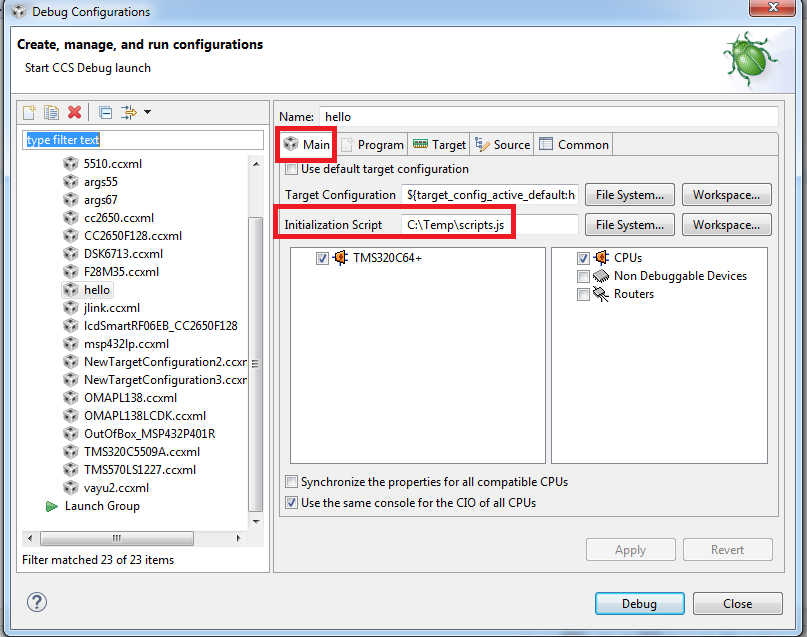
    You can specify your js file in the Initialization Script field for the associated debug configuration:

    Thanks

    ki

  • Thank you very much ki for your help and fast answer.

    About your first answer, I tried at first to use gel for automatization but I did'nt succeed.
    My goal is to have a menu like "Debug as " in CCS that connect to the target and load automatically a program in the target. It works very well because when you have only one CPU.
    When you are using a DM3725 for example, you have 2 CPUs and have a procedure to follow :
    At first you have to connect to the Cortex A8 CPU , load some gel, and after have to connect to the DSP and then after load the program.
    To my mind, you can not make such sequential things like that with gel file , that's why I decided to use DSS scripting. Could you confirm me that we could'nt do that with gel ?

    About your second answer, If I use the initialization script, I can add some parameters. Could you tell me where I can found all specific variables from a project , for example we can see in your figure that ${target_config_active_default:... } is one of the variable, maybe it exists a variable for the program name too ?

    Thank you in advance for your answer.

    regards,

    Pat.
  • lavenu patrick1 said:
    When you are using a DM3725 for example, you have 2 CPUs and have a procedure to follow :
    At first you have to connect to the Cortex A8 CPU , load some gel, and after have to connect to the DSP and then after load the program.
    To my mind, you can not make such sequential things like that with gel file , that's why I decided to use DSS scripting. Could you confirm me that we could'nt do that with gel ?

    You can specify a startup GEL file in the target configuration file. A separate one can be defined for each CPU. This file is autoloaded by the debugger when the debugger is launched. There is a GEL call-back called "OnTargetConnect()" which will automatically be called (if defined in the startup GEL file) when the debugger connects to that CPU. In that call-back you can use GEL calls to load a program. You can also automate the target connect by setting that option in the debug settings.

    Using those options, you can automate your described scenario via GEL

    lavenu patrick1 said:
    About your second answer, If I use the initialization script, I can add some parameters. Could you tell me where I can found all specific variables from a project , for example we can see in your figure that ${target_config_active_default:... } is one of the variable, maybe it exists a variable for the program name too ?

    The initialization script field is quite limited in the types of variables it can accept. Basically it is not possible to make that path relative.

    Thanks

    ki

  • Thank you very much for your help ki, I succeeded by associating gel and DSS script.

    pat.