This thread has been locked.

If you have a related question, please click the "Ask a related question" button in the top right corner. The newly created question will be automatically linked to this question.

XDS-200 Error connecting to the TIVA C-Series microcontroller

Other Parts Discussed in Thread: TM4C1292NCPDT

Hi,

I was able to successfully connect, flash and debug the software using XDS-200 debugger all these days.

All of a sudden from this morning am getting the following error:

Configuration: tm4c1292ncpdt

Debugger: XDS200
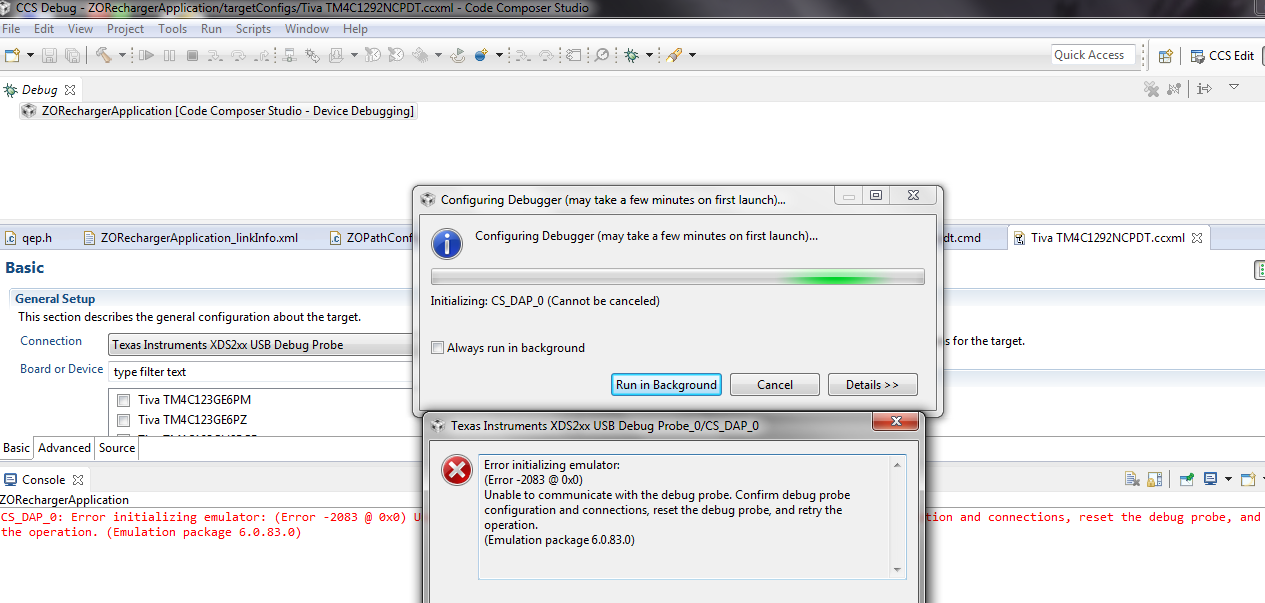
Request your help to assess and fix this issue, is there any firmware upgrade needed? i have done multiple resets of the debugger by removing the power/connection from the laptop, but of no use.

Thanks,

-Nikhilesh

  • And when i do test connection, i get the following information:

    [Start: Texas Instruments XDS2xx USB Debug Probe_0]

    Execute the command:

    %ccs_base%/common/uscif/dbgjtag -f %boarddatafile% -rv -o -S integrity

    [Result]


    -----[Print the board config pathname(s)]------------------------------------

    C:\Users\saggen1\AppData\Local\TEXASI~1\
    CCS\ti\0\0\BrdDat\testBoard.dat

    -----[Print the reset-command software log-file]-----------------------------

    This utility has selected a 560/2xx-class product.
    This utility will load the program 'xds2xxu.out'.
    E_RPCENV_IO_ERROR(-6) No connection: DTC_IO_Open::dtc_io
    Failed to open i/o connection (xds2xxu:0)

    An error occurred while soft opening the controller.

    -----[An error has occurred and this utility has aborted]--------------------

    This error is generated by TI's USCIF driver or utilities.

    The value is '-250' (0xffffff06).
    The title is 'SC_ERR_ECOM_EMUNAME'.

    The explanation is:
    An attempt to access the debug probe via USCIF ECOM has failed.

    [End: Texas Instruments XDS2xx USB Debug Probe_0]
  • Nikhilesh Saggere said:
    Request your help to assess and fix this issue, is there any firmware upgrade needed? i have done multiple resets of the debugger by removing the power/connection from the laptop, but of no use.

    Please take a look at the troubleshooting tips here:
    http://processors.wiki.ti.com/index.php/Debugging_JTAG_Connectivity_Problems#Host_connection_error

    Personally I hit this error as well a while ago when I was working with XDS200 and TM4C1294LP. The error was intermittent, but in some instances, it would get into a state where a simple disconnect/reconnect or power cycle of the emulator was not sufficient to clear the issue, instead a restart of the PC was required. I was also running an older version of the firmware at that time, so you may want to check that you are running the latest firmware (1.0.0.6). My setup got a lot more stable after updating the firmware.
    http://processors.wiki.ti.com/index.php/XDS200#Updating_the_XDS200_firmware

  • I restarted the laptop and upgraded the firmware package; the issue is resolved now.
    Thanks!