Try to move from CCS 3 to CCS 4
How do I configure the target in CCS 4 if I use BHUSB510 with TCI6486 Emulator driver on CCS3
Are teh same drivers used, if not, where do I get new drivers
This thread has been locked.
If you have a related question, please click the "Ask a related question" button in the top right corner. The newly created question will be automatically linked to this question.
Unless you unchecked the box during install the Blackhawk drivers should be automatically included in the CCSv4 installation. Additionally, these are downloaded through the automatic update process inside CCSv4.
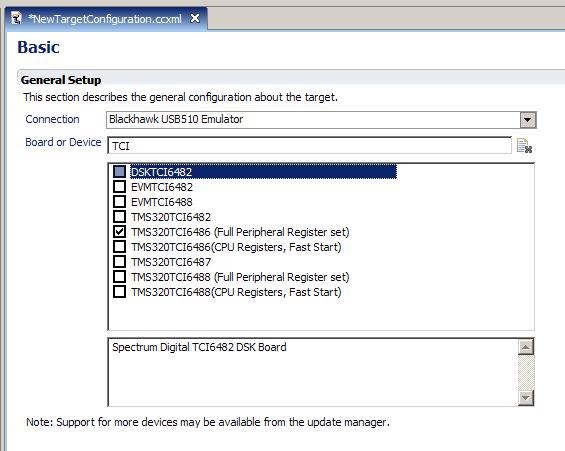
With that said, you should be able to create a new Target Configuration file and select the appropriate emulator and device as shown in the attached.
*edit* Note that there is also the Blackhawk USB510L in addition to the USB510, so make sure you specify which of the two you have (I am not sure of the differences but presumably you must choose the correct one).
Tim, thanks
I do not see TCI6486 in my window as you see in your example.
I guess I need to get it from the update manager
Question - how do I start the update manager, how do I get to this driver, and where do I put it (or how do I tell CCS where I put it)
Thanks
Ran
I un-install my old version of ccs4 and load the latest version, and indeed I could configure the target as EVM6486
I did save the target configuration
However, when I try to open a debug session I get erro message:
Does not have a valid set up. Please configure the target and try again
What is missing?
Hi ran,
Could your provide as much of the details described here?
http://processors.wiki.ti.com/index.php/Troubleshooting_CCS#Information_for_Support
Thanks
ki