This thread has been locked.

If you have a related question, please click the "Ask a related question" button in the top right corner. The newly created question will be automatically linked to this question.

Problems detecting XDS100 with other FT232 device under Linux

(split from original thread at: https://e2e.ti.com/support/development_tools/code_composer_studio/f/81/t/346776

Hi.
I have a problem with using XDS100 together with other FTDI devices.
According to this, this is a known issue and supposed to be solved
processors.wiki.ti.com/.../XDS100

but it's not. I have CCSv6 on Linux Mint 17 and I can't use XDS100 simultaneously with another FT232 device.
This is very frustrating. I don't want to use two PCs just for that.

Is there any way to solve this? To create some kind of symlink ttyUSBXDS100, for example.
Please help!

  • Nobody can help?
    TI support?
  • Michael, have you tried running ccs as root? I have seen this clear up some usb issues in the past but I've forgotten the details. It may be permissions problems somewhere in udev.
  • Wups - sorry. I just saw where DeSouza addressed this already.
  • Hi Randy.

    My XDS100v2 worked from the beginning, from the first install.

    The problem starts when I plug in another FTDI device, like the Sparkfun FTDI basic. In this case I have two /dev/ttyUSB devices (0 and 1), and the CCS gives the following error when trying to debug:

    Error connecting to the target:
    (Error -151 @ 0x0)
    One of the FTDI driver functions used during the connect
    returned bad status or an error. The cause may be one or
    more of: no XDS100 is plugged in, invalid XDS100 serial number,
    blank XDS100 EEPROM, missing FTDI drivers, faulty USB cable.
    Use the xds100serial command-line utility in the 'common/uscif'
    folder to verify the XDS100 can be located.
    (Emulation package 6.0.83.1)
    

    Running with sudo solves the problem. But it's not the right way for this. The is no reason for running CCS as root.

    How can this be solved?

    Thanks.

  • Michael,

    I see. Sorry for not reading the thread more closely.

    However, I don't understand why running as root would solve this problem.

    It sounds to me that the driver needs to be modified. It looks like it assumes the first ttyUSBx device is its own. There should be a way to walk through the available ttyUSBx devices and select the one belonging to TI by the man/part ID of the usb.

    --Randy
  • You're right, the problem is exactly as you described.

    It's up to TI to fix this issue.

  • Hi,

    One advice to everyone that replied to this thread: please refrain from reopening old threads, as there is a risk they will be overlooked as it happened with this one for years.

    The issue mentioned by Michael_V  was in fact fixed a long time ago (the conflict between different FTDI devices), and I can't reproduce it in my setup. I have a pretty busy Linux machine as shown in the screenshot below (BeagleBone White, Flyswatter2 and a Arduino Pro Mini programmer) but I still can connect to CCS without any issues.

    I even changed my board and switched between the historical VID/PID changes made to my BBW (history mentioned here). These changes make the BeagleBone White become closer to a standard FTDI serial converter, but still worked fine.

    Given you haven't told me which board you are using, perhaps there may be a specific to the board you are using. Can you issue the xds100serial command as shown in the screenshot above and see what may be happening?

    From inside your CCS target configuration editor you could also try to specify a serial number and see if the JTAG debugger gets properly recognized. Something discussed in this FAQ entry.

    Hope this helps,

    Rafael

  • This is what lsusb shows

    Bus 001 Device 002: ID 8087:8001 Intel Corp. 
    Bus 001 Device 001: ID 1d6b:0002 Linux Foundation 2.0 root hub
    Bus 003 Device 001: ID 1d6b:0003 Linux Foundation 3.0 root hub
    Bus 002 Device 006: ID 0cf3:e300 Atheros Communications, Inc. 
    Bus 002 Device 005: ID 5986:0670 Acer, Inc 
    Bus 002 Device 004: ID 0bda:0129 Realtek Semiconductor Corp. RTS5129 Card Reader Controller
    Bus 002 Device 003: ID 045e:0745 Microsoft Corp. Nano Transceiver v1.0 for Bluetooth
    Bus 002 Device 008: ID 0403:a6d0 Future Technology Devices International, Ltd Texas Instruments XDS100v2 JTAG / BeagleBone A3
    Bus 002 Device 007: ID 0403:6001 Future Technology Devices International, Ltd FT232 USB-Serial (UART) IC
    Bus 002 Device 002: ID 8564:4100  
    Bus 002 Device 001: ID 1d6b:0002 Linux Foundation 2.0 root hub

    This is what xds100serial shows

    Scanning for XDS100 emulators...
    
    VID/PID    Type            Serial #    Description
    0403/a6d0  XDS100v1/v2     TIYOH3KR    Texas Instruments XDS100+RS232 V1.
    

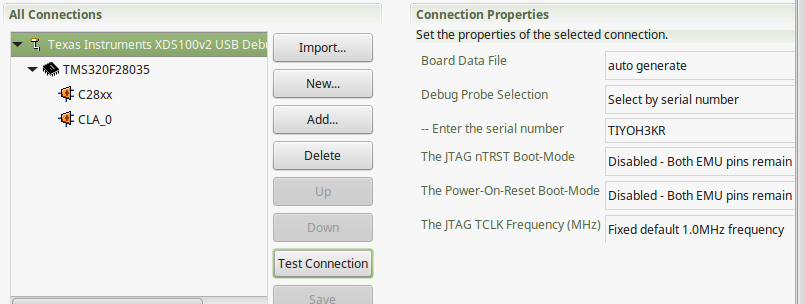
    This is my configuration in CCS

    This is what happens when I click on Test Connection

    An error occurred while soft opening the controller.
    
    -----[An error has occurred and this utility has aborted]--------------------
    
    This error is generated by TI's USCIF driver or utilities.
    
    The value is '-151' (0xffffff69).
    The title is 'SC_ERR_FTDI_OPEN'.
    
    The explanation is:
    One of the FTDI driver functions used during the connect
    returned bad status or an error. The cause may be one or
    more of: no XDS100 is plugged in, invalid XDS100 serial number,
    blank XDS100 EEPROM, missing FTDI drivers, faulty USB cable.
    Use the xds100serial command-line utility in the 'common/uscif'
    folder to verify the XDS100 can be located.
    
    [End: Texas Instruments XDS100v2 USB Debug Probe]
    

    This is what happens when I repeat the test without FTDI device (only the last part of the output)

    -----[Perform the Integrity scan-test on the JTAG DR]------------------------
    
    This test will use blocks of 64 32-bit words.
    This test will be applied just once.
    
    Do a test using 0xFFFFFFFF.
    Scan tests: 1, skipped: 0, failed: 0
    Do a test using 0x00000000.
    Scan tests: 2, skipped: 0, failed: 0
    Do a test using 0xFE03E0E2.
    Scan tests: 3, skipped: 0, failed: 0
    Do a test using 0x01FC1F1D.
    Scan tests: 4, skipped: 0, failed: 0
    Do a test using 0x5533CCAA.
    Scan tests: 5, skipped: 0, failed: 0
    Do a test using 0xAACC3355.
    Scan tests: 6, skipped: 0, failed: 0
    All of the values were scanned correctly.
    
    The JTAG DR Integrity scan-test has succeeded.
    
    [End: Texas Instruments XDS100v2 USB Debug Probe]

    As you can see, the problem wasn't fixed.

  • Hi,

    The output of the xds100serial utility indicates it is a v1. What happens if you configure your .ccxml file to use a XDS100v1?

    Over the years slight changes to the XDS100 device drivers made v1 and v2 almost 100% compatible between them, but in my experience I have seen the ability to connect be impaired in certain scenarios. Perhaps that is what you are experiencing in this case.

    When I get back to the office I will try to connect a v1 and double check this.

    Regards,

    Rafael

  • Hi,

    I was finally able to put together my XDS100v1 (a F28069 controlCARD) and the other devices, and I can see that CCS fails to connect.

    I contacted a developer and in fact we use different OS drivers for the v1 (the FTDI provided drivers), while in v2 and v3 we use the open source implementation. In this case, it is possible the FTDI driver itself is at fault, but there is investigation on the way.

    Regards,
    Rafael
  • I having the same issue which os drivers did you use?