This thread has been locked.

If you have a related question, please click the "Ask a related question" button in the top right corner. The newly created question will be automatically linked to this question.

CCS 5.5 Memory Map View + MMU Page Table


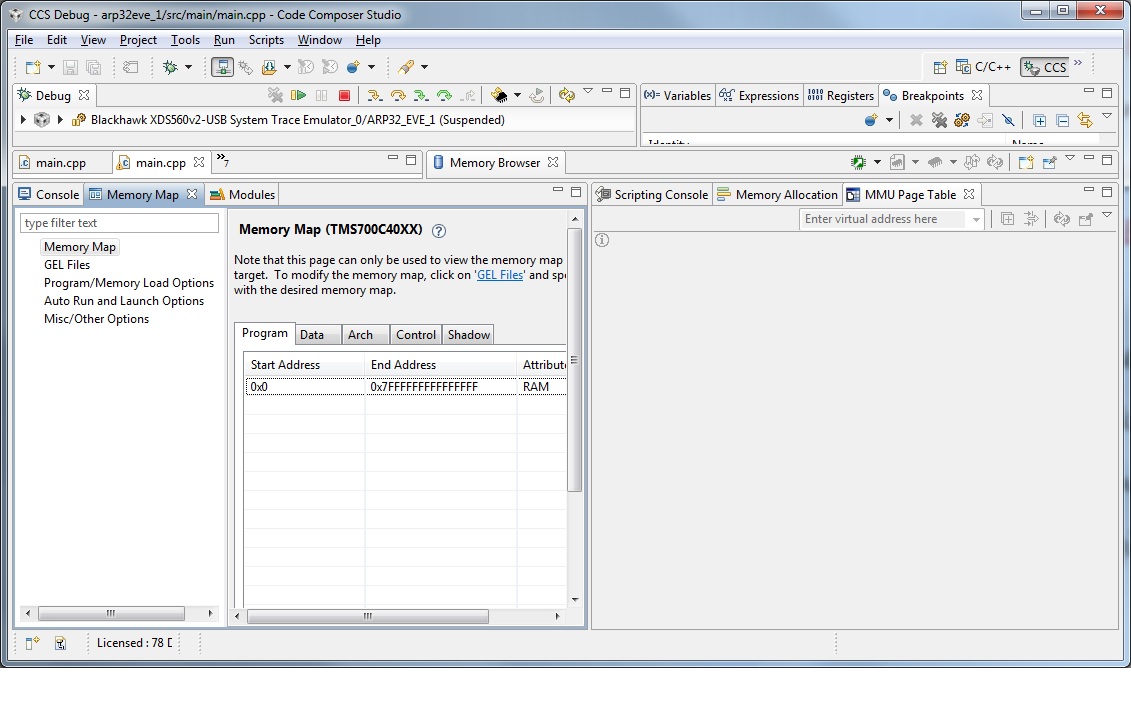
In Code Compose 5.5 memory Map view I see the end address as 0x7FFF FFFF FFFF FFFF

Is this correct (64 bit) ?

Also the MMU page table view is greyed.  I can not input any virtual address, Why?
Thanks

  • Hi,

    The MMU Page Table view is very limited in the supported devices and technically was never stable (check this thread).

    In this case, I suggest you to take a look at the short clip below that may be helpful

    Hope this helps,

    Rafael

  • Thanks for the reply.

    What about the 64 bit Address you see in the screen shot.

    Is this an error or the address can be 64 bit

    Regards

  • Hi,

    As a general rule, when the debugger has no information about the physical memory of the device or core, it assumes a 64-bit memory space by default. The information about the physical memory is provided to the debugger via GEL scripts using GEL_MapAdd or GEL_MapAddStr APIs - details can be found in the CCS help.

    This provides for unlimited memory access from a debugger perspective.
     
    Regards,
    Rafael

  • Hi
    You are right. The eve core has no GEL_MapAdd or GEL_MapAddStr in its GEL file.
    All other cores have these scripts and I do not see any issues with there Memory maps.

    I
    Do you have a GEL file for the EVE Core with the correct memory address for the DRA7xx?
    Thanks for the help.

    Regards
  • Hi,

    Sorry, unfortunately I do not have a memory map GEL file for this class of cores. I will post on this thread if I am able to find something that could be used.

    I apologize for the inconvenience,
    Rafael