This thread has been locked.

If you have a related question, please click the "Ask a related question" button in the top right corner. The newly created question will be automatically linked to this question.

UNIFLASH installation error

Other Parts Discussed in Thread: UNIFLASH

hi..!

I recently download the offline version of uniflash_3.4.0.00003_ from TI

well, I wasn't able to install the setup. it gave me the following error.
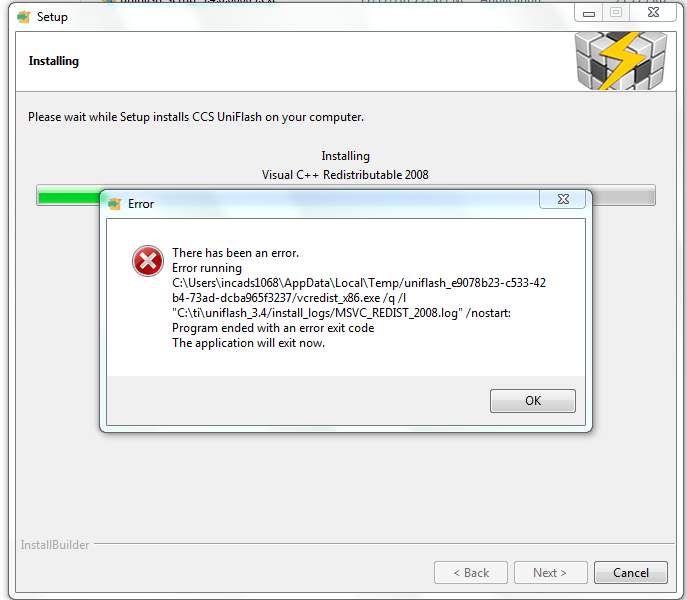
Is there any way I could carry out the installation successfully ?

Thanks and Regards,

-Maisie

  • Hi Maisie,

    Can you attach the error log file mentioned in the above directory?

    Regards,
    Gautam
  • Hi Maisie,

    You can download and install vc redistributable (x86) 2008 first, or you could try installing the newly released Uniflash 3.4.1.

    Danish

  • Hi,

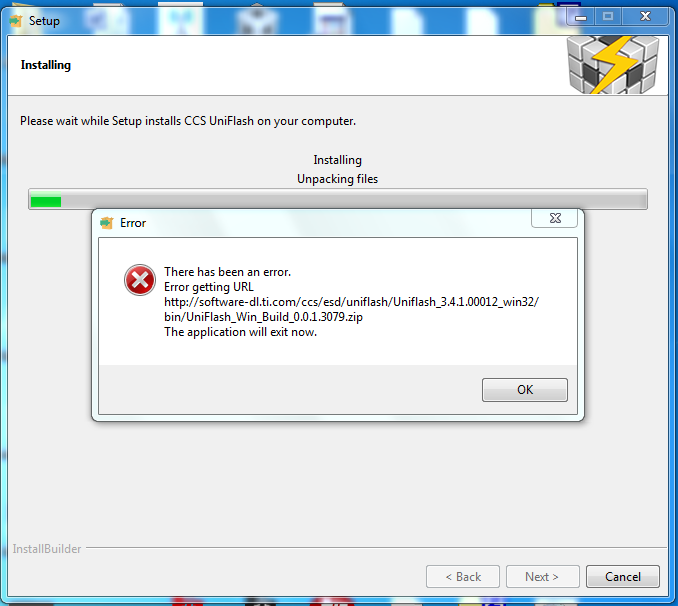
    well i have tried installing the newly released Uniflash 3.4.1.

    it gave an error as shown :

    I have also attached the error log file

    Log started 02/22/2016 at 16:22:10
    Preferred installation mode : win32
    Trying to init installer in mode win32
    Mode win32 successfully initialized
    [16:22:13] installer command line args: 
    [16:22:13] Starting preinstall actions here 
    [16:22:13] Override-url 
    repourl http://software-dl.ti.com/ccs/esd/uniflash/Uniflash_3.4.1.00012_win32/repo
    installtype web
    Executing C:\Users\incads1068\AppData\Local\Temp/uniflash_6f0ae738-64ac-4843-768e-c51fa245805e/proxyfinder.exe http://www.google.com
    Script exit code: 0
    
    Script output:
     194.138.0.25:80
    
    Script stderr:
     
    
    [16:22:24] 
    	
    	simplelink_cc1xxx_cc2xxx 1
    	simplelink_wifi 1
    	c2000_jtag 1
    	hercules 1
    	msp430 1
    	msp432 1
    	stellaris  1
    	stellaris_alt 1
    	sitara 1
    	ucd31xx_device_support 1
    
    [16:22:24] Emulation 1
    DebugServer 1
    CC3200 1
    [16:22:24] 
    TI EMU: --enable-components c2800,arm,xds100,xds560
    BH EMU: --enable-components c2800,arm
    SD_EMU: /noc2400 /noc5400 /noc6000 /nodavinci /noomap /noc5500
    
    Preparing to Install
    [16:22:30] blackhawk 1
    spectrum digital 1		
    
    Preparing to Install
    Directory already exists: C:\ti\uniflash_3.4
    Unpacking files
    Unpacking C:\ti\uniflash_3.4\uniflashCLI.bat
    Directory already exists: C:\Users\incads1068\AppData\Local\Temp\uniflash_6f0ae738-64ac-4843-768e-c51fa245805e
    Unpacking files
    Unpacking C:\Users\incads1068\AppData\Local\Temp\uniflash_6f0ae738-64ac-4843-768e-c51fa245805e\uniflash.bat
    Directory already exists: C:\Users\incads1068\AppData\Local\Temp\uniflash_6f0ae738-64ac-4843-768e-c51fa245805e
    Unpacking files


    Thanks and Regards,

    Maisie

  • Could you try it again? It could have been a hiccup in the network.  Or you could download the offline package.

    Thanks

    Danish

  • Hi,

    I tried installing the offline package too . Gives me the same error as shown previously.

    Thanks and Regards,

    Maisie
  • Hi Maisie,

    The offline package doesn't look to download anything from the server. Did you unzip the zip file, retaining the folder structure?

    Danish

  • Hi Danish,

    I hadn't realized that before. So I unzipped the the zip file ... and it did get installed !

    Thank you very much !!
    Regards,
    Maisie

  • I have issue with uniflash ... installation completed


    !SESSION 2016-07-24 07:26:05.262 -----------------------------------------------
    eclipse.buildId=unknown
    java.version=1.7.0_60
    java.vendor=Oracle Corporation
    BootLoader constants: OS=win32, ARCH=x86, WS=win32, NL=en_SG
    Command-line arguments: -os win32 -ws win32 -arch x86 -data @noDefault

    !ENTRY org.eclipse.osgi 4 0 2016-07-24 07:26:06.666
    !MESSAGE Application error
    !STACK 1
    java.lang.UnsatisfiedLinkError: D:\ti\uniflash_3.4\ccs_base\DebugServer\bin\LibraryLoader.dll: Can't find dependent libraries
    at java.lang.ClassLoader$NativeLibrary.load(Native Method)
    at java.lang.ClassLoader.loadLibrary1(Unknown Source)
    at java.lang.ClassLoader.loadLibrary0(Unknown Source)
    at java.lang.ClassLoader.loadLibrary(Unknown Source)
    at java.lang.Runtime.load0(Unknown Source)
    at java.lang.System.load(Unknown Source)
    at com.ti.debug.engine.xpcom.Runtime.preXPCOMInit(Runtime.java:163)
    at com.ti.debug.engine.xpcom.Runtime.startBare(Runtime.java:116)
    at com.ti.debug.engine.xpcom.Runtime.createComponent(Runtime.java:170)
    at com.ti.utility.filesystem.DirectoryService.<init>(DirectoryService.java:26)
    at com.ti.utility.filesystem.DirectoryService.<init>(DirectoryService.java:9)
    at com.ti.utility.filesystem.DirectoryService$SingletonHolder.<clinit>(DirectoryService.java:44)
    at com.ti.utility.filesystem.DirectoryService.instance(DirectoryService.java:49)
    at com.ti.common.core.utils.ds.CoreUtilsProvider.getTemporaryFileDir(CoreUtilsProvider.java:16)
    at com.ti.common.core.CoreUtils.getTemporaryFileDir(CoreUtils.java:114)
    at com.ti.uniflash.rcp.Application.getRuntimeAppDir(Application.java:89)
    at com.ti.uniflash.rcp.Application.getWorkspaceDir(Application.java:96)
    at com.ti.uniflash.rcp.Application.setupWorkspaceFolder(Application.java:103)
    at com.ti.uniflash.rcp.Application.start(Application.java:32)
    at org.eclipse.equinox.internal.app.EclipseAppHandle.run(EclipseAppHandle.java:196)
    at org.eclipse.core.runtime.internal.adaptor.EclipseAppLauncher.runApplication(EclipseAppLauncher.java:110)
    at org.eclipse.core.runtime.internal.adaptor.EclipseAppLauncher.start(EclipseAppLauncher.java:79)
    at org.eclipse.core.runtime.adaptor.EclipseStarter.run(EclipseStarter.java:353)
    at org.eclipse.core.runtime.adaptor.EclipseStarter.run(EclipseStarter.java:180)
    at sun.reflect.NativeMethodAccessorImpl.invoke0(Native Method)
    at sun.reflect.NativeMethodAccessorImpl.invoke(Unknown Source)
    at sun.reflect.DelegatingMethodAccessorImpl.invoke(Unknown Source)
    at java.lang.reflect.Method.invoke(Unknown Source)
    at org.eclipse.equinox.launcher.Main.invokeFramework(Main.java:629)
    at org.eclipse.equinox.launcher.Main.basicRun(Main.java:584)
    at org.eclipse.equinox.launcher.Main.run(Main.java:1438)
  • Hi,

    Can you post your installation logs please? I'd like to verify that everything installed as expected.

    Thanks

    Danish

  • I am getting the same error when I try to run uniflash after installing it.  I am attaching the install log. Any ideas on how to get this working?uniflash_setup_3.4.1.00012_install.log

  • here is the log file I get when I try to run uniflash:

    !SESSION 2016-11-15 14:39:39.212 -----------------------------------------------
    eclipse.buildId=unknown
    java.version=1.7.0_60
    java.vendor=Oracle Corporation
    BootLoader constants: OS=win32, ARCH=x86, WS=win32, NL=en_CA
    Command-line arguments:  -os win32 -ws win32 -arch x86 -data @noDefault
    
    !ENTRY org.eclipse.osgi 4 0 2016-11-15 14:39:39.948
    !MESSAGE Application error
    !STACK 1
    java.lang.UnsatisfiedLinkError: C:\ti\uniflash_3.4\ccs_base\DebugServer\bin\LibraryLoader.dll: Can't find dependent libraries
    	at java.lang.ClassLoader$NativeLibrary.load(Native Method)
    	at java.lang.ClassLoader.loadLibrary1(Unknown Source)
    	at java.lang.ClassLoader.loadLibrary0(Unknown Source)
    	at java.lang.ClassLoader.loadLibrary(Unknown Source)
    	at java.lang.Runtime.load0(Unknown Source)
    	at java.lang.System.load(Unknown Source)
    	at com.ti.debug.engine.xpcom.Runtime.preXPCOMInit(Runtime.java:163)
    	at com.ti.debug.engine.xpcom.Runtime.startBare(Runtime.java:116)
    	at com.ti.debug.engine.xpcom.Runtime.createComponent(Runtime.java:170)
    	at com.ti.utility.filesystem.DirectoryService.<init>(DirectoryService.java:26)
    	at com.ti.utility.filesystem.DirectoryService.<init>(DirectoryService.java:9)
    	at com.ti.utility.filesystem.DirectoryService$SingletonHolder.<clinit>(DirectoryService.java:44)
    	at com.ti.utility.filesystem.DirectoryService.instance(DirectoryService.java:49)
    	at com.ti.common.core.utils.ds.CoreUtilsProvider.getTemporaryFileDir(CoreUtilsProvider.java:16)
    	at com.ti.common.core.CoreUtils.getTemporaryFileDir(CoreUtils.java:114)
    	at com.ti.uniflash.rcp.Application.getRuntimeAppDir(Application.java:89)
    	at com.ti.uniflash.rcp.Application.getWorkspaceDir(Application.java:96)
    	at com.ti.uniflash.rcp.Application.setupWorkspaceFolder(Application.java:103)
    	at com.ti.uniflash.rcp.Application.start(Application.java:32)
    	at org.eclipse.equinox.internal.app.EclipseAppHandle.run(EclipseAppHandle.java:196)
    	at org.eclipse.core.runtime.internal.adaptor.EclipseAppLauncher.runApplication(EclipseAppLauncher.java:110)
    	at org.eclipse.core.runtime.internal.adaptor.EclipseAppLauncher.start(EclipseAppLauncher.java:79)
    	at org.eclipse.core.runtime.adaptor.EclipseStarter.run(EclipseStarter.java:353)
    	at org.eclipse.core.runtime.adaptor.EclipseStarter.run(EclipseStarter.java:180)
    	at sun.reflect.NativeMethodAccessorImpl.invoke0(Native Method)
    	at sun.reflect.NativeMethodAccessorImpl.invoke(Unknown Source)
    	at sun.reflect.DelegatingMethodAccessorImpl.invoke(Unknown Source)
    	at java.lang.reflect.Method.invoke(Unknown Source)
    	at org.eclipse.equinox.launcher.Main.invokeFramework(Main.java:629)
    	at org.eclipse.equinox.launcher.Main.basicRun(Main.java:584)
    	at org.eclipse.equinox.launcher.Main.run(Main.java:1438)