This thread has been locked.

If you have a related question, please click the "Ask a related question" button in the top right corner. The newly created question will be automatically linked to this question.

Code composer real time variable/array exportation to matlab


Hello everyone, I'm working with an array on Code Composer but I need to export its values to Matlab in real time. I want to know if there is a way to create a .dat file where I can only save the array values and modify the same file in real time (while I'm debugging the project) or if there is another way of doing this.

I'm working with Code Composer 4.2.4 and the TMS320 C5535 EZDSP

  • Set the following Breakpoint properties:

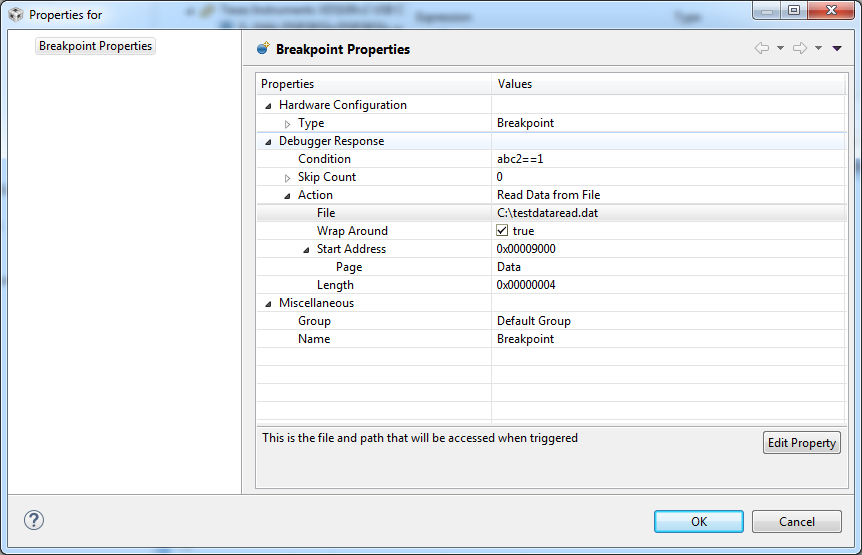
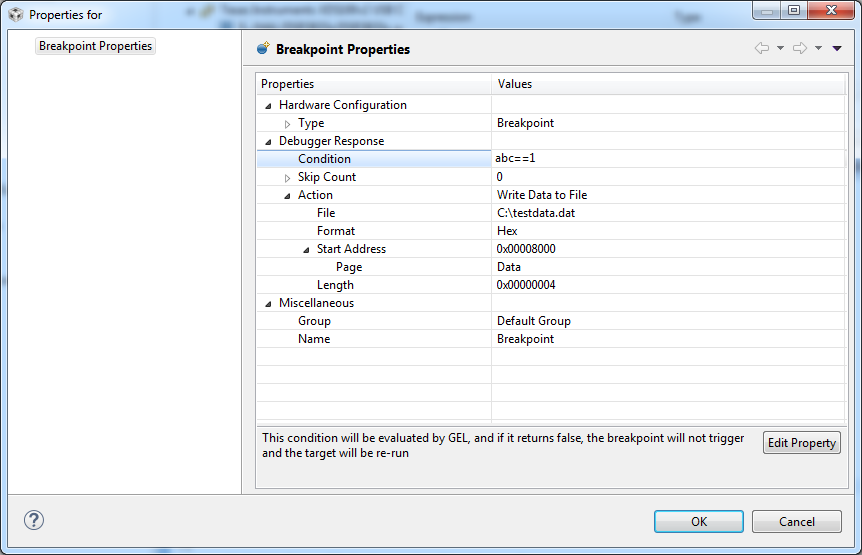
    1.  "Action" to either "Write Data to File" or  "Read Data from a file.

    2. Set "File" to the path and name of the file to write or read from.

    3.  Set the Start Address of the array to write to or read from.

    4. Set the length of the array.

    I believe the target stops while saving or reading from the file.

    If the read/write is to slow, you might want to try saving several iterations of data each time the breakpoint occurs.

    The data file format can be found at

    also take a look at and

    Stephen

  • You could time your control loop with a general purpose 32-bit timer If you want to know how much the breakpoint read/write is slowing your program down. If the timer is running at 100MHz, it will take approximately 42 seconds to wrap around.

    Using the timer, you could have your code compute many different timer statistics, i.e. max, average and standard deviation. Max time will probably be the most usefull statistics since it will tell you if the breakpoint read/writes are slowing your code down.

    Stephen
  • Hello Diego,

    Did you get it to work?

    Stephen
  • Yes,it worked but now I have another question: how do I get the program back running automatically when it writes the data to the .dat file? and how do I import values from those files to another variable?

    Thanks

  • Hello Diego,

    "how do I get the program back running automatically when it writes the data to the .dat file? "

    The program shouldn't stop at the breakpoint if you set up the breakpoint properly (See example below).  When the breakpoint is reached, the debugger will wrtie/read data to/from the specified data file and then continue running the program.

    "how do I import values from those files to another variable?"

    The debugger copies the data file contents to the memory location specified in the breakpoint properties.

    Stephen