This thread has been locked.

If you have a related question, please click the "Ask a related question" button in the top right corner. The newly created question will be automatically linked to this question.

Problems with connecting TMS320C5515 using Code Composer Studio v6

Other Parts Discussed in Thread: TMS320C5515

Hi All,

I am having problems connecting my device (TMS320C5515) using CCS v6. I was using CCS v4 before and it worked fine, now I installed the CCSv6 on the same computer. So let me take you step-by-step:

After I Launch Target Configuration:

0e2235aa6a49ded9230443b460f4e971.jpg

I try to connect the target (Run->Connect Target), and I get an error:

-----------------------------------------------------------------------------------------------------------------------------------------------------------------------------------------------------------------------

C55xx: Error connecting to the target: (Error -151 @ 0x0) One of the FTDI driver functions used during the connect returned bad status or an error. The cause may be one or more of: invalid XDS100 serial number, blank XDS100 EEPROM, missing FTDI drivers, faulty USB cable. Use the xds100serial command-line utility in the 'common/uscif' folder to verify the XDS100 can be located. (Emulation package 6.0.14.5) 

-----------------------------------------------------------------------------------------------------------------------------------------------------------------------------------------------------------------------

I installed a FTDI Driver from this link : ftdichip.com/Drivers/D2XX.htm 

I am running on Windows 7, and this is what my device manager shows:

0e4907dd54e1cd716ec5db7f13cf6002.jpg

Device manager could be using the same driver with CCS v6, which it  used already before with CCS v4. Is this the causing the error or is there another type of problem?

Thanks for any help

Darko

  • Darko,

    Thank you for sending such detailed post.

    From the type of error message you are getting (described in section 5.1 of this wiki page) and the screenshot from the Device Manager, it seems you have a C5515EVM board and is plugging a USB cable to the J2 connector, is that so?

    If so, this board features a more advanced onboard JTAG debugger a XDS510. To properly configure it, refer to section 2.7 of this wiki page.

    If that does not seem to be your case, can you go to the directory below and run the command xds100serial.exe? It should return something similar to:

    xds100serial.exe said:

    Microsoft Windows [Version 6.1.7601]
    Copyright (c) 2009 Microsoft Corporation.  All rights reserved.

    C:\ti\ccsv6\ccs_base\common\uscif>xds100serial.exe
    Scanning for XDS100 emulators...

    VID/PID    Type            Serial #    Description
    0403/a6d0  XDS100v1/v2     SD5515      Texas Instruments Inc.XDS100 Ver 1.0

    Hope this helps,

    Rafael

  • Rafael,

    Thank you for the reply.

    I do have a C5515EVM board and I am plugging a USB cable to the J2 connector.

    However, I have tried to do as you have suggested, and I have found another problem.

    As you can see the wiki article you suggested is very clear, and it says to choose a specific connection and specific board in the target configuration.

    4dc958e81d15427d9b8592e83a31bb68.jpg

    But when I try to do this, I dont have a required connection:

    ce82c74f5755800d5c567713fd434f95.jpg

    Here are shown all possible connections I can select.

    Why cant I find the required connection?

    Thank you for your reply

    Darko

  • Darko Trogrlic said:
    Why cant I find the required connection?

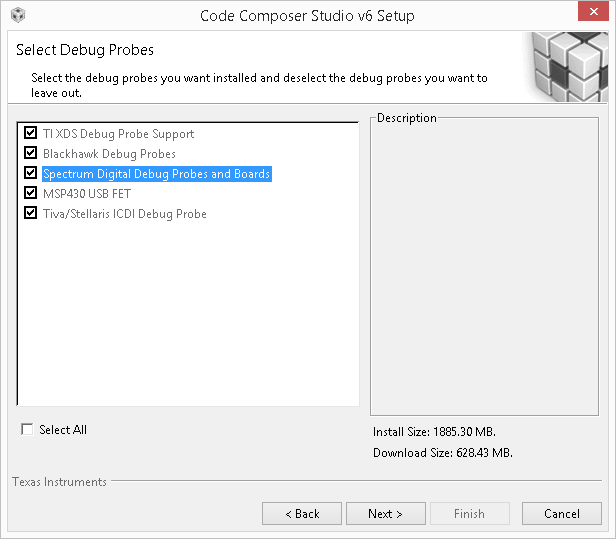
    It looks like when CCS 6 was installed, support for the "Spectrum Digital Debug Probes and Boards" wasn't selected.

    It you re-run the CCS 6 installer and point at your existing CCS 6 installation you should be able to add support for the "Spectrum Digital Debug Probes and Boards" on the "Support Debug Probes" screen:

  • Darko,

    Thanks for sending the screenshot; as Chester pointed out, it seems you don't have Spectrum Digital support installed (it is disabled by default during CCS install).

    The procedure mentioned by Chester is also highlighted in section 3.1 of the wiki page below.

    http://processors.wiki.ti.com/index.php/Updating_CCSv6

    Hope this helps,

    Rafael