This thread has been locked.

If you have a related question, please click the "Ask a related question" button in the top right corner. The newly created question will be automatically linked to this question.

Error calling char variable from C code by function block of Simulink

Other Parts Discussed in Thread: ENERGIA

Hello all again;

I want to ask for your help to understand this problem. I need to make a converter from float value to string, to be send by serial transmit of my Tiva C launchpad. Im trying to make the conversion in a simulink function block using the sprintf function.

During the debug in the Code Compiler Studio it works fine, I only receive a warning that the return variable are not compatible with the format, but the value gets saved to the char variable.

The problem ocurr with Matlab, because regardless the value of the constant, the block always give me the value of -128; I was searching for hours, but i can't found any solution.

This is the C code:

#include <stdio.h>
#include "dobloh.h"
double u;
char doble(double u)
{
	static char car[2000];
	sprintf(car,"%.3f",u);
	return car;
}

"dobloh.h" Header:

#ifndef DOBLADOR_C_
#define DOBLADOR_C_
char doble(double u);
#endif /* DOBLADOR_C_ */

Function block code:

function y = callingDoblez(u)
%#codegen
y=0.0;
y =  coder.ceval('doble',u);

Diagram:
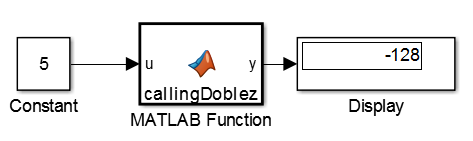
I hope you can help me to understand the problem,

Thanks for your time

Regards

Alberto

  • You will want to change

    char doble(double u)

    to

    char * doble(double u)

    Stephen

  • Hi, thanks a lot for your answer;

    After the modification the warning disappear, but now I have an error:

    Building with 'MinGW64 Compiler (C)'. 
    C:\Users\Alberto\Desktop\slprj\_sfprj\untitled\_self\sfun\src\c2_untitled.c: In function 'sf_gateway_c2_untitled': 
    C:\Users\Alberto\Desktop\slprj\_sfprj\untitled\_self\sfun\src\c2_untitled.c:180:10: error: incompatible types when assigning to type 'double' from type 'char *' 
       c2_b_y = doble(c2_b_u); 
              ^ 
     
    gmake: *** [c2_untitled.obj] Error -1
    Component: Make | Category: Make error
    Unable to create mex function 'untitled_sfun.mexw64' required for simulation.
    

    The new code is:

    #include <stdio.h>
    #include "dobloh.h"
    double u;
    
    char *doble(double u)
    {
    	static char car[2000];
    	sprintf(car,"%.3f",u);
    	return car;
    }

    I tried to use char* doble..., char * doble... and char *doble... all with the same result.

    What do you think can be the problem?

    Thanks again,

    regards

  • Are you sure the display requires a string. Also, could you post c2_untitled.c?

    What is the data type of c2_b_y?

    Stephen

  • Well the unique way to use the serial transmitter block is with variable like [1 2 3] pr double('123'), any other format send me the Ascci value and is not usefull for the application.

    The c2_b_y it's a data generated by Matlab because I only have the doblez.c code. 

    The file c2_untitled.c was generated by Matlab and it's a huge file, this is the last part where the error appear:

    void c2_untitled_method_dispatcher(SimStruct *S, int_T method, void *data)
    {
      switch (method) {
       case SS_CALL_MDL_START:
        mdlStart_c2_untitled(S);
        break;
    
       case SS_CALL_MDL_SET_WORK_WIDTHS:
        mdlSetWorkWidths_c2_untitled(S);
        break;
    
       case SS_CALL_MDL_PROCESS_PARAMETERS:
        mdlProcessParameters_c2_untitled(S);
        break;
    
       default:
        /* Unhandled method */
        sf_mex_error_message("Stateflow Internal Error:\n"
                             "Error calling c2_untitled_method_dispatcher.\n"
                             "Can't handle method %d.\n", method);
        break;
      }
    }
    

    regards

    Alberto

  • Hello Alberto,

    In your previous post, the error was shown to be in sf_gateway_c2_untitled and not c2_untitled_method_dispatcher.

    I'm not familiar with the  serial transmitter block.  Does that have anything to do with serial communications?

    I am not sure why you have to send a string to the display.  according to , the input can be one of the following:

    short, which displays a 5-digit scaled value with fixed decimal point
    long, which displays a 15-digit scaled value with fixed decimal point
    short_e, which displays a 5-digit value with a floating decimal point
    long_e, which displays a 16-digit value with a floating decimal point
    bank, which displays a value in fixed dollars and cents format (but with no $ or commas)

    Stephen

  • I don't understand the problem with the file generated by Matlab, because in the debuging in CCS all works fine....

    I'm using the display to check the value of the function block output, once I obtain the correct value I will remove it and use the serial transmitter.

    I need to comunicate two Tiva C by UART using the Serial Transmiter developed for this launchpad, the block is the Serial Transmitter for Energia, it only accept value in Unit8 format. The problem is if I read a value of a sensor with value 123 and send to the Serial transmitter, It will send a { because it's the Ascci code for it, and if I send a balue of 123.54, give me a lot of symbols that can't be interpreted in the receptor.

    But If I use a constant generator with the value: double('123') I will receive the value 123. Also If I make a block that generate a char with [1 2 3], and send to the serial transmitter I will receive the 123 again.

    So, This is what I want to try to make
  • If you want to view a string of character, you can't use the Display Block.

    Why not have the function block  output two values, an integer (use atoi()) and a string. The integer value could be displayed on display block and the string could be transmitted.

  • You could also use two function blocks: one that outputs a string to the serial transmitter and one that outputs an integer to the Display block.

  • I agree, the problem is that I need to make work the code in the block to generate the string....

  • Hello Alberto,

    Please select verify If one or more of the posts above helped you solve your problem.

    Thanks,
    Stephen

  • Hi Stephen;

    The C code with the upgrade that you suggest works very well during the debuging in CCS, this is the final version:

    #include <stdio.h>
    #include <string.h>
    #include "dobloh.h"
    
    char car[2000];
    
    char * doble(double u)
    {
    	sprintf(car,"%.3f",u);
    	return car;
    }
    

    But the real problem continues, because the function block in simulink doesn't accept arrays, so I need to call the value from C code in Unit8 or double, but this is exactly the same format that the variable have in the input of the function block.

    I was thinking in use Mex code but it not possible to use with code generator for embedded systems.

    My final option is to use S-function but apparently the output format can be array also....

    So, I don't know how to solve that, and the above suggestion doesn't work for this purpose.