This thread has been locked.

If you have a related question, please click the "Ask a related question" button in the top right corner. The newly created question will be automatically linked to this question.

Calculate atan2 in CCS (limit from -180 to 180 degree)

Other Parts Discussed in Thread: TMS320F28069M, CONTROLSUITE

Hello,

I am programming microcontroller TMS320F28069M in order to read the value from a Hall capteur which sends to me 2 signals analogic sin and cos.

We can consider that the signals have  the form:

S = A1. sin(Angle) + offset 1   and         C = A2. cos(Angle) + offset 2

You can see a part of my code here

#include "DSP28x_Project.h"      // Device Headerfile and Examples Include File
#include "math.h"

float16 gVoltage0[3];     //float16 = double
float16 gVoltage1[3];
float16 sinteta;
float16 costeta;
float16 gAngle0;
float16 gVerifier;
int16 gAngle;
Uint16 gcount;
...............
...............
gVoltage0[2] = (gVoltage0[2]/Adc_ValeurBits)*Adc_ValeurTension - Adc_Offset1;
gVoltage1[2] = (gVoltage1[2]/Adc_ValeurBits)*Adc_ValeurTension - Adc_Offset2;

// Valeurs de cosinus et sinus
sinteta  = gVoltage0[2]/Adc_Ampli1;
costeta =  gVoltage1[2]/Adc_Ampli2;

// Calibration des valeurs des cosinus
gVerifier =   (sinteta)*(sinteta) + (costeta)*(costeta);
if ( (gVerifier > (1+Adc_CalibVerifier)) || (gVerifier <(1-Adc_CalibVerifier)))
{
  if (costeta < 0)
  {
     costeta  =  - sqrt(1-sinteta*sinteta);
  }
  else costeta  =  sqrt(1-sinteta*sinteta) ;
}
   
// Calcul d'angle
gAngle0 =  (atan2(sinteta,costeta)*180)/PI;
gAngle =  ((int16) gAngle0) % 180 ;
	

"float16" is actually "double" data type

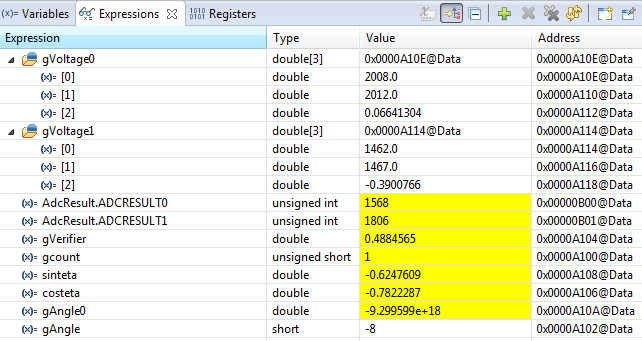
The results  through Debug: 

So, I used the atan2 function to calculate the angle, but the problem is that values of the Angle are expanded to its limits of data type. You can see that "Angle0" has the value of 1.231e+9, far more away its true value -41.76 degree. I tried the steps to calculate angle with atan2 in different program ( C-free 4.0) and it works well without problems in CCS.

What do I have to do to solve this problem ? Add or include some special libraries to CCS 

Thanks,

Max

  • For general tips on floating point math like this, please see this wiki article.  

    I presume the type float16 is a 32-bit floating point type.  Consider changing to a 64-bit type.  Be sure to use compiler version 15.12.0.LTS or later, so you can use C99 64-bit math functions like atan2l.

    Thanks and regards,

    -George

  • I use CCS the version 6.1.2 , so I can say it the latest version

    The microcontroller has data of 32 bits, so it's useless when you use 64 bits

  • Maxime Torrelli said:
    The microcontroller has data of 32 bits, so it's useless when you use 64 bits

    That's not correct.  You may need your final results to be 32-bit, but you can compute intermediate results with 64-bit types.

    Thanks and regards,

    -George

  • When I use C2000 compiler version 15.12.0.LTS with no options, I get the correct value with the following test case, so there's nothing wrong with the library function.  Please show us your complete command line options.  You can find this in the build console window.

    #include <stdio.h>
    #include <math.h>
    
    #define PI 3.14159
    
    int main()
    {
        double sinteta = -0.6557275;
        double costeta =  0.7352034;
        double gAngle0;
    
        gAngle0 = (atan2(sinteta,costeta)*180)/PI;
    
        printf("sinteta %f\n", sinteta);
        printf("costeta %f\n", costeta);
        printf("atan2(sinteta, costeta) %f\n", atan2(sinteta,costeta));
        printf("gAngle0 %f\n", gAngle0);
        printf("gAngle  %ld\n", (long)gAngle0 % 180);
    }
    
    sinteta -0.655728
    costeta 0.735203
    atan2(sinteta, costeta) -0.728322
    gAngle0 -41.729786
    gAngle  -41
    
  • Here is all of my code. I modified it from the example project  "Example_2806xAdcSoc " in the controlSuite.

    #include "DSP28x_Project.h"      // Device Headerfile and Examples Include File
    #include "math.h"


    #define Adc_ValeurBits     4096  // 12 bits
    #define Adc_ValeurTension  3.3  // 0 - 3.3 V
    #define Adc_Offset1        1.557  // Sin offset
    #define Adc_Ampli1         0.4553
    #define Adc_Offset2        1.574  // Cos offset
    #define Adc_Ampli2         0.4375
    #define PI                 3.14159265359
    #define Adc_CalibBits      3
    #define Adc_CalibVerifier  0.05   // 5% erreur
    
    
    // Prototype statements for functions found within this file.
    __interrupt void adc_isr(void);
    void Adc_Config(void);
    
    // Global variables used in this example:
    float16 gVoltage0[3];
    float16 gVoltage1[3];
    float16 sinteta;
    float16 costeta;
    float16 gAngle0;
    float16 gVerifier;
    int16 gAngle;
    Uint16 gcount;


    main()
    {
    
    // Step 1. Initialize System Control:
    // PLL, WatchDog, enable Peripheral Clocks
    // This example function is found in the F2806x_SysCtrl.c file.
       InitSysCtrl();
    
    
    // Step 2. Initialize GPIO:
    // This example function is found in the F2806x_Gpio.c file and
    // illustrates how to set the GPIO to it's default state.
    // InitGpio();  // Skipped for this example
    
    // Step 3. Clear all interrupts and initialize PIE vector table:
    // Disable CPU interrupts
       DINT;
    
    // Initialize the PIE control registers to their default state.
    // The default state is all PIE interrupts disabled and flags
    // are cleared.
    // This function is found in the F2806x_PieCtrl.c file.
       InitPieCtrl();
    
    // Disable CPU interrupts and clear all CPU interrupt flags:
       IER = 0x0000;
       IFR = 0x0000;
    
    // Initialize the PIE vector table with pointers to the shell Interrupt
    // Service Routines (ISR).
    // This will populate the entire table, even if the interrupt
    // is not used in this example.  This is useful for debug purposes.
    // The shell ISR routines are found in F2806x_DefaultIsr.c.
    // This function is found in F2806x_PieVect.c.
       InitPieVectTable();
    
    // Interrupts that are used in this example are re-mapped to
    // ISR functions found within this file.
       EALLOW;  // This is needed to write to EALLOW protected register
       PieVectTable.ADCINT1 = &adc_isr;
       EDIS;    // This is needed to disable write to EALLOW protected registers
    
    // Step 4. Initialize all the Device Peripherals:
    // This function is found in F2806x_InitPeripherals.c
    // InitPeripherals(); // Not required for this example
       InitAdc();  // For this example, init the ADC
       AdcOffsetSelfCal();


    // Step 5. User specific code, enable interrupts:
    
    // Enable ADCINT1 in PIE
       PieCtrlRegs.PIEIER1.bit.INTx1 = 1;	// Enable INT 1.1 in the PIE
       IER |= M_INT1; 						// Enable CPU Interrupt 1
       EINT;          						// Enable Global interrupt INTM
       ERTM;          						// Enable Global realtime interrupt DBGM
    
    
    // Configure ADC
    	EALLOW;
        AdcRegs.ADCCTL2.bit.ADCNONOVERLAP  = 1;	// Enable non-overlap mode
    	AdcRegs.ADCCTL1.bit.INTPULSEPOS	   = 1;	// ADCINT1 trips after AdcResults latch
    	AdcRegs.INTSEL1N2.bit.INT1E        = 1;	// Enabled ADCINT1
    	AdcRegs.INTSEL1N2.bit.INT1CONT     = 0;	// Disable ADCINT1 Continuous mode
        AdcRegs.INTSEL1N2.bit.INT1SEL 	   = 1;    // setup EOC1 to trigger ADCINT1 to fire
        AdcRegs.ADCSAMPLEMODE.bit.SIMULEN0 = 1 ;  //Simulating mode
        AdcRegs.ADCSOC0CTL.bit.CHSEL 	   = 2;    // set SOC0 channel select to ADCINA2 + ADCINB2
        AdcRegs.ADCSOC0CTL.bit.TRIGSEL 	   = 5;    // set SOC0 start trigger on EPWM1A, due to round-robin SOC0 converts first then SOC1
    	AdcRegs.ADCSOC0CTL.bit.ACQPS 	   = 6;	// set SOC0 S/H Window to 7 ADC Clock Cycles, (6 ACQPS plus 1)
    	EDIS;
    
    // Assumes ePWM1 clock is already enabled in InitSysCtrl()452;
       EPwm1Regs.ETSEL.bit.SOCAEN	= 1;		// Enable SOC on A group
       EPwm1Regs.ETSEL.bit.SOCASEL	= 4;		// Select SOC from CMPA on upcount
       EPwm1Regs.ETPS.bit.SOCAPRD 	= 1;		// Generate pulse on 1st event
       EPwm1Regs.CMPA.half.CMPA 	= 0;	// Set compare A value
       EPwm1Regs.TBPRD 				= 113;  // Set period ADC for ePWM1  - 400kHz  - 2.5 us
       EPwm1Regs.TBCTL.bit.CTRMODE 	= 0;		// count up and start
    
    
       gcount= 0;
       // Wait for ADC interrupt
       for(;;)
       {
    
    
       }
    
    }
    
    
    __interrupt void  adc_isr(void)
    {
      // Mesurer les signaux : 20 periode ADC pour prendre toutes les valeurs - 50 us
      gVoltage0[gcount] = AdcResult.ADCRESULT0;   //Sin
      gVoltage1[gcount] = AdcResult.ADCRESULT1;   //Cos
      // Mesurer la deuxieme fois
      if (gcount == 1)
       {
    	  // Valeurs moyennes
    	  gVoltage0[2] = (gVoltage0[0] +gVoltage0[1]) /2;
    	  gVoltage1[2] = (gVoltage1[0] +gVoltage1[1]) /2 ;
          // Deduire les valeurs en tension
    	  gVoltage0[2] = (gVoltage0[2]/Adc_ValeurBits)*Adc_ValeurTension - Adc_Offset1;
    	  gVoltage1[2] = (gVoltage1[2]/Adc_ValeurBits)*Adc_ValeurTension - Adc_Offset2;
    	  // Valeurs de cosinus et sinus
    	  sinteta  = gVoltage0[2]/Adc_Ampli1;
    	  costeta =  gVoltage1[2]/Adc_Ampli2;
    	  // Calibration des valeurs des cosinus
    	  gVerifier =   (sinteta)*(sinteta) + (costeta)*(costeta);
    	  if ( (gVerifier > (1+Adc_CalibVerifier)) || (gVerifier <(1-Adc_CalibVerifier)))
    		{
    		  if (costeta < 0)
    		  {
    			  costeta  =  - sqrt(1-sinteta*sinteta);
    	      }
    		  else costeta  =  sqrt(1-sinteta*sinteta) ;
    		}
          // Calcul d'angle
    	  gAngle0 =  (atan2(sinteta,costeta)*180)/PI;
    	  gAngle =  ((int16) gAngle0) % 180 ;
    	  gcount = 0;
       }
      else gcount++;
    
    
      AdcRegs.ADCINTFLGCLR.bit.ADCINT1 = 1;		//Clear ADCINT1 flag reinitialize for next SOC
      PieCtrlRegs.PIEACK.all = PIEACK_GROUP1;   // Acknowledge interrupt to PIE
    
      return;
    }


    I cant find out the problem, maybe the example has problems itself

  • So we use 64-bit type to calculate and after, shift the bit to get the value of 32-bit type ?
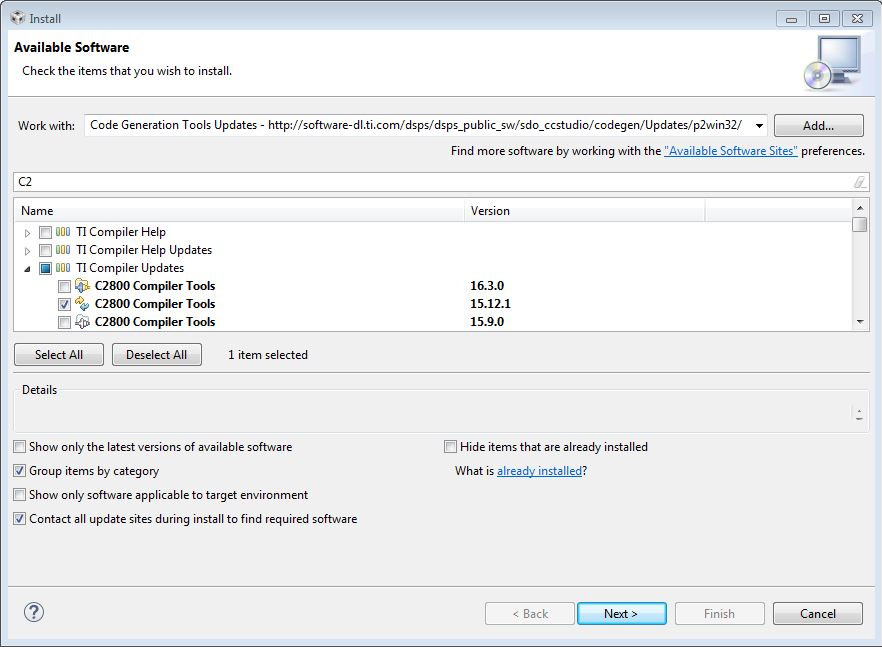
  • I think that I find out the problem, in the preference window, I cant find C2000 compiler version 15.12.0.LTS existing. So maybe the installation has the problem. So how I can update my compiler ?

    I used "Install the new software" with the option "Code Generation Tools update", but the site of ti refused my connection. Do you have any solution ?

  • Maxime Torrelli said:
    I used "Install the new software" with the option "Code Generation Tools update", but the site of ti refused my connection. Do you have any solution ?

    There are multiple sites to choose from for updating the compiler.  Try another one.  See this screen shot below.

    Thanks and regards,

    -George

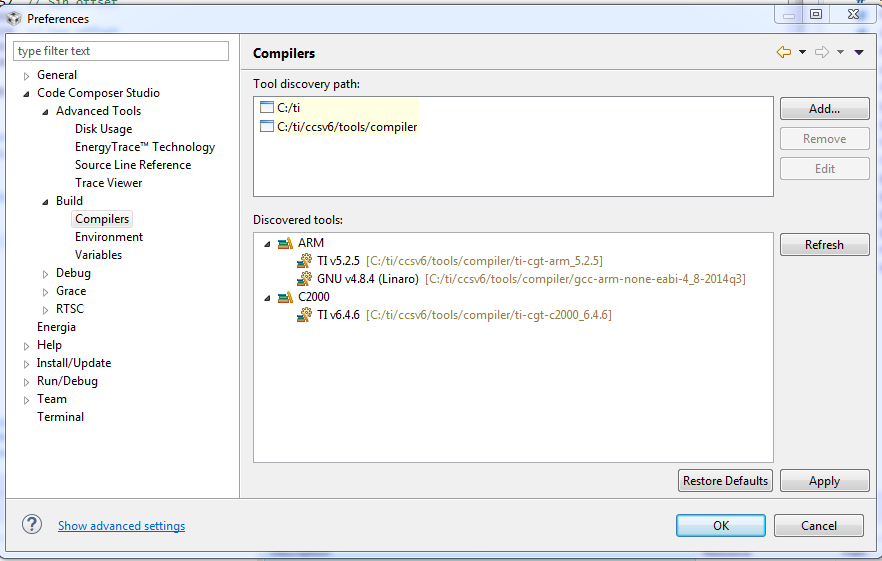
  • Looking at your screenshot, I see you are using C2000 compiler version 6.4.6. Using this version, my test case operates as expected, so we have not yet established that upgrading to 15.12.0.LTS will improve your example.

    On C2000, the type "double" is only 32 bits. I don't see any 64-bit arithmetic in your example.

    Please show us your complete command line options from the build console window.
  • Like you said, somehow after updating the compiler v15, it changed nothing. In fact, it updated value of Angle0 faster, but sended numbers out of range. Really  weird.

    Here is what exists in the build console with compiler v6

    **** Build of configuration Debug for project Example_2806xAdcSoc ****
    
    "C:\\ti\\ccsv6\\utils\\bin\\gmake" -k all 
    'Building file: ../Example_2806xAdcSoc.c'
    'Invoking: C2000 Compiler'
    "C:/ti/ccsv6/tools/compiler/ti-cgt-c2000_6.4.6/bin/cl2000" -v28 -ml -mt --cla_support=cla0 --float_support=fpu32 --vcu_support=vcu0 --include_path="C:/ti/ccsv6/tools/compiler/ti-cgt-c2000_6.4.6/include" --include_path="/packages/ti/xdais" --include_path="C:/ti/controlSUITE/device_support/f2806x/v151/F2806x_headers/include" --include_path="C:/ti/controlSUITE/device_support/f2806x/v151/F2806x_common/include" --include_path="C:/ti/controlSUITE/libs/math/IQmath/v160/include" --include_path="C:/ti/controlSUITE/libs/math/FPUfastRTS/V100/include" -g --define="_DEBUG" --define="LARGE_MODEL" --quiet --verbose_diagnostics --diag_warning=225 --diag_suppress=10063 --issue_remarks --output_all_syms --cdebug_asm_data --preproc_with_compile --preproc_dependency="Example_2806xAdcSoc.pp"  "../Example_2806xAdcSoc.c"
    'Finished building: ../Example_2806xAdcSoc.c'
    ' '
    'Building target: Example_2806xAdcSoc.out'
    'Invoking: C2000 Linker'
    "C:/ti/ccsv6/tools/compiler/ti-cgt-c2000_6.4.6/bin/cl2000" -v28 -ml -mt --cla_support=cla0 --float_support=fpu32 --vcu_support=vcu0 -g --define="_DEBUG" --define="LARGE_MODEL" --quiet --verbose_diagnostics --diag_warning=225 --diag_suppress=10063 --issue_remarks --output_all_syms --cdebug_asm_data -z -m"Example_2806xAdcSoc.map" --stack_size=0x200 --warn_sections -i"C:/ti/ccsv6/tools/compiler/ti-cgt-c2000_6.4.6/lib" -i"C:/ti/ccsv6/tools/compiler/ti-cgt-c2000_6.4.6/include" -i"C:/ti/controlSUITE/device_support/f2806x/v151/F2806x_common/lib" -i"C:/ti/controlSUITE/libs/math/IQmath/v160/lib" -i"C:/ti/controlSUITE/libs/math/FPUfastRTS/V100/lib" --reread_libs --verbose_diagnostics --issue_remarks --xml_link_info="Example_2806xAdcSoc_linkInfo.xml" --entry_point=code_start --rom_model -o "Example_2806xAdcSoc.out" -l"rts2800_fpu32_fast_supplement.lib" -l"rts2800_fpu32.lib" "./Example_2806xAdcSoc.obj" "./F2806x_Adc.obj" "./F2806x_CodeStartBranch.obj" "./F2806x_DefaultIsr.obj" "./F2806x_GlobalVariableDefs.obj" "./F2806x_PieCtrl.obj" "./F2806x_PieVect.obj" "./F2806x_SysCtrl.obj" "./F2806x_usDelay.obj" "C:/ti/controlSUITE/device_support/f2806x/v151/F2806x_common/cmd/28069_RAM_lnk.cmd" "C:/ti/controlSUITE/device_support/f2806x/v151/F2806x_headers/cmd/F2806x_Headers_nonBIOS.cmd"  -l"IQmath_fpu32.lib" 
    'Finished building target: Example_2806xAdcSoc.out'
    ' '
    
    **** Build Finished ****
    

    They are all default build configurations of example "Example_2806xAdcSoc" in controlSUITE. I have just modified the code

  • Did you really implant your code in a microcontroller ? because when I use your code calculating atan2 with a microcontroller and with different programs, it doesn't work. But if I run seperately it , without implantation, like you have done, it works. So maybe the problem is that CCS compiles in wrong way for microcontroller.

    If you noticed, I have said the value of variable is extended by its data type. So i don't know if data type is also a problem

  • No, I ran the executable under a simulator so that I could use printf. This demonstrates that the compiler is generating correct code for atan2. The compiler doesn't generate code differently if the code will be embedded.

    The correct value for gAngle0 (approximately 41) easily fits in range for a 32-bit float variable, so there should be no issues with whether you use float, double, or long double.

    Perhaps CCS is displaying the value of gAngle0 incorrectly. Please show us the memory window view of gAngle0 when CCS shows its value as 1.23e+09.
  • I run my code with the new compiler v15, and here is the memory window for all variables.

    The strange here is the microcontroller use the wrong number of Angle0 to calculate Angle.

  • Update: Finally, I found out the problem, how stupid am I. In fact, by default, the program implant on F28069_ram, but for my case, I have to change it to F28069M_RAM to use with the lauchpad, so the ram configuration is different. That's why the function atan2 returns wrong values. I had checked forum C2000 and in the end, luckily, find a comment in an irrelevant topic which also solve my problem.
    Thanks for all your help.