This thread has been locked.

If you have a related question, please click the "Ask a related question" button in the top right corner. The newly created question will be automatically linked to this question.

XDS110v3 vs XDS100v3

Other Parts Discussed in Thread: CC1310

Hello,

I have a TI CC1310 development kit which consists of a SmartRF06 board and a CC1310 daughter board.  I am running CCS 6.1.3.  After installing the IDE I plugged in my development kit.  The drivers seem to have installed correctly (the Windows Device Manager shows TI XDS100v3 Channel A and Channel B).  After downloading a simple sample project and rebuilding it, I attempted to flash the program to my dev kit.  I got the following error dialog:
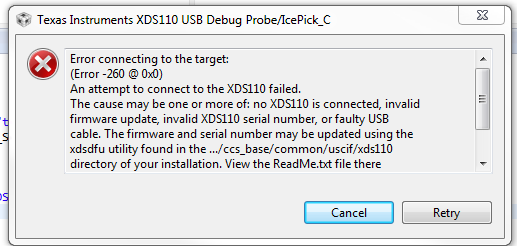
There are a couple of issues:

  1. I checked the project debugger settings and there is only an option for XDS110v3 debugging.  The Windows Device Manager and the dev kit documentation indicate that the board uses XDS100v3 emulation.
  2. As reported in other threads I tried swapping USB cables.  I suspect this is not the issue as I am using the ones that came with the kit as well as another known good cable.

I am at the end of my rope trying to figure out what's wrong.  Using the 'xdsdfu' utility shows 0 USB devices on the bus.  I am plugged in directly to my PC (which is directly plugged in to a wall socket so that I can rule out laptop issues).  I am running Windows 7 if that is of any information.

Has anyone encountered this issue before?

Many thanks!

  • The XDS110 and the XDS100v3 are different debug probes.  The RF06 board has an XDS100v3 on it.  However your debug configuration is set for an XDS110 and thus will fail to connect.

    If you go into the properties for your project you should be able to change the debug connection type as show below.

    If for some reason that doesn't work then you can change the connect in the ccxml file.  This file may be in a "targetConfigs" folder in your project or in the root folder.  Just double click on it in the project view and it will open it in the target config editor and allow you to change the connection type.

    Hopefully that helps you get past the error.

    Regards,

    John

  • Hi John, I am extremely grateful to you. Thanks for solving that. I looked in the debug settings but there was no option for the XDS100v3 but it was in the project properties as you pointed out. Thanks!
  • Great to hear that it is working for you. We are looking at improving this in the future where you could select the exact board that you are using and then CCS would know which debug probe is integrated onto that board.

    John