This thread has been locked.

If you have a related question, please click the "Ask a related question" button in the top right corner. The newly created question will be automatically linked to this question.

CCS6 watch expressions not working, showing periods instead of values

Other Parts Discussed in Thread: MOTORWARE, LAUNCHXL-F28069M, BOOSTXL-DRV8301

Hi all,

Watch expressions are not working. Screenshot below.

I am using CCS Version: 6.1.3.00033 and doing Motorware labs using a LaunchXL-F28069M Launchpad (rev 1.1) with one BoostXL-DRV8301 Rev B on J5. In general, the labs work and the motor can be controlled.

But I keep running into a problem with Watch Expressions. I took a screenshot to show the problem. It doesn't show the values of variables. Instead, it shows periods.

See the periods next to gMotorVars.Flag_enableSys, gMotorVars.Flag_Run_Identify, and so on. To do the labs, I need to view and change the values of these and other variables. Usually it works.

Right now this is happening in Motorware lab 12b (proj_lab12b), but this has happened repeatedly with several of the labs. When it happens, nothing seems to fix it. I've tried cleaning and rebuilding the project, starting a new debug session, restarting CCS, restarting the computer, powering the board off and back on... Once this thing with the periods happens, nothing I've tried fixes it, except exiting CCS, deleting all the contents of my Eclipse workspace directory, and then restarting CCS with a blank slate and reimporting all the Motorware projects.

I am using the Enable Silicon Real Time Mode and I am enabling Continuous Refresh in the Watch Expressions window as instructed in the Motorware labs.

Attempting to click one of the periods and inputting a value has no effect. It changes back to a period.

Please help. This is not only irritating, it would be a real hindrance to doing any real work after I'm done playing with the labs.

Oh yeah I forgot to say. It's the newest Motorware, 1_01_00_16

Thanks

  • Nathan Hartman41 said:
    But I keep running into a problem with Watch Expressions. I took a screenshot to show the problem. It doesn't show the values of variables. Instead, it shows periods.

    Since the variables have a type of unsigned char, by default the Expressions view shows the value as a character. If the value in the unsigned char variable isn't a valid ASCII character then the Expressions view displays a period.

    If you right-click on a variable in the Expression view and select the Number Format menu you can chose to display the variable with a different format. e.g. Decimal:

  • It's not a number format problem.

    Here is a screenshot when it works properly. It is working properly right now because I deleted the entire workspace and started over as described in my original post. Note that gMotorVars.enableSys and its friends are shown as unsigned char, and the value is displayed correctly. So it's not a number format issue.

    Eventually something will happen and the problem will return.

    This is an intermittent problem. When it manifests, it seems to be right from the start of a debug session.

  • Nathan Hartman41 said:
    It's not a number format problem.

    Here is a screenshot when it works properly.

    I think it is a number format problem, since the screen shot from the working case shows the unsigned char variables are being displayed with a Decimal format. Whereas in the failure case the unsigned char variables are displayed with a character format.

    Nathan Hartman41 said:
    This is an intermittent problem. When it manifests, it seems to be right from the start of a debug session.

    I don't what causes the format of the unsigned char variables to revert to character format.

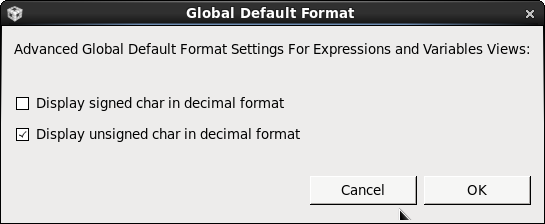
    However, I did find that CCS allows the default format for unsigned char variables to be set to decimal. If you use the View menu in the Expression view (the white triangle) and use Number Format -> Default Number Format... and on the dialog tick the "Display unsigned char in decimal format" option this may prevent the issue: