This thread has been locked.

If you have a related question, please click the "Ask a related question" button in the top right corner. The newly created question will be automatically linked to this question.

Adding a file to Code Composer does not compile


Hello,

I've been using code composer for a year and have added source files in the past but I have not needed a new C source for months until now, but when I add a new file it does not seem to be part of the project, it does not compile it. 

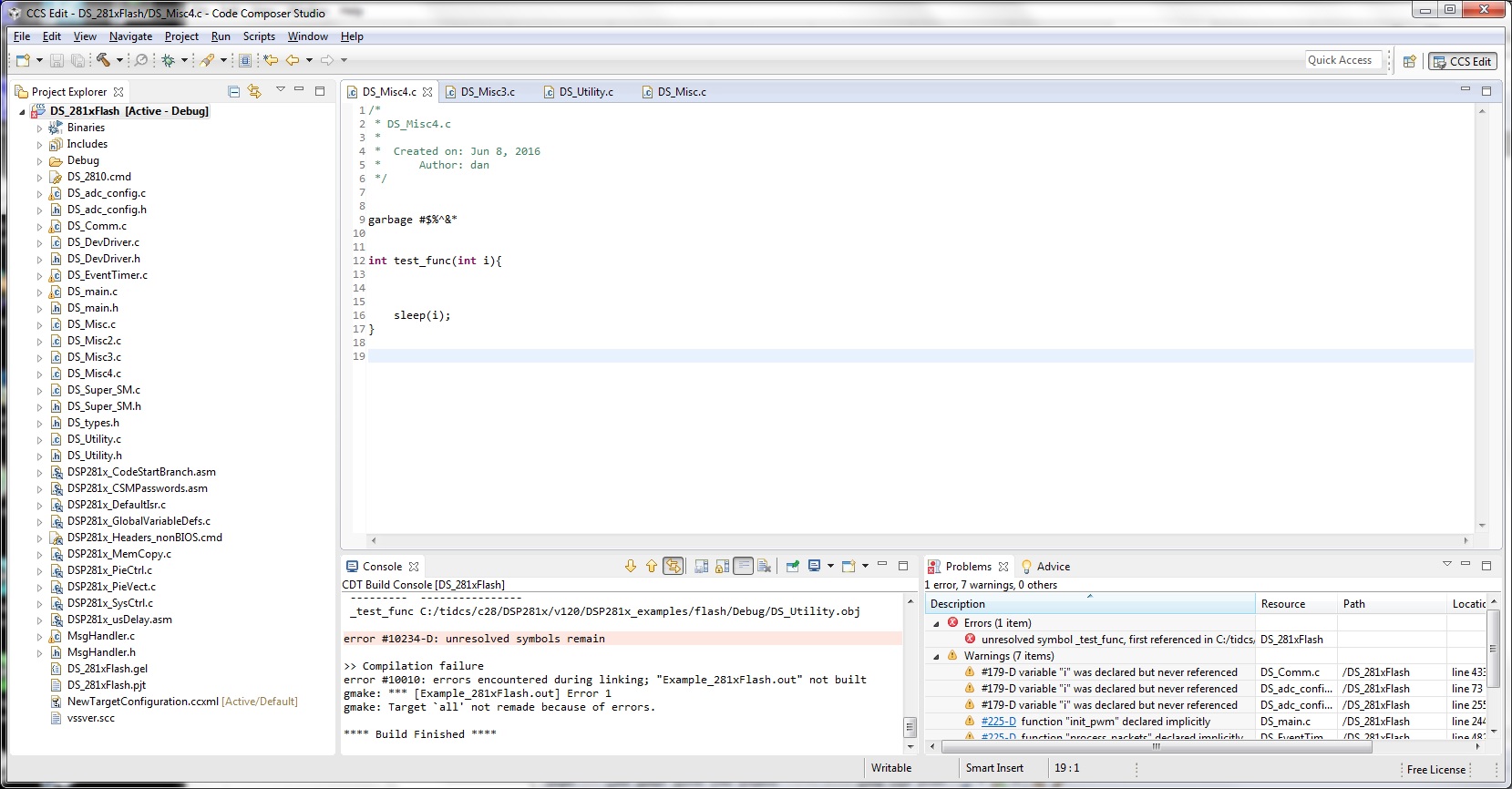
As a test I call a simple function from some random place but this function is an "unresolved symbol"(see screen shot)

As another test I place garbage text but it does not produce a syntax error.

Several methods tried to add a file:
1) Right click in the Project Explorer on the project name and choose NEW/SOURCE FILE  etc it then creates a new file(notice DS_Misc.c)
2) Create the file in another place. Right click the project and choose ADD FILES...(notice DS_Misc2.c)
I tried this in Code Composer 5.5 and 6.1

I think the project is corrupted but I tried it on another project with the same result. (Or I've forgotten something very basic.)

Any suggestions would be appreciated.
  • Dan,

    It appears that you are following the correct steps so it is quite likely that the project is corrupted. This appears to be a CCSv3 project that was migrated to CCSv5 or CCSv6, is that correct? It is certainly possible that something got corrupted during migration or somewhere along the way.

    You could try cleaning the project or importing it into a new workspace, but if those don't help, recreating the project from scratch in the latest CCS version might be the best option. I understand that is not ideal as you would need to manually add the source files and build options for the project, but might be the best long-term solution.

  • I tried to import the troubled project into a new project but the problem still persists.

    I then created a new project and added all the source files which now seems to fix the problem because it compiles the new file as expected. But it will take a while to get all the settings etc the same as the original, and I'm not sure I'll get them all(until I do a lot of testing).

    There are still some things I'm not sure of:

    - can I just add the *.gel file to the new project? Should I?
    - There were 3 .cmd files in the old project, I probably should clean them up but if I just add all three will it run from flash the way it did before?
    - I assume I should not add the old .pjt file(which is presumably where some corruption may exist) should I just go screen by screen thru the project properties to set things up?
    - there is a vssver.scc file in the old project, should I use that?
    - are there other files in sub directories that I should take from the old project?

    Thanks,
    Dan
  • I just looked at the GEL file, no I can't add that because the names are different, it seems to define build and run functions(and some debugger settings) so I guess I don't need those functions.

  • Dan Mezynski said:
    - can I just add the *.gel file to the new project? Should I?

    GEL files are not part of the build process, but are used during the debug process. They are debugger scripts used to set up memory maps, set up target states etc. If you had a custom GEL file that was required for your custom target board, then you would need to add it to the target configuration that you define in CCSv6. This wiki page contains more information: http://processors.wiki.ti.com/index.php/GEL

    Dan Mezynski said:
    There were 3 .cmd files in the old project, I probably should clean them up but if I just add all three will it run from flash the way it did before?

    Yes. If the original project linked in all 3 .cmd files, then you should add them all to the new project

    Dan Mezynski said:
    I assume I should not add the old .pjt file(which is presumably where some corruption may exist) should I just go screen by screen thru the project properties to set things up?

    You do not need to add the .pjt file (that is the older CCSv3 project file that is no longer used/recognized in CCSv6), but would need to refer to it to gather all the compiler and linker options and then add each of those options to the new project by finding the options under Project Properties->Build->Compiler or Linker.

    Dan Mezynski said:
    there is a vssver.scc file in the old project, should I use that?

    I do not recognize that file type.

  • Dan Mezynski said:
    - there is a vssver.scc file in the old project, should I use that?

    According to http://stackoverflow.com/questions/3253632/what-are-vssver-scc-files-and-can-i-delete-them vssver.scc is used for Microsoft Visual SourceSafe (VSS), and if you are not using VSS it is safe to delete the vssver.scc file.