This thread has been locked.

If you have a related question, please click the "Ask a related question" button in the top right corner. The newly created question will be automatically linked to this question.

Energia install not recognised - Windows 10

Other Parts Discussed in Thread: ENERGIA, CCSTUDIO, MSP430G2553

"The selected directory does not resemble an Energia install. Please select the directory containing the 'energia' executable."

I get the above error when trying to set the Energia preferences in CCS V6.1.3

The folder is at E:\Energia  ( second hard disc at C:\ drive is a small SSD )

The folder holds energia.exe and the standard Energia folders.

Any advice would be welcomed.

Ted

  • Ted,

    At first I was not able to reproduce this. For me Energia 17 and CCSv6.1.3 were working fine together. The trick is that you renamed the energia folder. If you leave it as the default name then it works fine. If I rename mine to be just plain "energia" then I get the same error message as you. I think the error message could be improved as clearly the executable is there. I will try to find out why renaming the directory causes issues as well. For now if you rename back to energia-0101E0017 it should work fine.

    Regards,
    John
  • Thank you for the above answer. I changed the directory back as you suggested and it makes the error message go away and enables the 'next' button on the dialog. However, now, when I push the 'Next>' button, nothing happens. The dialog stays up and I cannot proceed to create my New Energia Sketch..  Also, since it didn't seem to work, I pressed 'Cancel'.  Now, when I select 'New Energia Sketch' from the project explorer area, nothing happens.  This thing is a bit buggy.  What do I need to do to make it work again.  This is getting frustrating when I can't move forward to develop a simple Energia Sketch..

  • Curtis,

    I don't see a Next button.  Did you mean finish?  I just want to double check that we are trying the same thing.

    Here are my Energia settings

    If I go to the project menu and select New Energia Sketch this is what I see:

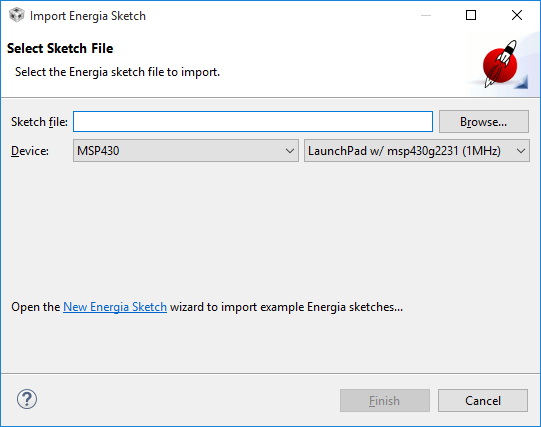
    If I select to import a sketch from the project menu this is what I see:

    A couple things I would try:

    Try creating a new workspace.  I am wondering if something has gotten corrupted in the workspace.  If creating a new workspace allows you to use Energia then we know that is the problem and can try to clean the old one.

    You can add -clean to the ccstudio.exe command line.  Or run from a command prompt.  ccstudio.exe -clean

    I am checking around to see if anyone has seen anything like this.

    Regards,

    John

  • Curtis,

    Could you also let us know which version of Energia you are using, and also attach your <workspace>/.metadata/.log file.

    Thanks,
    - Baltasar
  • I am using the latest version:   energia-0101E0017.  I just reloaded it from Energia's website this morning.  It is their December 2015 version.

    I am using the latest CCS version 6.1.2.  I installed a fresh version of that a couple days ago and have applied all the updates I could find.

    I moved my workspace folder so it forced a prompt for a new CCS workspace folder location (new workspace).

    I opted to use CCS in Simple mode.

    Under "Project Explorer", I right click and select 'New' -> 'Energia Sketch'

    I name it and select MSP430 as my device and "Launchpad w/ msp430g2553 (16MHz)"

    I click Finish

    Now, without it asking where my Energia project is, it all appears to work..  

    Well, that was nice :-)

    Problem Solved?  I guess it was just a matter of resetting everything...

    One problem does exist, different than before.  My I2C communications is not working.  But that's a different problem that I believe is solved with an update to the Energia project.  I'll raise that issue in a different post.

    It is unfortunate that both products don't work right out of the box and that there is an Energia tweak required in order to allow use of I2C...