This thread has been locked.

If you have a related question, please click the "Ask a related question" button in the top right corner. The newly created question will be automatically linked to this question.

CCS 6.1.2 Incredibly SLOW operation

Other Parts Discussed in Thread: CC1310

I am trying to develop code on a PC with WIN 10 for the CC1310. When I try doing something I eventually (not after too long) get to a point where my whole computer is bogged down. I cannot click on a file tab and have it switch until after 3 - 4 minutes! I cannot cancel CCS from the task manager - I end up getting "CCS is not responding, do you want to wait or cancel now" I cancel now and then I have to wait another minute or two before it finally shuts down.

My computer then works fine. It is an AMD A6-5200 at 2GHz with 12G RAM. I see this when running Task Manager and Webroot SecureAnywhere for system protection. It seems like there's a LOT of ethernet traffic when CCS starts up and when it tries to do most operations. BTW - build project seems to REALLY bring the system to its knees.

If I ever get a version of CCS that actually works (it used to be a lot more reliable), how can I freeze it and NOT let there be any changes to the toolset or, alternatively, is there anyway I can roll back any of what seems like small mods appear to make this tool totally unreliable?

  • Hi Rachel,

    The A6-5200 should still be a decent processor and you have plenty of RAM. CCS runs pretty well on Windows 10, so the OS should not be an issue. Is the slowness when you try a project build? Or is it just slow in general? For your builds, you may want to enable parallel builds if you have not done so already.

    Another known cause of slowness is if you have a large number of open projects in your workspace, especially if they are large projects. You can close some project. You can also try disabling Indexing since that indexing can use up a substantial amount of CPU resources. You can disable it on a per project bases or at the global level in your workspace properties and see if this helps.

    Rachel Adamec90 said:
    It seems like there's a LOT of ethernet traffic when CCS starts up

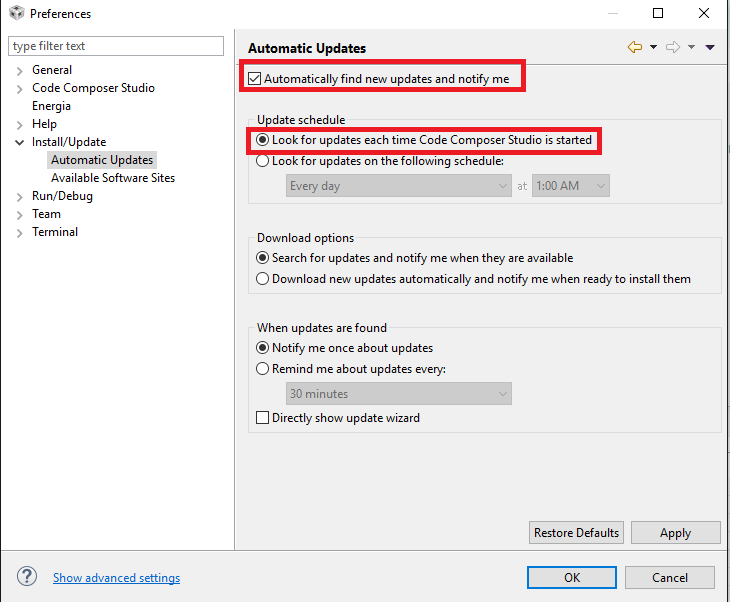
    By default, CCS will look for updates everytime you start up CCS. You can change this behavior by only checking at a specified time or even disabling auto-checking of updates completely.

    Rachel Adamec90 said:
    If I ever get a version of CCS that actually works (it used to be a lot more reliable), how can I freeze it and NOT let there be any changes to the toolset

    When you find a stable environment, you can decline to take any more updates. If you disable the auto-checking of updates as mentioned above, then you would not get any notification of updates.

    Rachel Adamec90 said:
    alternatively, is there anyway I can roll back any of what seems like small mods appear to make this tool totally unreliable?

    There is a way to roll-back some changes but not all. To be frank, it is a bit confusing so we don't really recommend it.

    Hope this helps

    ki