This thread has been locked.

If you have a related question, please click the "Ask a related question" button in the top right corner. The newly created question will be automatically linked to this question.

AM572X: IPU1 Local Register Access


CCS 6.1.3
Windows 7 64-bit
BH XDS560v2
AM572x EVM (just the CPU board, no screen)

For some reason, peripherals that are local to the IPU1 subsystem do not show up:
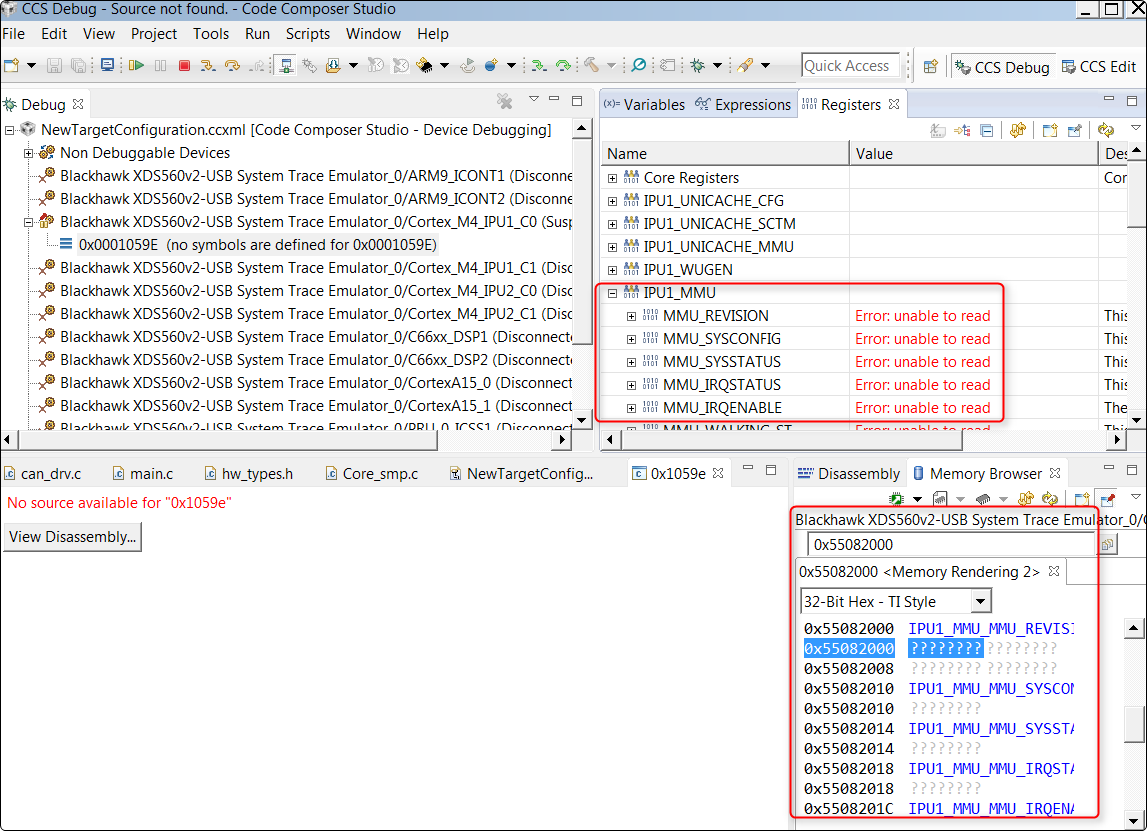
Steps to reproduce the issue:

  1. Start with EVM booting from SD card flashed with Proc SDK 2.00.02 binaries.
  2. Login to console as root.
  3. echo on > /sys/bus/platform/devices/58820000.ipu/power/control
  4. Connect to IPU1_C0
  5. Open memory window to 0x55082000 and also look in register window.  Nothing seems to be visible.  You should hopefully be seeing the same as my screenshot at this point.

I can view the registers through the DAP at 0x58882000 (slightly different address as viewed from DAP), but for some reason the M4 cannot see its own local registers.

Brad

  • Brad Griffis said:
    I can view the registers through the DAP at 0x58882000 (slightly different address as viewed from DAP), but for some reason the M4 cannot see its own local registers.

    I don't have a EVM to reproduce the problem, but some suggestions to investigate the problem:

    1) If you hover the mouse over the question marks in the CCS memory browser, do you get a tool-tip which displays the reason why the CCS debugger is unable to access the IPU MMU registers?

    2) If you look at the Memory Map for the IPU1_C0 (use menu Tools -> Memory) what does CCS display as the attributes for the address 0x55082000?

    If there is a GEL file loaded for the IPU1_C0, the GEL file might be disabling access to the address range of the IPU MMU registers.

    [I looked at the AM572x TRM and can't see a reason why the M4 wouldn't be able to access the IPU MMU registers when the DAP can]

  • Chester Gillon said:
    1) If you hover the mouse over the question marks in the CCS memory browser, do you get a tool-tip which displays the reason why the CCS debugger is unable to access the IPU MMU registers?

    Error: Target failed to read 0x55082000

    Chester Gillon said:

    2) If you look at the Memory Map for the IPU1_C0 (use menu Tools -> Memory) what does CCS display as the attributes for the address 0x55082000?

    If there is a GEL file loaded for the IPU1_C0, the GEL file might be disabling access to the address range of the IPU MMU registers.

    I'm not using any gel files.  The memory map is wide open.

  • Was this ever resolved? I am having the same issue.
  • Unfortunately, no.  Which peripherals are you trying to inspect?  I wrote some scripts for decoding the Unicache AMMU table if that's helpful to what you're doing.  If you use the latest omapconf it can be done from the Linux command line from the A15.  Alternatively it can be done using a DSS script that I wrote that leverages the DAP.

  • Ultimately I want to be able to access GPIO, UART, and SPI peripherals.

    I'm not familiar with DSS scripting but I'd be interested in taking a look at what you've got; maybe I can extrapolate some answers for my own application.
  • Given your needs, I don't think DSS is the right solution. The Debug Access Port (DAP) is a better option. The DAP is an initiator hanging off the L3 interconnect. You can connect to it in CCS and peak/poke any memory mapped registers via CCS. It's a really handy little tool.

    Here's how to use it:

    1. In the "Debug" pane, right click on your ccxml file and choose "Show all cores".
    2. Expand the "Non Debuggable Devices" box that pops up.
    3. Right click on the one that says CS_DAP_DebugSS and connect.
    4. Open a Memory window (View -> Memory).
    5. Now you can enter the address for any peripheral. Make sure you use the L3 address and not the local address that the IPU's use. If you need help with that, just let me know a specific peripheral/register (and which IPU instance) you're using.
    6. In your memory window, you can use the push-pin icon to lock the context of that window to the DAP. Otherwise, clicking on the M3 so you can step through code, etc. would cause the memory window to be viewed from the M3.

    Brad
  • Brad,

    I went through the steps you outlined above but hit a snag at step 5. After opening up the memory view and entering the address for the IPU1 MMU (0x58882000 as seen by the L3), the memory view in CCS still shows all question marks and I get a dump to my Linux console that looks something like the following:

    [ 685.077060] ------------[ cut here ]------------
    [ 685.081712] WARNING: CPU: 0 PID: 0 at drivers/bus/omap_l3_noc.c:147 l3_interrupt_handler+0x25c/0x36c
    [ 685.090885] 44000000.ocp:L3 Custom Error: MASTER CS_DAP TARGET IPU1 (Read): Data Access in User mode during Functional access
    [ 685.102235] Modules linked in: pru_rproc pruss_intc xhci_plat_hcd xhci_hcd usbcore pruss dwc3 udc_core usb_common snd_soc_simple_card snd_soc_simple_card_utils snd_soc_omap_hdmi_audio omap_aes_driver omap_sham pruss_soc_bus ahci_platform omap_wdt libahci_platform libahci libata scsi_mod ti_vpe ti_vip ti_sc ti_csc ti_vpdma dwc3_omap rtc_omap extcon_palmas rtc_palmas extcon_core mt9t11x pixcir_i2c_ts snd_soc_tlv320aic3x omap_des rtc_ds1307 des_generic crypto_engine omap_remoteproc virtio_rpmsg_bus rpmsg_core remoteproc sch_fq_codel cryptodev(O)
    [ 685.150869] CPU: 0 PID: 0 Comm: swapper/0 Tainted: G W O 4.9.28-geed43d1050 #3
    [ 685.159080] Hardware name: Generic DRA74X (Flattened Device Tree)
    [ 685.165197] Backtrace:
    [ 685.167669] [<c020b29c>] (dump_backtrace) from [<c020b558>] (show_stack+0x18/0x1c)
    [ 685.175273] r7:00000009 r6:60000193 r5:00000000 r4:c1022410

    <the rest of the trace has been omitted for brevity>

    It looks to me like portions of memory are being set as protected by the Linux side, but I'm not certain that that is actually happening or what I'd do to fix it if it was.
  • I should also point out that my ultimate goal is that I need the IPU to be able to access peripherals like UART, SPI, GPIO, etc. on its own from code. I actually started another thread on the subject before I came across yours:

    e2e.ti.com/.../611525
  • Scott Jackson7 said:
    Brad,

    I went through the steps you outlined above but hit a snag at step 5. After opening up the memory view and entering the address for the IPU1 MMU (0x58882000 as seen by the L3), the memory view in CCS still shows all question marks and I get a dump to my Linux console that looks something like the following:

    [ 685.077060] ------------[ cut here ]------------
    [ 685.081712] WARNING: CPU: 0 PID: 0 at drivers/bus/omap_l3_noc.c:147 l3_interrupt_handler+0x25c/0x36c
    [ 685.090885] 44000000.ocp:L3 Custom Error: MASTER CS_DAP TARGET IPU1 (Read): Data Access in User mode during Functional access
    [ 685.102235] Modules linked in: pru_rproc pruss_intc xhci_plat_hcd xhci_hcd usbcore pruss dwc3 udc_core usb_common snd_soc_simple_card snd_soc_simple_card_utils snd_soc_omap_hdmi_audio omap_aes_driver omap_sham pruss_soc_bus ahci_platform omap_wdt libahci_platform libahci libata scsi_mod ti_vpe ti_vip ti_sc ti_csc ti_vpdma dwc3_omap rtc_omap extcon_palmas rtc_palmas extcon_core mt9t11x pixcir_i2c_ts snd_soc_tlv320aic3x omap_des rtc_ds1307 des_generic crypto_engine omap_remoteproc virtio_rpmsg_bus rpmsg_core remoteproc sch_fq_codel cryptodev(O)
    [ 685.150869] CPU: 0 PID: 0 Comm: swapper/0 Tainted: G W O 4.9.28-geed43d1050 #3
    [ 685.159080] Hardware name: Generic DRA74X (Flattened Device Tree)
    [ 685.165197] Backtrace:
    [ 685.167669] [<c020b29c>] (dump_backtrace) from [<c020b558>] (show_stack+0x18/0x1c)
    [ 685.175273] r7:00000009 r6:60000193 r5:00000000 r4:c1022410

    <the rest of the trace has been omitted for brevity>

    It looks to me like portions of memory are being set as protected by the Linux side, but I'm not certain that that is actually happening or what I'd do to fix it if it was.

    This might be due to the clock automatically gating on the IPU1 subsystem.  You can force the clock to stay on from the Linux console with this command:

    echo on > /sys/bus/platform/devices/58820000.ipu/power/control

  • Brad, Scott,

    I was not able to connect to the IPU1 from CCS (the GEL file routine is not powering up this core), but I was able to see the registers from IPU2.

    In this case, I would suspect that something else is at play - some peripheral registers are not active when the peripheral itself is powered off/disabled, but I suspect that shouldn't be the case for the MMU registers themselves.

    I don't have a ready-to-run Linux image for my board, but as soon as I get one I will try Brad's method.

    Regards,

    Rafael

  • Brad,

    I finally was able to get back to this. I was not able to connect to the IPU1_C0 or C1 cores using your method. I am using the provided SD card with my AM572x GPEVM. Perhaps something else is missing from this procedure?

    Regards,
    Rafael