This thread has been locked.

If you have a related question, please click the "Ask a related question" button in the top right corner. The newly created question will be automatically linked to this question.

CCSV6 support for f28335. Should I replace chip in design?

Hi, we have a product line that is built around a 28335.  We have older machines running CCS3.3 that are on the last legs but our attempts to get CCS6 to run have been no joy.  It has no way to manually install the dsp/bios.  It can't even load the example projects.  We can't find any examples or references for anything other than the 430 product line.  Is TI dropping the C2000s from the line?  I can't find any references in support.

  • Hi James,

    C2000 is well supported by CCS and we have no plans to change this.

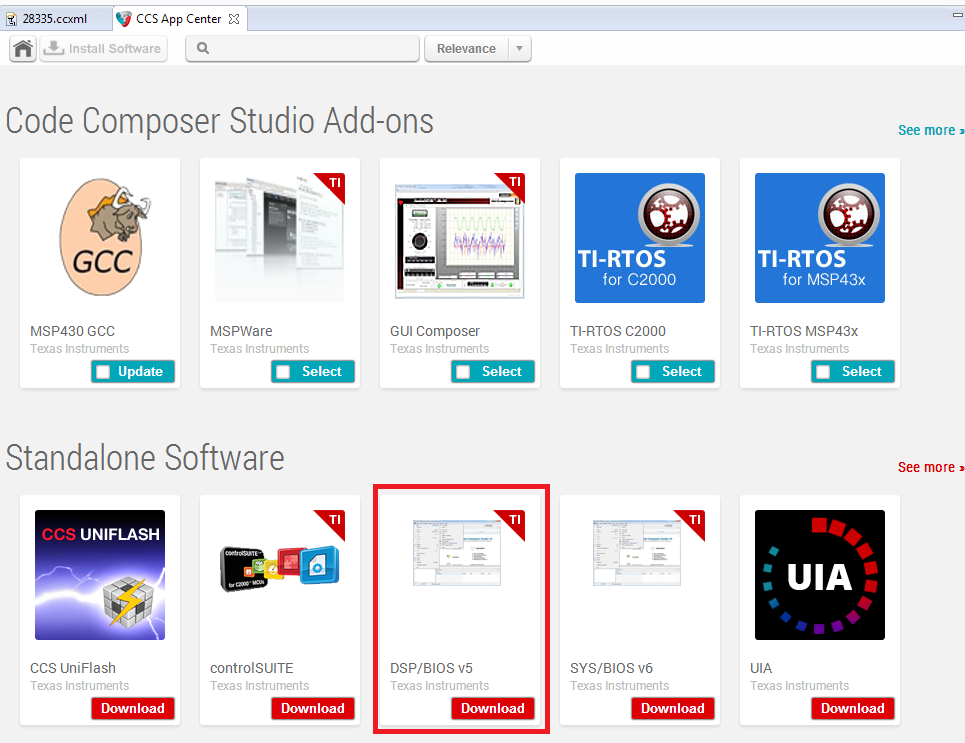
    CCSv6 does not ship with DSP/BIOS, but you can access it via the App Center in CCS:

    On the link next to DSP/BIOS, you will see a option to download controlSUITE. This has all the examples and documentation for C2000.


    Hope this helps

    ki

  • Hi Ki,

    We had already installed the bios v5. The link you pointed out only installs it on to the PC as a standalone utility. The code composer IDE does not recognize it so it does not automatically select it for install. There is probably a hidden hot key to force to install but I can't even find a mention of the BIOS. I already searched the E2E boards and found several others with the same problem but no one had found an solution. If you know of any manual that might have the cheat codes it would be appreciated.

    We are going to try and hack our copies of V3.3 onto an new W8.1 machine to make sure we can keep going.
  • James Hill said:
    The code composer IDE does not recognize it so it does not automatically select it for install. There is probably a hidden hot key to force to install but I can't even find a mention of the BIOS

    If BIOS is already installed on your PC, then you need to tell CCS where it is so it can use it. It checks in some default locations, and if it resides outside those locations you need to add the path to it. In the image below, you can see that I am pointing my CCS installation to the location of DSP/BIOS that came with another CCS installation. Once I did that, it detected it and I can use it.

    Note that there are several things to be aware of when using DSP/BIOS with versions of CCS greater than v3. See: http://processors.wiki.ti.com/index.php/DSP/BIOS_Support_in_CCS_Eclipse

    While CCS will continue to support C2000, the bigger issue in your case is that DSP/BIOS has been deprecated in support in favor of the newer SYS/BIOS (part of TI-RTOS).

    Thanks

    ki

  • Thanks Ki,
    It still did not appear in the window you indicated, but it gave me an idea. Erased the entire ti folder rather than just un-install, rooted the machine to add a dedicated admin, and did all the installs as admin, and this time it found the bios.

    Yes switching to a full RTOS would be a complete re-build. I hope they re-think that because not having a black-box RTOS is a real selling point. At its heart, the DSP/Bios is just a scripting tool so we can audit every line for security and ITAR review.
  • Hello James,

    How do you use the DSP/Bios to audit every line for security and ITAR review?

    Thanks,
    Stephen

  • stevenh said:

    Hello James,

    How do you use the DSP/Bios to audit every line for security and ITAR review?

    Thanks,
    Stephen

    Hi Stephen

    Even though I edit the .tcf using the Bios gui I still get a "Textual Configuration File"  that summarizes the entire set up.  On building the project, this information is used to automatically create configuration files that can be documented. 

    There are still some binaries and firmware handling the internals timer and task management that are blind to the end user, but they are small and easy to prove that nothing unseemly has been inserted.   It is not perfect but so far I have been able to make everyone happy.