


Other Parts Discussed in Thread: CCSTUDIO
With CCS 6.1.3.00033 running under Windows 7 attempted to double-click on a debug server .log file which had been written to a CCS project directory, to open the log file in the CCS editor. The following error was displayed:

On pressing OK then got another dialog:

Pressed Yes on the above dialog.
When attempted to re-start CCS 6.1.3 and use the same workspace, CCS failed to start reporting the following after had selected the workspace:
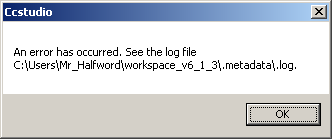
The .metadata\.log file in the workspace had OutOfMemoryError errors from what appears to be the Eclipse text editor. e.g.:
!ENTRY org.eclipse.osgi 4 0 2016-08-11 13:47:40.438
!MESSAGE Application error
!STACK 1
java.lang.OutOfMemoryError: Java heap space
	at java.util.Arrays.copyOf(Arrays.java:2367)
	at java.lang.AbstractStringBuilder.expandCapacity(AbstractStringBuilder.java:130)
	at java.lang.AbstractStringBuilder.ensureCapacityInternal(AbstractStringBuilder.java:114)
	at java.lang.AbstractStringBuilder.append(AbstractStringBuilder.java:535)
	at java.lang.StringBuffer.append(StringBuffer.java:322)
	at org.eclipse.core.internal.filebuffers.ResourceTextFileBuffer.setDocumentContent(ResourceTextFileBuffer.java:577)
	at org.eclipse.core.internal.filebuffers.ResourceTextFileBuffer.initializeFileBufferContent(ResourceTextFileBuffer.java:288)
	at org.eclipse.core.internal.filebuffers.ResourceFileBuffer.create(ResourceFileBuffer.java:247)
	at org.eclipse.core.internal.filebuffers.TextFileBufferManager.connect(TextFileBufferManager.java:112)
	at org.eclipse.ui.editors.text.TextFileDocumentProvider.createFileInfo(TextFileDocumentProvider.java:559)
	at org.eclipse.ui.editors.text.TextFileDocumentProvider.connect(TextFileDocumentProvider.java:478)
	at org.eclipse.ui.texteditor.AbstractTextEditor.doSetInput(AbstractTextEditor.java:4233)
	at org.eclipse.ui.texteditor.StatusTextEditor.doSetInput(StatusTextEditor.java:237)
	at org.eclipse.ui.texteditor.AbstractDecoratedTextEditor.doSetInput(AbstractDecoratedTextEditor.java:1480)
	at org.eclipse.ui.editors.text.TextEditor.doSetInput(TextEditor.java:169)
	at org.eclipse.ui.texteditor.AbstractTextEditor$19.run(AbstractTextEditor.java:3220)
	at org.eclipse.ui.internal.WorkbenchWindow.run(WorkbenchWindow.java:2098)
	at org.eclipse.ui.texteditor.AbstractTextEditor.internalInit(AbstractTextEditor.java:3238)
	at org.eclipse.ui.texteditor.AbstractTextEditor.init(AbstractTextEditor.java:3265)
	at org.eclipse.ui.internal.EditorReference.initialize(EditorReference.java:361)
	at org.eclipse.ui.internal.e4.compatibility.CompatibilityPart.create(CompatibilityPart.java:319)
	at sun.reflect.NativeMethodAccessorImpl.invoke0(Native Method)
	at sun.reflect.NativeMethodAccessorImpl.invoke(NativeMethodAccessorImpl.java:57)
	at sun.reflect.DelegatingMethodAccessorImpl.invoke(DelegatingMethodAccessorImpl.java:43)
	at java.lang.reflect.Method.invoke(Method.java:606)
	at org.eclipse.e4.core.internal.di.MethodRequestor.execute(MethodRequestor.java:56)
	at org.eclipse.e4.core.internal.di.InjectorImpl.processAnnotated(InjectorImpl.java:898)
	at org.eclipse.e4.core.internal.di.InjectorImpl.processAnnotated(InjectorImpl.java:879)
	at org.eclipse.e4.core.internal.di.InjectorImpl.inject(InjectorImpl.java:121)
	at org.eclipse.e4.core.internal.di.InjectorImpl.internalMake(InjectorImpl.java:345)
	at org.eclipse.e4.core.internal.di.InjectorImpl.make(InjectorImpl.java:264)
	at org.eclipse.e4.core.contexts.ContextInjectionFactory.make(ContextInjectionFactory.java:162)
I think the problem is that while CCS ran out of Java heap space on the first attempt to open the log file, which turned out to be a "large" size of 146,576,929 bytes, on subsequent start-up attempts CCS fails to initialize at it has remembered the open editor files but then gets an out-of-heap error on attempting to open the large file.
After deleting the workspace file .metadata\.plugins\org.eclipse.e4.workbench\workbench.xmi where the workbench state is stored, which among other things remembers which files were open in the editor, was then able to re-start CCS 6.1.3 with the same workspace.
Can CCS 6.1.3 be made to improve the error handling of attempting to open a file which is too large for the built in editor?

