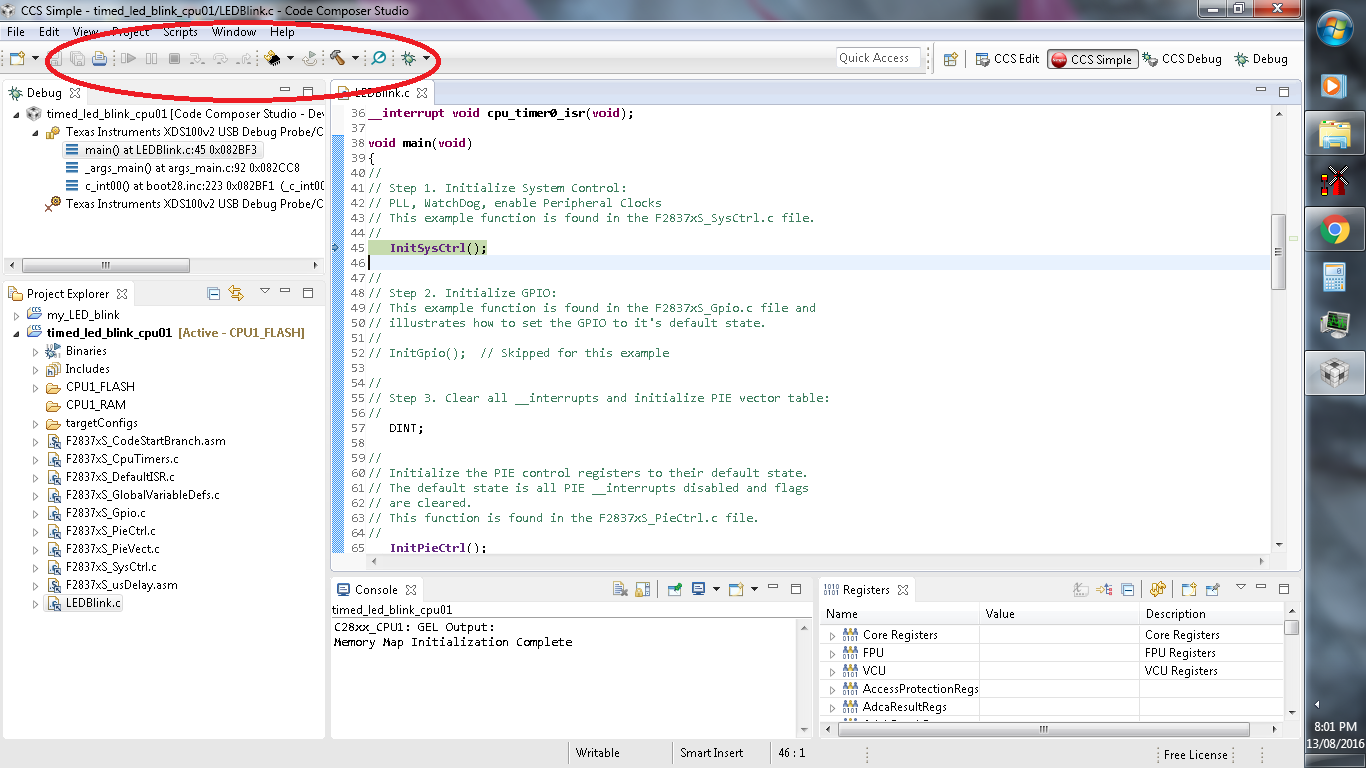
I am using Code Composer Studio Version: 6.1.0.00104 for TMS320F28377S MCU. When I debug my code, all the buttons - single step, run, stop, restart appears to be grayed out. This issue gets solved temporarily when I remove and then reinstall CCS.
This thread has been locked.
If you have a related question, please click the "Ask a related question" button in the top right corner. The newly created question will be automatically linked to this question.
I am using Code Composer Studio Version: 6.1.0.00104 for TMS320F28377S MCU. When I debug my code, all the buttons - single step, run, stop, restart appears to be grayed out. This issue gets solved temporarily when I remove and then reinstall CCS.
This is a known bug in CCS 6.1.0 when working with the CCS Simple perspective, as you are doing. The bug has been fixed in CCS 6.1.1 and higher so I would suggest updating to the latest 6.1.3 if that is feasible. http://processors.wiki.ti.com/index.php/Download_CCS
If you need to stick with 6.1.0 for some reason, this post describes a workaround you can use. Note, the workaround makes reference to Energia projects but the same steps apply to CCS projects as well.