This thread has been locked.

If you have a related question, please click the "Ask a related question" button in the top right corner. The newly created question will be automatically linked to this question.

Start without debugging

Other Parts Discussed in Thread: MSP430G2553

I know only one method to download program to device and start it using CCS: Run - Debug (F11). When the program is downloaded, debugger breaks on the first program line. I need to execute Resume (F8), and then stop debugger, just to have program running.

Is it possible just to start without debugger? Like in Visual Studio, there are Debug and Run commands. If impossible, can I disable breakpoint in the beginning of the program?

  • Hello Alex,

    You can always use loadti to load and run the program without the CCS IDE.

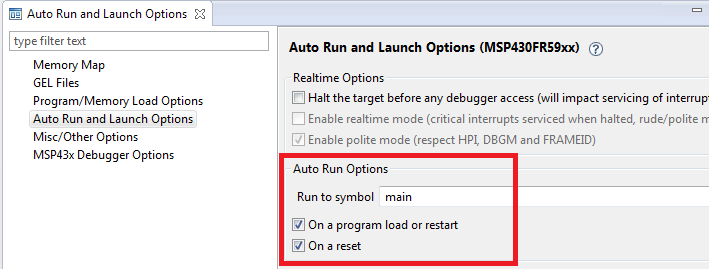
    You can also modify the "auto-run to label" breakpoint to run to whichever label you wish. The default is set to main, hence why you see it halted at main when you load the program. Note that if you disable the auto-run feature completely, then the program will be halted at the entry point of the program. If you want it to run indefinitely after program load, you can set the label to something that it can't reach and the program will just be left running.

    Thanks

    ki

  • I added this line just before the end of main function:

    main_end: goto main_end; // goto is just to prevent unused label compiler warning

    In the project properties, Run to symbol, replaced main with main_end. Now when Debug command is executed, it breaks in the line 149 of boot.asm file:

    cpacr .set 0xE000ED88 ; CAPCR address
    MOVW r1, #cpacr & 0xFFFF ; breaks here

    I can live without this, just was curious, whether CCS has such command. In most cases, I don;t need debugger and want just to start the program.
  • Alex Farber38 said:
    In the project properties, Run to symbol, replaced main with main_end. Now when Debug command is executed, it breaks in the line 149 of boot.asm file:

    I can repeat that behavior, but noticed got the following reported in the CCS console:

    CortexA15_0: AutoRun: Target not run as the symbol "main_end" is not defined

    A label is not a global symbol, and it looks like "Run to symbol" only accepts the name of a global symbol. E.g. while the name of a label can be qualified with the enclosing function name; can set a breakpoint on a label named main_end in the function main by using main::main_end the "Run to symbol" doesn't allow that.

    The only work-around is enter a global symbol on "Run to symbol" which is never reached, e.g. the exit function.

  • Replacing "main" with "exit" did the trick. Thank you.

  • Compiling for MSP430G2553 in Debug mode didn't have 'exit' symbol defined and the trick above didn't work for me. Replacing it with 'abort' symbol did work though. Found the list of defined symbols in the Debug/projectname.map file.