This thread has been locked.

If you have a related question, please click the "Ask a related question" button in the top right corner. The newly created question will be automatically linked to this question.

CCS 6.1.3.00034 Command Line Build Error

Other Parts Discussed in Thread: CCSTUDIO

OS: Linux 12.04 Ubuntu

CCS: 6.1.3.00034 

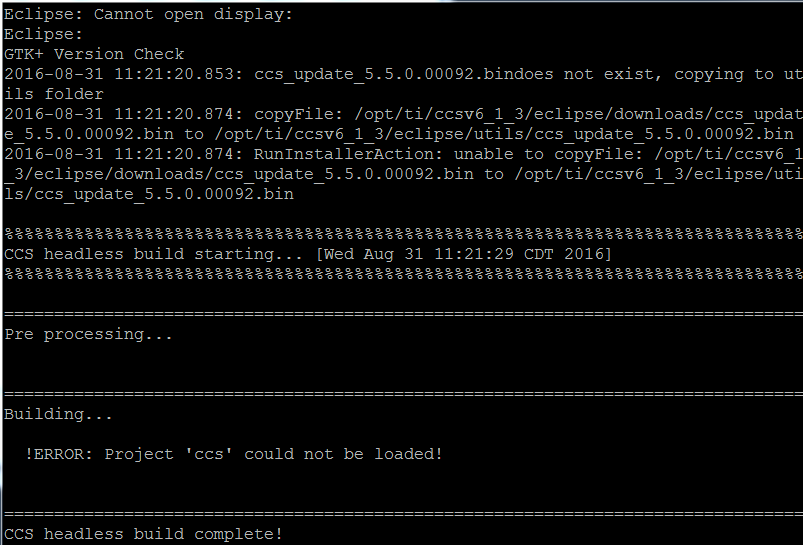
When building projects via command line (SSH command line to Linux server), I didn't have any trouble when using CCS 6.1.1.00022. Now with the switch to 6.1.3.00034, the build hangs for around 5 minutes, then shows the error below. I'm using the same build commands I used previously with no issues.

Details:

pwd is ~/mydirectory
project at ~/mydirectory/ccs/.project
project source files at ~/mydirectory

project build configuration is "Debug"

These are the two lines that are run in this order to build a ccs project.

/opt/ti/ccsv6_1_3/eclipse/eclipse -data $(pwd) -application com.ti.ccstudio.apps.projectBuild -ccs.workspace $(pwd)/ccs -ccs.autoImport -ccs.clean


/opt/ti/ccsv6_1_3/eclipse/eclipse -nosplash -data $(pwd) -application com.ti.ccstudio.apps.projectBuild -ccs.workspace $(pwd)/ccs -ccs.configuration Debug -ccs.autoImport

Everything above the "CCS Headless Build Starting" also doesn't show up for the previous CCS version.

Thoughts?

Regards

Chris
  • Chris,

    Christopher Chiarella said:

    /opt/ti/ccsv6_1_3/eclipse/eclipse -data $(pwd) -application com.ti.ccstudio.apps.projectBuild -ccs.workspace $(pwd)/ccs -ccs.autoImport -ccs.clean

    /opt/ti/ccsv6_1_3/eclipse/eclipse -nosplash -data $(pwd) -application com.ti.ccstudio.apps.projectBuild -ccs.workspace $(pwd)/ccs -ccs.configuration Debug -ccs.autoImport

    I suspect the text highlighted above might be the source of the problem. The -ccs.workspace option does not take a parameter, it is used for building all projects in the workspace. If you want to specify a specific project the option -ccs.projects <name> can be used instead. 

    http://processors.wiki.ti.com/index.php/Projects_-_Command_Line_Build/Create

    Could you try removing that text and see if it helps?

  • Thanks, I corrected my command but I am still seeing the same result.
    New Command: /opt/ti/ccsv6_1_3/eclipse/eclipse -nosplash -data $(pwd) -application com.ti.ccstudio.apps.projectBuild -ccs.workspace -ccs.configuration Debug -ccs.autoImport

    I run that command above, it hangs at the building. But if I cancel the command while it is hanging, and then run it again, it works. It seems to work once a .metadata folder is created, but is getting stuck somewhere upon that creation.

    Regards
    Chris
  • I tried a similar command as yours and didn't have any issues, but this was on Windows. I'll give it a try on Linux and see if I can reproduce the behavior you are seeing.

    FYI, we just released CCS 6.2 in case you want to give that a try.
    http://processors.wiki.ti.com/index.php/Download_CCS

  • Chris,

    A colleague and I both tried this command on Linux and were able to observe the same behavior as you. I suspect it may be related to the -ccs.autoImport option. Although I've seen this option being used in the past (and it still works fine for me on Windows), it is not listed as a supported option when you invoke help on the projectBuild command.  

    Could you try changing your commands to one of these alternate solutions (they worked in my test)? The first is the import command with the autobuild option and the second splits it into two commands, one for import and the other for build.

    1) eclipse -nosplash -data $(pwd) -application com.ti.ccstudio.apps.projectImport -ccs.location <path_to_project> -ccs.autoBuild

    or

    2) eclipse -nosplash -data $(pwd) -application com.ti.ccstudio.apps.projectImport -ccs.location <path_to_project> 
        eclipse -nosplash -data $(pwd) -application com.ti.ccstudio.apps.projectBuild -ccs.workspace -ccs.configuration Debug 


    Let me know if this helps.

  • Yes, excellent, those worked for me! Appreciate the help!

    Regards
    Chris