This thread has been locked.

If you have a related question, please click the "Ask a related question" button in the top right corner. The newly created question will be automatically linked to this question.

Problem with the GDB launcher on CCS6.1.3: Suggested Answer

I am following the instructions on processors.wiki.ti.com/.../Processor_SDK_Linux_Training:_Hands_on_with_the_Linux_SDK, but have a problem with GDB on "Debugging with CCS and GDB" chapter.

After I pressed Debug button, the progress bar stuck at 57% forever. It seems it fails starting gdbserver on target side.

When I halted it, it showed the following error msg.

So, I tried to manually start the gdbserver through the console, and I could see the debugger starts right away:

However, it still showed some warning about shared library symbols for "linux-vdso.so.1", which I couldn't find anywhere. Also, when I tried step-over, it didn't show the expected print-outs neither.

Here is my settings for Gdbserver. I tried put some variations such as /usr/bin/gdbserver with different port numbers, but nothing worked so far:
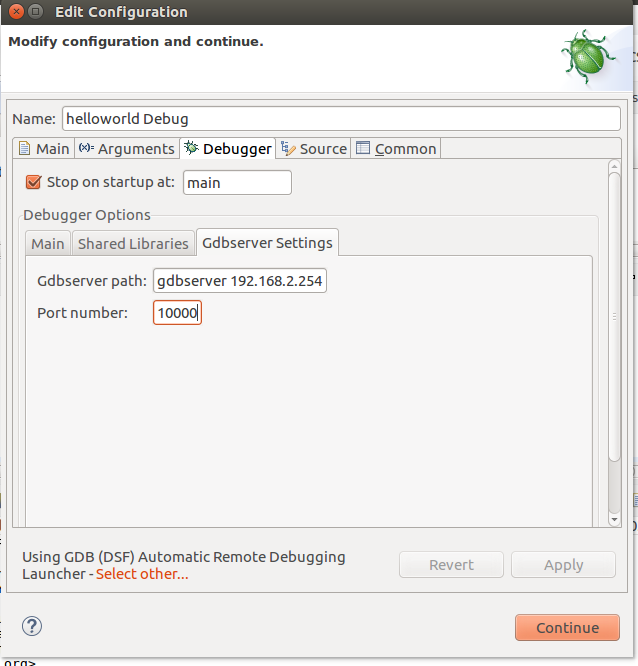
Here is my test environment:

TI SDK 03.00.00.04-Linux-x86 on Ubuntu 16.04.1 LTS

CCS6.1.3, Beaglebone black.

I also posted the same question in Sitara Processors forum. e2e.ti.com/.../539368

  • Hi,

    Unfortunately I don't have a test setup at the moment, but at first glance the automatic remote launcher is not able to "find" the gdbserver application on the target (as you suggested). Perhaps this application is located in a different path, therefore I would try to find it in the target filesystem: from the root you can issue the following:
    user@host:~/find * -name gdbserver

    The library error is set in the .gdbinit file (shown at the procedure in the link you sent) and point to the root of the target filesystem. That should enable you to properly resolve the libraries.

    Hope this helps,
    Rafael
  • Hi,

    1. About gdbserver:

    gdbserver file is located in /usr/bin/ as expected. I also verified it with "find" command.

    It seems CCS doesn't even send the command to target board.

    2. About linux-vdso.so.1 file

    It doesn't seem to be an issue with .gdbinit file because I couldn't find linux-vdso.so.1 file in .../targetNFS.

    By the way, .gdbinit file shows the following. Do you see any problem?

    set sysroot /home/.../ti-processor-sdk-linux-am335x-evm-03.00.00.04/targetNFS

    Thanks,

    Jung.