This thread has been locked.

If you have a related question, please click the "Ask a related question" button in the top right corner. The newly created question will be automatically linked to this question.

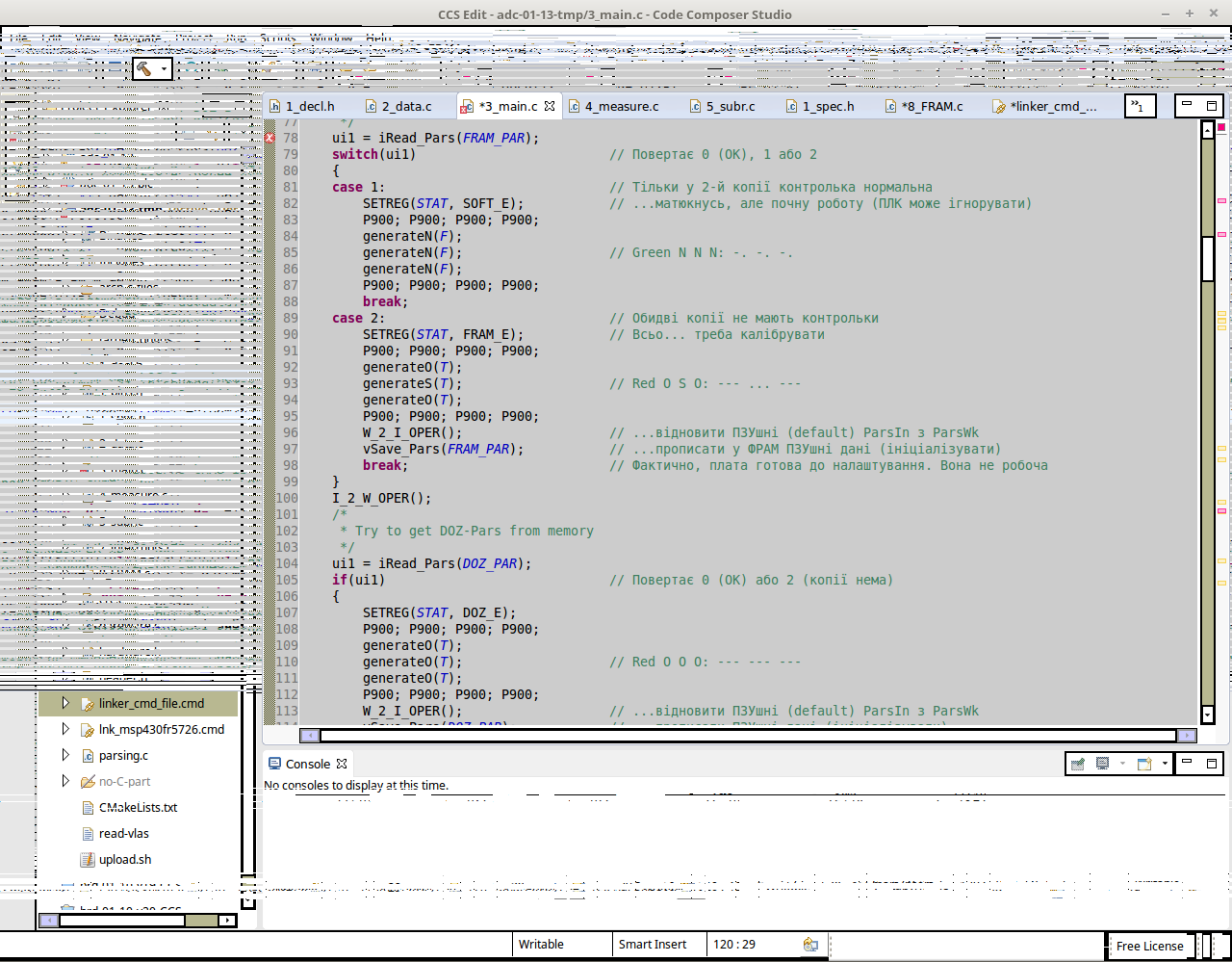
Screen is blurred during file editing


I work with CCS Version: 6.1.3.00034 under Linux Mint. When I edit texts, the part of a screen is blurred (look attachment). As a rule it happens OUTSIDE the editor window, but sometimes all the screen is covered.

To clean the screen I have to perform some stupid shaman dance, e.g. save all files.

Not a single software causes such a phenomena. What can be the reason?

Regards,

Yury
  • Yury,

    Lately I have been having some trouble with scrolling things on my PC as well, which shows the exact same blurring. However, in my case this is happening with a laptop running Windows 7/64 and is not restricted to CCS. I suspect this may be due to graphics drivers as my laptop runs with Intel HD3000 graphics and this issue started to happen long after I got this PC - perhaps after a driver update, but at this point I can't be absolutely certain.

    Linux is obviously a different beast, however a few searches around did not return anything relevant that could be causing this. A few threads that talk about the interactions between Eclipse and Ubuntu UI are shown below:

    http://stackoverflow.com/questions/34020576/eclipse-freezes-ui-on-ubuntu

    http://unix.stackexchange.com/questions/261817/after-updating-ubuntu-to-16-04-due-to-driver-issues-netbeans-and-eclipse-have-s

    I will keep searching around to see if I can find anything relevant.

    Regards,

    Rafael

  • Rafael,

    Thanks for an answer! I have not managed to cope with my problem so far. 

    I try to force my system to use GTK+ 2 

    SWT_GTK3=0; echo $SWT_GTK3

    Then I launch CCS and see the old situation. Maybe I misunderstand your hints, maybe we have another problem. BTW I have the same problem with PyCharm (Community Edition). Don't know whether it gives us some help...

    Regards,

    Yury

  • Yury,

    >>Then I launch CCS and see the old situation. Maybe I misunderstand your hints, maybe we have another problem.
    No, you got the hints right. Given we actively test CCS only with Ubuntu, I don't have any reports that are specific to Mint apart from what I am able to find on the internet.

    >>BTW I have the same problem with PyCharm (Community Edition). Don't know whether it gives us some help...
    I am not familiar with PyCharm. If this tool is based on the same Eclipse version as the one used by CCSv6.1.3 then it is indicative of an inherent incompatibility between the Mint GUI and Eclipse.

    You could potentially try CCSv6.2 a try, as it is a native 64-bit version that may help solve some of these drawing problems. Two different versions of CCS can coexist in the same system provided they are installed in separate directories and use different workspaces.

    In the meantime I report back any findings on this regard.

    Hope this helps,
    Rafael
  • Rafael,

    Thank you - I have not noticed the new Studio released!

    Installed. Compiled the project. Began to customize CCS... The blurring popped again!

    AFAIK PyCharm is not based on Eclipse. So the problem may be not pure Eclipse + Linux. BTW I consider PyCharm as the best IDE I ever worked with.

    Maybe it's sensible to ask PyCharm people. I'll look into their community.

    UPD: Cannot ask PyCharm because the problem has not showed itself. Unable to screenshot. So far...

    Regards,

    Yury

  • Yury,

    Which Mint version are you using and which GUI? I may try to install and run it on a VM here but unfortunately I can't promise a speedy process (RAM on my computer is at a premium, and a VM quickly blocks me from doing anything else).

    I installed PyCharm yesterday on my Windows box and it really looks interesting. I couldn't quite figure out which underlying IDE they are using, but it seems proprietary.

    By the way, which customizations were you doing to CCS when the issue started? Anything related to the GUI color scheme, fonts, encoding, etc.?

    Regards,

    Rafael

  • Rafael,

    Mint 17.2 named by you :)

    PyCharm is not based on some popular engine, AFAIK. The Community Edition is free and I love to develop Python scripts with it. 

    My deeds when the blurring occurred had not influenced the IDE. It dealt with build configuration (Debug/Release) and project properties. I'm not a guru in CCS, as you see, so it was a new experience for me hoe Debug and Release output codes are differ in a size! Don't understand what kind of debug stuff do they insert in a Debug binary. And why it takes 30% of a Release size.

    Regards,

    Yury

  • Yury,

    Regarding the drawing errors: I found out that my old netbook Acer AO751h had Linux Mint 17.2 and I installed CCSv6.2 there but was unable to reproduce the problems. Therefore in this particular case I don't know what could possibly be happening in your system.

    Regarding the size differences between each build configuration, the thread below mentions what is included in a typical .out file:
    e2e.ti.com/.../1980699

    To actually compare the files and verify the differences you can check the utility mentioned in the thread below:
    e2e.ti.com/.../146158

    As a general statement, the .out file size in the filesystem does not reflect the actual code size loaded to the target - the debug information is not loaded at all to the device. Also, an optimized code does not necessarily mean it is smaller - if you are looking for absolute speed, the optimizer will unroll loops, inline functions to gain the extra cycles wasted with context switching, for example.

    A very thorough page that talks about optimization is in the link below. Despite talking about C6000, several basic concepts are applicable to the optimization process in general.
    processors.wiki.ti.com/.../Optimization_Techniques_for_the_TI_C6000_Compiler

    Regards,
    Rafael
  • Rafael,

    As a matter of fact I counted 3 apps with the blurring already: CCS, PyCharm and DipTrace (EDA software). So, the E2E forum answer is: this is another domain problem. I close the issue. Thanks for a try!

    About the .OUT file size. I meant not the file size but the binary loaded to MCU. The MSPDEBUG reports me all info with particularities about each section (__interrupt_vector, .rodata, .text, .data, etc.). We speak about an "image" in memory.

    And here you gave me a good hint with your optimisation links.. I checked the compiler settings - they are different in Debug and Release modes. That answers all.

    As it seems to me (maybe I'm too optimistic) I got the meaning of this 2 modes in CCS, maybe not only in CCS. We just can have 2 different settings of Compiler and Linker and meander between then in a process of developing our project. These settings might be called SET_1 and SET_2. And anything we want inside each of them! It is assumed that for debug phase of development we'd better prefer more "transparent" code - and the optimisation may be OFF or weak. This set is called Debug Mode. Closer to release phase we need more compact code - and we use Release Mode with O2 or O3 level. And due to 2 modes in Eclipse (and CCS) we can try Release set and we have Debug set stored.

    Am I right? If so - it is great! It irritated me a little not to understand what is it Debug and Release modes. And thank you for your push in a right direction!

    Regards,

    Yury

  • Yury,

    Iurii Vlasenko said:
    As it seems to me (maybe I'm too optimistic) I got the meaning of this 2 modes in CCS, maybe not only in CCS. We just can have 2 different settings of Compiler and Linker and meander between then in a process of developing our project. These settings might be called SET_1 and SET_2. And anything we want inside each of them!

    You are absolutely right. And it is not limited to two: you can have several build configurations, each with its own compiler/linker settings, different debug configurations, different compiler versions and even devices - provided they belong to the same target architecture (ARM, C2000, C6000, etc.). The short videos at the end of the wiki page below illustrate some usability examples:

    http://processors.wiki.ti.com/index.php/Project_Build_Configurations

    Also, as an example I send you the attached project that was designed to exercise CIO operations in several TI devices that have an ARM core. Pay special attention to the files that are excluded from each build configuration to avoid conflicts.

    Hope this helps,

    Rafael

    CIO_test_ARM.zip

  • Thank you so much! Well, it's useful to look into a manual sometime :)

    It' a pity that I get this understanding when there's a farewell in a near future. I migrate to  32K FRAM MCUs and my projects are going to break 16K limit. So I'll have to return to Code Blocks as my IDE. After all, I never use CCS with it's debugger - the Studio dislikes my ez430 Launchpads. So, I face CB + GCC + mspdebug again. Still, the TI native compiler for msp430 is very good. I'll miss it with GCC :)

    Maybe I'll give another chance to Eclipse. I tried it several years ago but it seemed to much complicated with it's workspaces. That was too much to a beginner that had some experience from 80-s and dropped off the profession for 20 years :) But after CCS the Eclipse is not so frightening.

    Anyway, your help is appreciated!

    Best regards,

    Yury

  • Yury,

    Iurii Vlasenko said:
    I migrate to  32K FRAM MCUs and my projects are going to break 16K limit.

    The timing couldn't be better: since you are in need of a full CCS license (no code size limitations), you can get one for the retail price of a Launchpad.

    Simply go to https://store.ti.com/ and search for CCS-PROMO

    Regards,

    Rafael

  • Rafael,

    The mystery is over, I think. A friend of mine gave me a link to a similar problem. They just disabled SNA hardware acceleration. As I have an Intel graphic - I tried the recipe and... drums...  it helped!

    At least for 5 hours I use CCS without problems. Oh, no! I have problem with Studio, but of another domain. I'm going to open new topic - about a space of refactoring operation.

    Anyway, thanks for all your efforts!

    Best regards,

    Yury