This thread has been locked.

If you have a related question, please click the "Ask a related question" button in the top right corner. The newly created question will be automatically linked to this question.

Eclipse.exe


I've tried installing CCS v4 three times now.  Installing goes fine, but when I attempt to launch the application, a Windows browse window pops up and begins looking for 'eclipse.exe'.  

I've tried searching for it and have not found it either.  I have tried installing off of the CD that I received with my chronos ez430 and have also downloaded and installed the CCS v4 exe from TI's website.  Neither has been successful for me.

I am running Windows Vista Home Premium SP2.

Any suggestions?

  • Noah,

    Have you extracted the zip file before running the installer?  I have seen the behavior you describe when someone runs the installer from within the zip file as it will not run any of the child installer programs that install the bulk of CCS.

    Regards,

    John

  • The file that I have is an EXE (setup_CCS_MC_Core_4.1.1.00014.exe), not a ZIP file.  I have just tried installing this file on my work PC running WinXP SP2 and got the same result.

  • Noah Wass said:
    The file that I have is an EXE (setup_CCS_MC_Core_4.1.1.00014.exe), not a ZIP file

    In the folder that has the EXE, is there a subfolder called 'install_images' with content inside it?

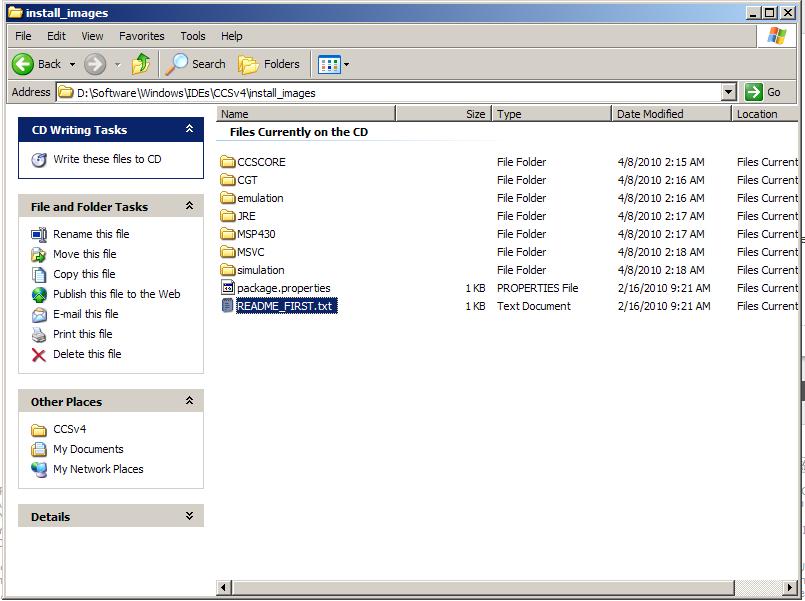
  • I took a screenshot and a directory listing.  Here are both:


    Directory Listing:


     Volume in drive D is eZ430-Chronos

     Volume Serial Number is 7651-09F6


     Directory of D:\Software\Windows\IDEs\CCSv4\install_images


    04/08/2010  02:15 AM    <DIR>          .

    04/08/2010  02:15 AM    <DIR>          ..

    04/08/2010  02:15 AM    <DIR>          CCSCORE

    04/08/2010  02:16 AM    <DIR>          CGT

    04/08/2010  02:17 AM    <DIR>          JRE

    04/08/2010  02:17 AM    <DIR>          MSP430

    04/08/2010  02:18 AM    <DIR>          MSVC

    02/16/2010  09:21 AM               727 README_FIRST.txt

    04/08/2010  02:16 AM    <DIR>          emulation

    02/16/2010  09:21 AM               473 package.properties

    04/08/2010  02:18 AM    <DIR>          simulation

                   2 File(s)          1,200 bytes


     Directory of D:\Software\Windows\IDEs\CCSv4\install_images\CCSCORE


    04/08/2010  02:15 AM    <DIR>          .

    04/08/2010  02:15 AM    <DIR>          ..

    04/08/2010  02:16 AM    <DIR>          LICENSE

    02/16/2010  09:20 AM        70,166,944 idecore_setup_4.1.1.N201002091800.exe

    02/16/2010  09:20 AM        23,060,499 ti_dspack_setup_4.1.0.837.exe

    02/16/2010  09:20 AM        22,561,555 ti_dvt_setup_1.0.0.1837.exe

                   3 File(s)    115,788,998 bytes


     Directory of D:\Software\Windows\IDEs\CCSv4\install_images\CCSCORE\LICENSE


    04/08/2010  02:16 AM    <DIR>          .

    04/08/2010  02:15 AM    <DIR>          ..

    02/16/2010  09:21 AM             1,150 LICENSE.LIC

                   1 File(s)          1,150 bytes


     Directory of D:\Software\Windows\IDEs\CCSv4\install_images\CGT


    04/08/2010  02:16 AM    <DIR>          .

    04/08/2010  02:15 AM    <DIR>          ..

    02/16/2010  09:20 AM        31,254,619 ti_cgt_c2000_5.2.3b_setup_win32.exe

    02/16/2010  09:20 AM        23,075,038 ti_cgt_msp430_3.2.2_setup_win32.exe

                   2 File(s)     54,329,657 bytes


     Directory of D:\Software\Windows\IDEs\CCSv4\install_images\JRE


    04/08/2010  02:17 AM    <DIR>          .

    04/08/2010  02:15 AM    <DIR>          ..

    02/16/2010  09:20 AM        26,694,071 jre_1.5.0_14.zip

                   1 File(s)     26,694,071 bytes


     Directory of D:\Software\Windows\IDEs\CCSv4\install_images\MSP430


    04/08/2010  02:17 AM    <DIR>          .

    04/08/2010  02:15 AM    <DIR>          ..

    02/16/2010  09:20 AM        25,466,294 ti_msp430pack_setup_4.3.3.1.exe

                   1 File(s)     25,466,294 bytes


     Directory of D:\Software\Windows\IDEs\CCSv4\install_images\MSVC


    04/08/2010  02:18 AM    <DIR>          .

    04/08/2010  02:15 AM    <DIR>          ..

    10/01/2009  01:02 PM         5,236,736 MSVC80_Runtime.msi

    10/01/2009  01:02 PM         2,585,872 WindowsInstaller-KB893803-v2-x86.exe

    10/01/2009  01:02 PM         4,216,840 vcredist_x86.exe

                   3 File(s)     12,039,448 bytes


     Directory of D:\Software\Windows\IDEs\CCSv4\install_images\emulation


    04/08/2010  02:16 AM    <DIR>          .

    04/08/2010  02:15 AM    <DIR>          ..

    02/16/2010  09:20 AM        23,650,640 bh_emupack_setup_4.1.0.0.exe

    02/16/2010  09:20 AM        15,346,280 sd_emupack_setup_4.1.0.2.exe

    02/16/2010  09:20 AM        18,900,590 ti_emupack_setup_4.1.1.2.exe

    02/16/2010  09:20 AM         3,162,161 ti_xds100_setup_4.1.0.7.exe

    02/16/2010  09:20 AM         1,863,206 ti_xds560_setup_4.0.1.23.exe

                   5 File(s)     62,922,877 bytes


     Directory of D:\Software\Windows\IDEs\CCSv4\install_images\simulation


    04/08/2010  02:18 AM    <DIR>          .

    04/08/2010  02:15 AM    <DIR>          ..

    02/16/2010  09:20 AM        50,817,506 ti_simpack_setup_4.6.2.0.exe

                   1 File(s)     50,817,506 bytes


         Total Files Listed:

                  19 File(s)    348,061,201 bytes

                  26 Dir(s)               0 bytes free

    Screenshot


  • That looks ok.

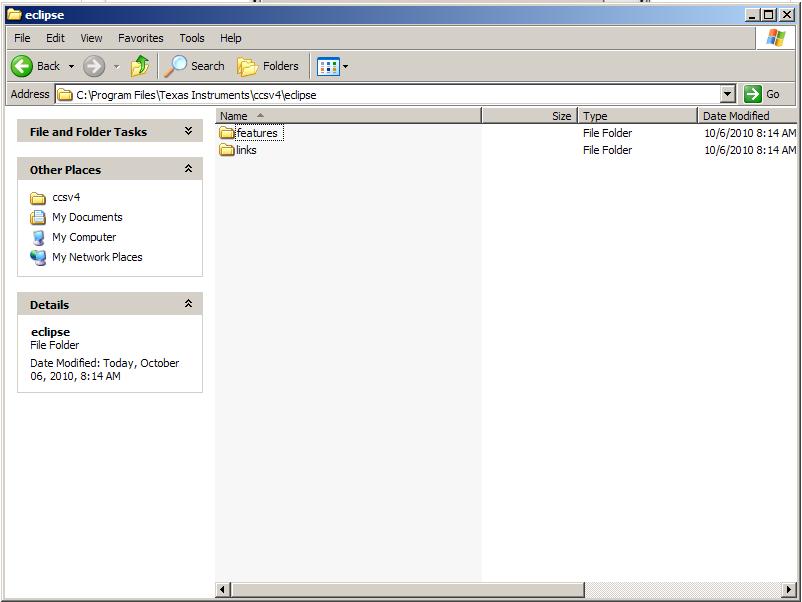
    After a successful installation, eclipse.exe should be located in <INSTALL DIR>\ccsv4\eclipse. Does that file exist? Also check the properties of your desktop shortcut and see if the path to eclipse.exe in the shortcut matches up

  • I would also suggest installing somewhere other than Program Files as you are running Windows Vista and Vista likes to lock down that directory pretty severely if you do not have full admin rights and UAC completely disabled.

    John

  • No, 'eclipse.exe' does not exist in that directory!  That would be a problem.


  • The install was not successful then. Could you try installing in a different directory (outside C:\Program Files) as John suggested?

  • I've downloaded the Eclipse SDK to see if that would help.  After installing the Eclipse SDK and opening CCS, CCS still cannot find 'eclipse.exe'.  I browse to the file 'eclipse.exe' and it opens the Eclipse SDK.  I was expecting CCS to open, but it never does.

  • Yes, I will try installing in a different directory.  I am going to leave the Eclipse SDK installed.

  • It is not possible to use the eclipse.exe from the Eclipse SDK with CCSv4.  CCSv4 includes a modified version of Eclipse.

    John

  • John, from what I've seen installing the Eclipse SDK does not help like you are saying.

    I just completed installing CCS into ...\My Documents\Texas Instruments as you suggested.  I got the same results.  Double-clicking the Code Composer Studio v4 icon only begins looking for 'eclipse.exe'.  

    Should I get the install file from a different source?  Do either of you have any suspicions of this install file missing an install file?  On this last install, I made sure that every possible check was placed before all of the install options. 

  • I've had this exact problem. This happens when u just double click the the zip and try to install without actually extracting the zip file. This was mentioned above, clearly this is what is happening.

  • I had the same problem however I've found solving for this issue. My OS is WindowsXP SP3, file system is NTFS. To resolve issue do follow steps:

    1) create directory outside Program Files. For instance D:\CodeComposerStudio.

    2) Go to Security tab in folder properties window and add "Everyone" user.

    3) Assign Full Control for this user in this folder.

    4) Run  setup_CCS_MC_Core_4.1.1.00014.exe and follow the installation instructions.

    5) Browse "D:\CodeComposerStudio" when you get "Choose Installation Location" step and click "Next".

    6) Be happy after installation run finish :)


  • I had same problem too and i solved just right clicking to setup file and choosing run as administrator.

  • Hi James Ellis,

    I got the setup_CCS_4.2.3.00004.exe which was 8.74MB, whatever you are telling like extract or zip cant perform on the .exe as you know this.

    when i double click on the setup file it was installed on C:\Program Files\Texas Instruments1\ccsv4 path.After installation , when launch the CCS it was asking

    eclipse.exe but you are saying there should be install_images but actually it was not there.i received only setup_CCS_4.2.3.00004.exe in USB stick not install_images/zip.

    Thanks

    --Mukund

  • Mukund,

    The CCS installation image is over a GB.  Make sure you are downloading the whole thing and then extract the zip before running the installer.  I am not sure where you got your USB stick but it sounds like it does not have the complete installation program but on the shell installer and none of the actual features.

    You can download the proper installer here: http://processors.wiki.ti.com/index.php/Download_CCS

    Also I would highly recommend not installing in Program Files if you are on Windows Vista or Windows 7.

    Regards,

    John